
GLAS Payment Tracker Excel Template Ireland
6
Free download
Excel spreadsheet for ROS Form 11 income tax data entry, deductions, taxable income and summary totals for Irish self-assessment.
Download template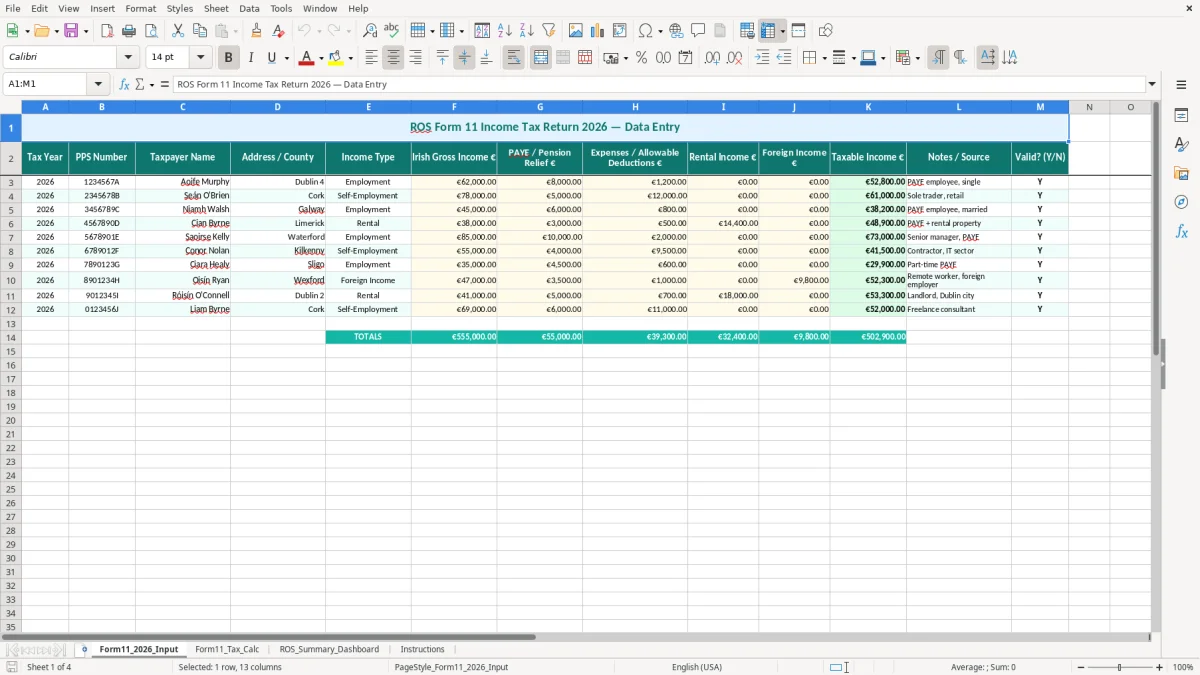
This ROS Form 11 income tax Excel spreadsheet helps you collect your self-assessment figures in one place before you log into ROS. It includes an input sheet, a tax calculation sheet, a summary dashboard and instructions, so you can organise income, deductions and taxable income without jumping between notes and receipts.
The template is built around the 2026 Form 11 process for Irish taxpayers who need a clear working file before filing. It is useful for a sole trader, a landlord with rental income, or anyone with mixed income who wants a cleaner trail for Revenue and a faster end-of-year return.
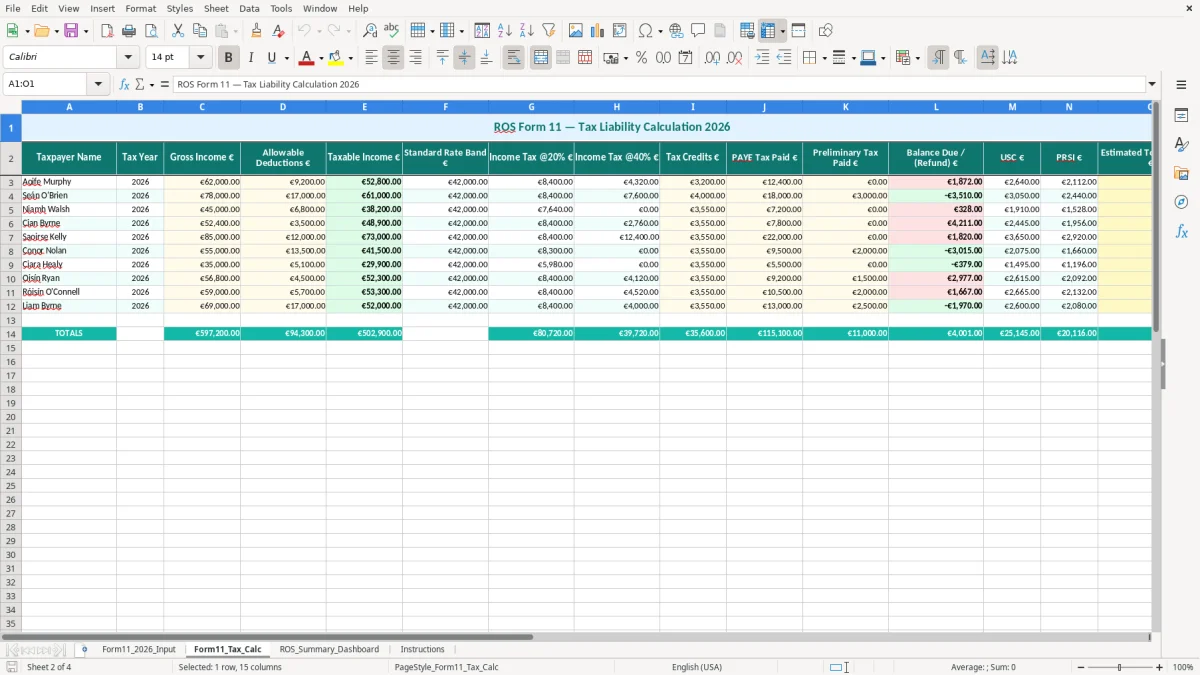
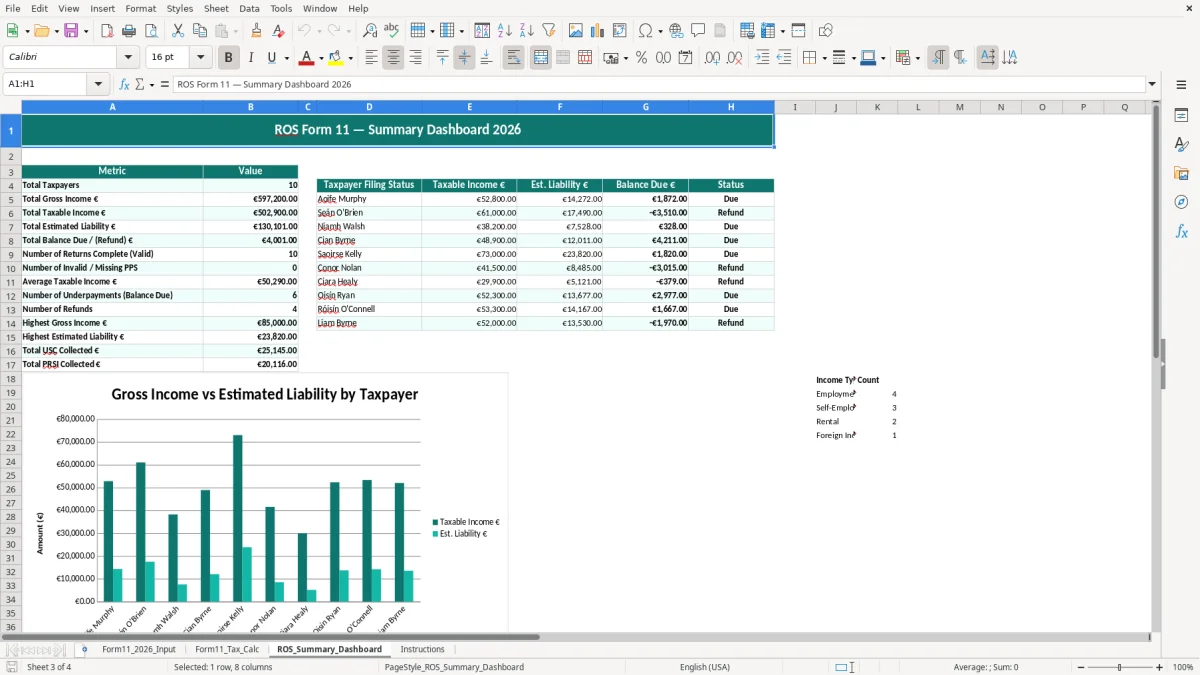
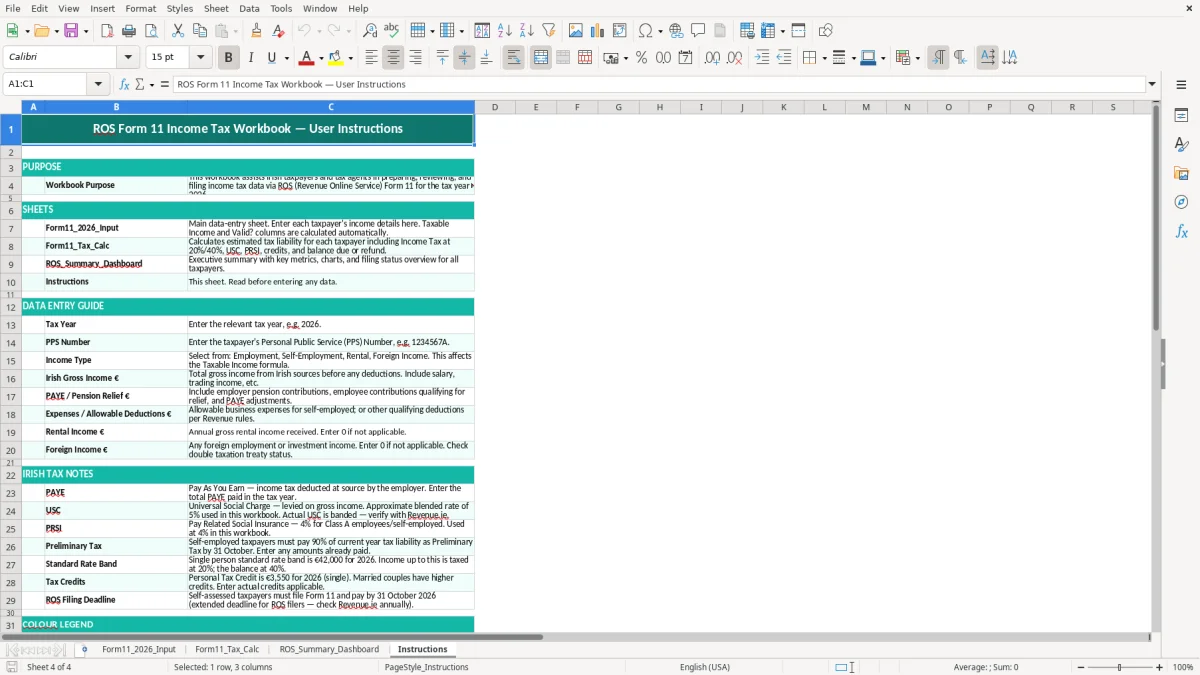
The first sheet is the main entry page, shown in image 1, with columns for tax year, PPS number, taxpayer name, income type, gross income, reliefs, expenses, rental income, foreign income, taxable income, notes and validation. Image 2 shows the tax calculation sheet, image 3 the dashboard summary, and image 4 the instructions tab.
This template is for the people who actually have to get a Form 11 done: a sole trader finalising figures before the mid-November ROS deadline, a landlord pulling together rental income, or a bookkeeper checking mixed income before filing. If you have PAYE, pension relief, rental income or foreign income in the same year, one tidy workbook is faster than chasing everything inside ROS at the last minute.
Image 1, the Form11_2026_Input sheet, is laid out like a working list rather than a reporting page. You enter the tax year, PPS number, taxpayer name, address or county, income type and euro amounts, then use the notes field to keep source details beside each line.
Take a sole trader carpenter with €58,000 Irish gross income, €3,200 allowable expenses and €1,500 pension relief. That is exactly the kind of case where a spreadsheet helps, because you can see the taxable income figure before you move to ROS and decide what still needs checking.
Image 3 shows the ROS_Summary_Dashboard, which is for a quick sense check rather than detailed bookkeeping. If your rental income is €12,000 and your foreign income is €4,500, the dashboard gives you a fast review point before you submit the return and start worrying about numbers you should have caught earlier.
Revenue expects you to keep the records behind your return for 6 years, and that is where a workbook like this earns its keep. It is not just about the final number on the Form 11; it is about being able to show where the income came from, what reliefs you claimed and what expenses you treated as allowable.
The template is useful if you are keeping your own return rather than handing everything to an accountant. A clean record with source notes, line-by-line totals and a valid yes/no flag is far better than a single total written on a scrap of paper and reconstructed later.
This workbook is aimed at income tax self-assessment, not VAT or PAYE. That means the key fields are the ones Revenue will look for on a Form 11 working file: income type, gross income, reliefs, deductions, rental income and foreign income, not invoice VAT splits or payroll submission data.
If you are close to the filing deadline, it is better to finish the spreadsheet first and then log into ROS with your figures ready. For a case with 24 income lines and 8 separate deduction entries, the spreadsheet reduces the chance of copying the wrong figure into the return and having to reopen the job later.
The costly mistake is not usually the tax rate; it is the missing detail. A blank PPS number, an untitled income line or a deduction with no source note can turn a tidy return into a half-day chase through bank statements, letting you lose time when you should be filing.
If you mix up gross income and taxable income, you can overstate or understate the return by thousands. On €42,000 of income with €5,000 of allowable deductions, entering the gross figure in the wrong box creates a €5,000 error before you even reach the summary screen.
Revenue can ask how you arrived at pension relief or expenses, and a workbook without notes leaves you digging later. A small firm owner who cannot support €2,400 of expenses may spend an evening reconstructing them, and if the figure is wrong the correction can mean a revised return and extra stress on top of the tax bill.
The biggest practical cost is pressure. If you leave 18 months of records until the final week before the Form 11 deadline, you are more likely to miss a foreign income line, forget a rental receipt or submit a return that needs correcting after the fact.
That same last-minute scramble also makes it harder to reconcile the figures behind a VAT 3 filing, so a VAT 3 workings sheet can keep the supporting calculations together before the return is sent.
The easiest way to make this stick is to tie it to a fixed job you already do. For many people that is the payroll run, the month-end bank reconcile or the weekend before the ROS filing window closes.
If you are dealing with dozens of invoices a week, multiple currencies and several people handling records, you may outgrow a workbook and need accounting software with stricter controls. For a straightforward sole trade or landlord file, though, this template is usually the simplest way to keep the Form 11 work under control without overcomplicating it.
For a straightforward sole trade or landlord file, though, this template is usually the simplest way to keep the trading details return work under control without overcomplicating it.

 Excel template built and verified by Ciara Byrne, Chartered Accountant (ACA) · builds the Excel templates.