
Cash Flow Projection Excel – Free Template (2026)
0
Free download
Track 2026 ploughing championship stall sales, costs, profit, VAT and targets by stall and date, with a dashboard for event reporting.
Download template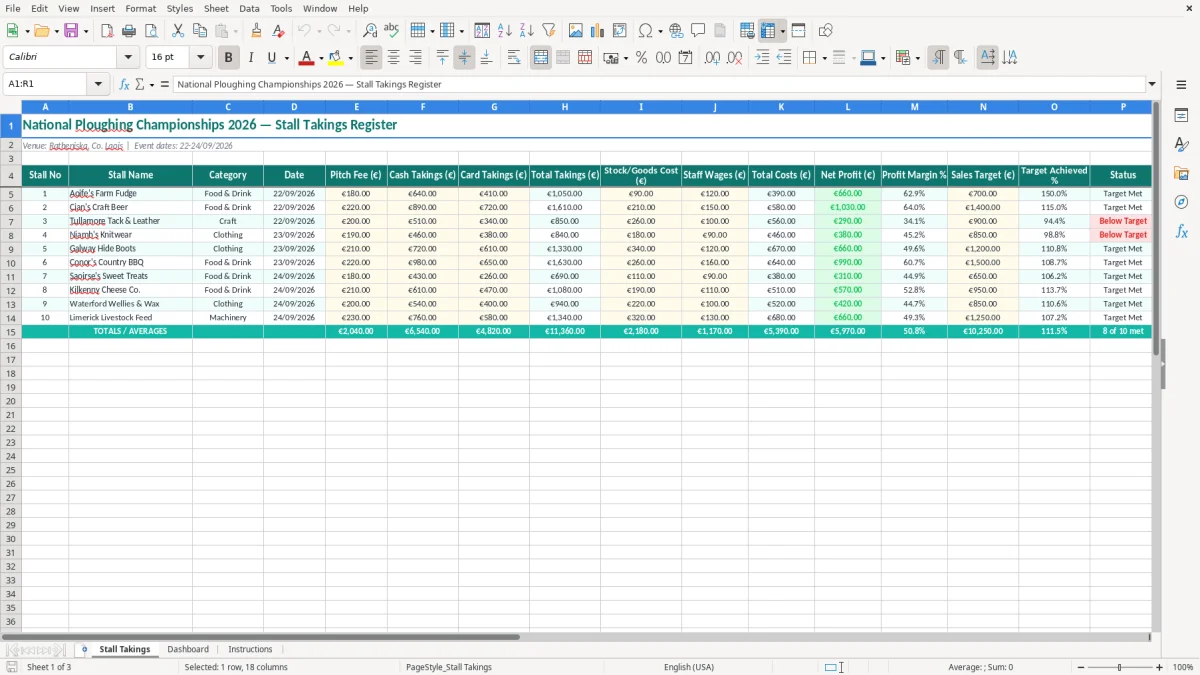
This Excel spreadsheet records stall takings at the 2026 National Ploughing Championships, including cash and card sales, pitch fees, stock costs, wages, profit, margins, targets, status and VAT due. It gives organisers one register for each stall and a dashboard for reviewing the event.
The main Stall Takings sheet is set up for the Ratheniska, Co. Laois event from 22-24/09/2026. Image 1 shows the 18-column register, while the Dashboard and Instructions sheets make the results easier to review and the file simpler for volunteers to complete.
The person filling this in is often not an accountant. It may be the treasurer of a farming organisation, the office manager of a food producer, or a volunteer carrying a clipboard between stalls at Ratheniska. The useful point is that the register follows the way the event actually operates: stall number, name, category, date, payment method, costs and result.
At the National Ploughing Championships on 22-24/09/2026, a food stall might count cash at closing, download its card total and pass both figures to the central treasurer. The treasurer can enter one row per day rather than waiting until all three days have blurred together. Image 1 shows the Stall Takings sheet with Cash Takings, Card Takings and Total Takings together, which makes that handover straightforward.
Suppose Aoife's Farm Fudge records €1,850.00 cash and €2,650.00 by card on one day. Its total takings are €4,500.00. If the pitch fee is €300.00, goods cost €1,400.00 and staff wages €500.00, total costs are €2,200.00 and the row shows €2,300.00 net profit, before any costs held elsewhere.
A committee can use the stall number and category to compare Food & Drink, crafts, machinery demonstrations or other activities without mixing one stall's result with another. That matters when a stall looked busy but had high stock or staffing costs. A bookkeeper can also use the dated rows as a starting point for posting event income and expenditure into the organisation's accounts.
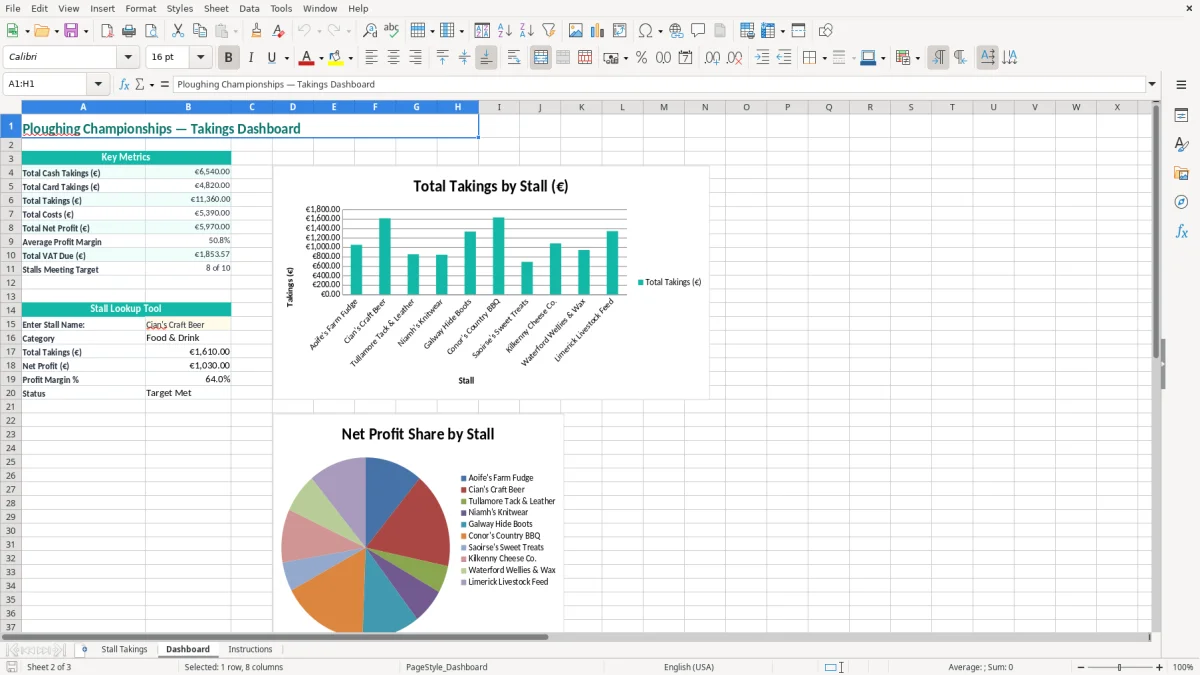
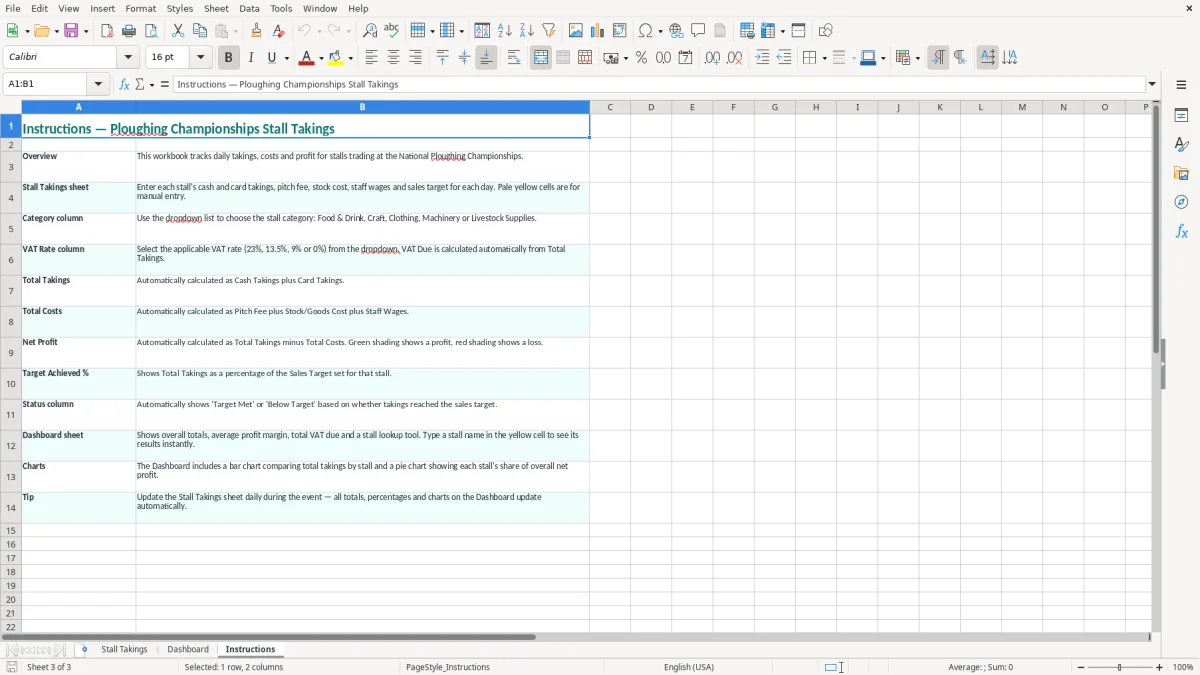
The Dashboard sheet, shown in image 2, is for the meeting after the event: it turns the entered rows into a quick view of performance. The Instructions sheet in image 3 is particularly useful where several volunteers enter figures, because it keeps the meaning of each column consistent.
The spreadsheet is a management register, not a substitute for deciding the organisation's VAT treatment. In Ireland, the standard VAT rate is 23%, with reduced rates including 13.5% and 9%, and zero-rated or exempt supplies in specific categories. The correct rate must follow the actual supply, not simply the fact that it was sold at a ploughing event.
Use the VAT Rate column for the rate applying to that stall's sales and retain the till report or sales breakdown supporting it. For example, €4,500.00 of takings at 23% VAT, where the figure is VAT-inclusive, contains €841.46 VAT: €4,500.00 × 23 ÷ 123. If €4,500.00 is instead an ex-VAT figure, VAT is €1,035.00. Those are different calculations, so decide whether the source figure is inclusive or exclusive before posting the result.
VAT registration thresholds are €37,500 for services and €75,000 for goods. A registered business normally files a bi-monthly VAT3 return and an annual Return of Trading Details through ROS. An event organiser should not treat the VAT Due column as a final VAT3 figure without separating taxable, zero-rated and exempt income and checking whether the sales belong to a registered trader or to the organisation itself.
Revenue expects business records and supporting documents to be retained for 6 years. Keep the completed workbook with till Z reports, card merchant statements, cash count sheets, supplier invoices, pitch agreements and wage records. If an invoice is issued, retain the supplier's name and address, sequential invoice number, date, VAT number where applicable, and VAT shown separately by rate.
My practical preference is to enter the VAT rate at the point of review, not ask a volunteer to guess it while serving customers. The treasurer can then check the category and evidence before the event figures are transferred to the accounts or VAT return.
That review step also sits neatly beside a committee budget workbook, where the same evidence can be checked against the event’s planned income and spending before figures move into the accounts.
The most expensive errors are usually small entries repeated across several stalls. A volunteer may enter the card terminal's settlement amount as gross card sales even though the provider has already removed a €45.00 fee. The register then understates takings or leaves the card fee missing from costs, and the committee cannot reconcile the bank receipt without reopening every stall record.
Another common failure is one total for all three event days. Imagine three stalls produce €12,000.00, €8,000.00 and €5,000.00. If the treasurer records only €25,000.00, there is no way to see that the final day fell sharply, test the cash count or identify which stall used too much stock. One row per stall and date preserves that operational detail.
Costs are often left until the week after the event. A stall showing €9,000.00 takings may have €4,000.00 of goods, €1,200.00 of wages and a €600.00 pitch fee. Its apparent sales success becomes €3,200.00 net profit before other costs, not €9,000.00 available for the club or association.
Entering a VAT-inclusive total as an ex-VAT figure can overstate VAT. At €10,000.00, the difference between 23% added on top (€2,300.00) and 23% included within the total (€1,869.92) is €430.08. That can distort both the dashboard and the amount later considered for the VAT3 return.
Targets also need a consistent basis. If the target is €6,000.00 ex VAT but takings are entered inclusive, Target Achieved % is not a meaningful comparison. I favour setting targets on the same basis as the sales figures and writing that basis into the Instructions sheet for the volunteers.
Finally, do not overwrite a row because the cash count was corrected. Keep the source count and a note with the adjustment. A five-minute correction at the stall is far cheaper than trying to explain a €780.00 difference from a single unexplained edit after the committee meeting.
This file works best when the handover is designed before the first customer arrives. Give each stall a simple closing sheet, nominate one person to verify the cash and card totals, and set a fixed collection time each evening. The central treasurer can then enter the figures while the evidence is still available, rather than reconstructing three days of trading from messages.
Use the yellow input cells for entries and avoid typing over calculated cells. Keep categories and stall names identical on every row; small changes such as Food, Food & Drink and Food and Drink can split a dashboard comparison. If you add data validation to a working copy, use a controlled list for Category and VAT Rate rather than relying on free typing.
Save the original entry file, a read-only final copy and an exported PDF of the Dashboard for the committee pack. Reconcile the grand total to the bank and card statements, then file the workbook with the supporting records for the 6-year Revenue retention period.
A spreadsheet remains suitable for a small event with perhaps 20 stalls and three dates. Once you have hundreds of transactions, multiple tills, refunds, stock movements or separate legal entities, move the transaction detail into bookkeeping or point-of-sale software and keep this workbook for summary reporting rather than making it the only record.

 Excel template built and verified by Ciara Byrne, Chartered Accountant (ACA) · builds the Excel templates.