
GLAS Payment Tracker Excel Template Ireland
6
Free download
RTD spreadsheet for Irish Revenue records, with data entry, summary totals and instructions for the 2026 Return of Trading Details.
Download template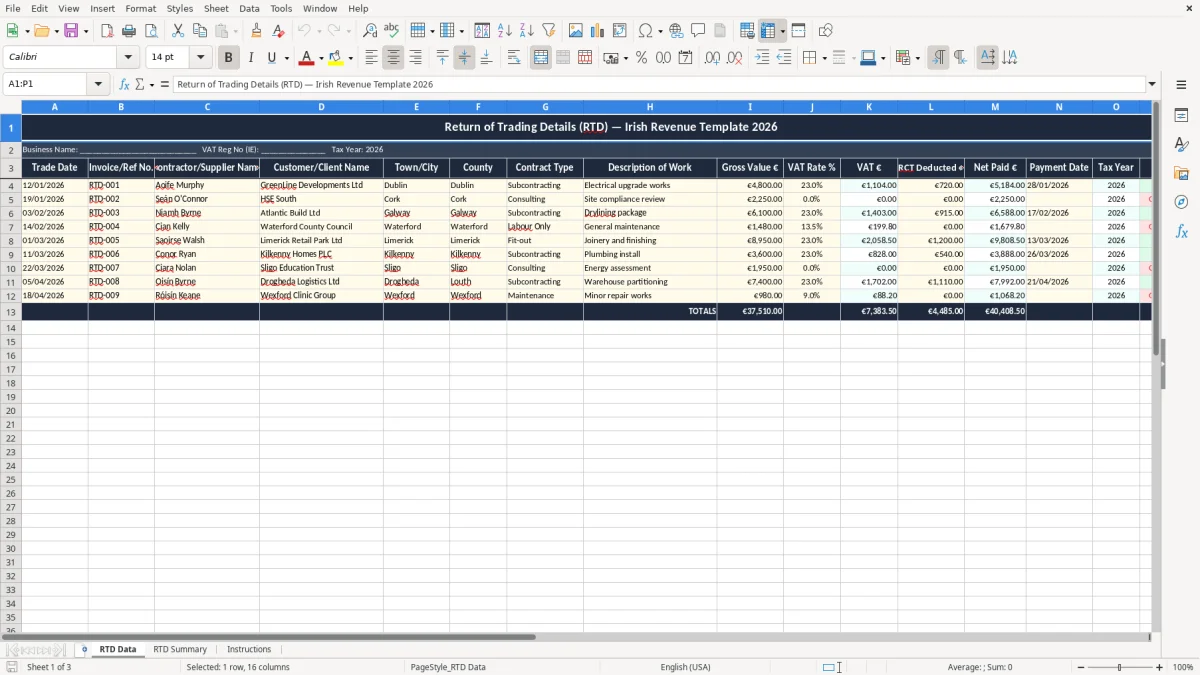
This RTD Excel template is a Return of Trading Details tracker for Irish contractors and suppliers who need to record invoices, VAT, RCT deductions and payments before filing the annual RTD with Revenue. It includes an RTD Data sheet, an RTD Summary sheet and an Instructions sheet.
Use it to keep the figures in one place during the year so your year-end return is quicker to check. The layout suits a sole trader, a small limited company, or a principal contractor handling multiple jobs and deductions.
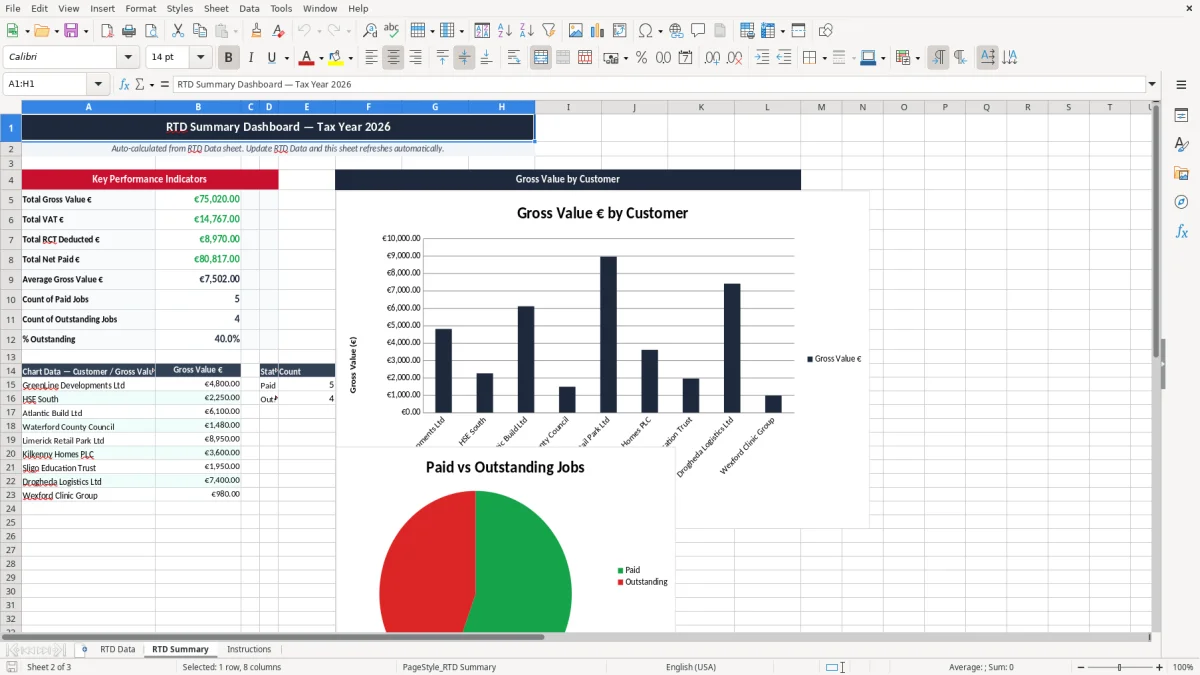
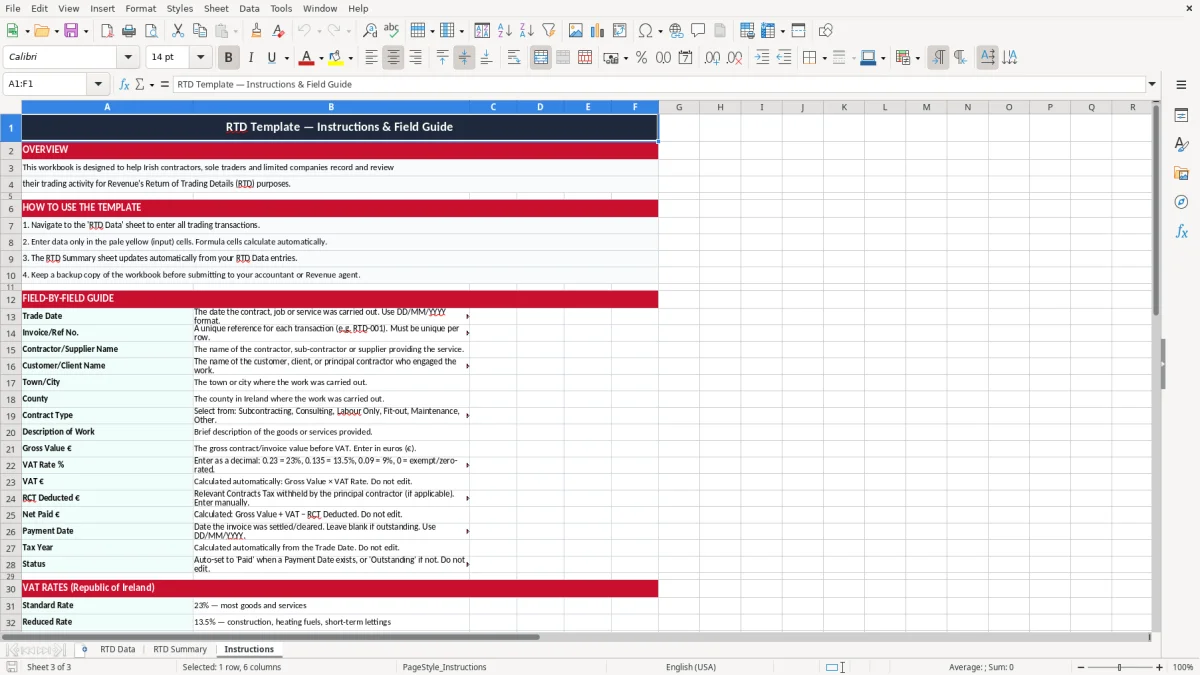
The first sheet, RTD Data, is built for line-by-line entries with fields for trade date, invoice reference, client details, gross value, VAT rate, VAT amount, RCT deducted, net paid, payment date, tax year and status. Image 1 shows the full entry table, image 2 shows the summary view, and image 3 gives you the setup notes.
An RTD spreadsheet is for the people who have to prove what was traded, who was paid and what was deducted before the annual Return of Trading Details goes to Revenue. In practice that means a principal contractor, a subcontractor, a small building firm, or a bookkeeper who is cleaning up the records before the filing window closes.
The first sheet, RTD Data, is set up for the real working month, not just the filing day. If you are running 40 jobs a month with invoices from €250 to €8,000, you need a row-by-row record that shows the client, county, contract type and the payment status without hunting through email.
A carpenter with 4 employees might use it to track 60 to 80 invoices a quarter, while a plumbing contractor could have 25 subcontractor lines with RCT deductions of 20% or 35%. With figures like that, a simple list is faster than trying to reconstruct the year from bank statements at the last minute.
You normally reach for this file at year end, during a clean-up before the RTD filing, or when a client asks you to match payments to invoices. The summary sheet gives you a quick view of gross value, VAT and RCT deducted, so you can spot a €1,200 invoice that was paid net of €840 and check that the deduction is recorded correctly.
Revenue expects you to keep records that support the figures behind the RTD, and the practical rule is to hold those records for 6 years. If you are also VAT registered, the same records need to line up with your bi-monthly VAT3 returns and, where relevant, the annual Return of Trading Details through ROS.
The template gives you the fields you need for that check: trade date, invoice or reference number, supplier or contractor name, client name, gross value, VAT rate, VAT amount, RCT deducted, net paid, payment date and tax year. That is the minimum useful trail when you are answering Revenue queries or reconciling against your accounting software.
If you have a subcontract invoice for €2,000 with VAT at 23%, the gross value is €2,000, VAT is €460 and the total invoice is €2,460 before any RCT deduction. If 20% RCT is withheld, the net paid is €1,600 before any separate settlement, so the spreadsheet needs all three figures rather than one combined number.
Where VAT is involved, the VAT number and sequential invoice reference matter just as much as the euro amounts. Revenue is looking for a paper trail that can be followed from invoice to payment to return, and this template is built around that sort of traceability rather than a loose note-taking format.
The most common failure is a spreadsheet that misses one of the three moving parts: invoice value, deduction and payment. If you only record the net amount paid, a €5,000 invoice with €1,000 RCT deducted can look like a €4,000 sale and your RTD totals will be wrong before you even start the return.
Another problem is using a bank statement as the main record. A payment of €3,690 does not tell you whether it was a €3,000 invoice with 23% VAT and a 20% deduction, or a €3,690 payment with no deduction at all, and that sort of guesswork costs time when you are closing the year.
If you have 50 lines and 5 of them are missing the payment date or VAT rate, you can easily spend 2 to 3 hours chasing documents instead of filing. If the error leads to a wrong deduction claim or a misposted VAT amount, the repair work can mean amended records, extra queries and a messy conversation with the person doing the return.
Duplication is another one. If a subcontractor invoice appears once as gross and once again as a separate payment line, you can double count €1,800 of turnover and overstate the RTD figures by the time you total the sheet.
Once duplicate payment lines start inflating totals, the same check should carry through to the CT1 tax workings so turnover and deductions stay aligned before filing.
The easiest way to keep an RTD sheet alive is to attach it to a routine you already do. For most Irish businesses that means the VAT3 close, the payroll run or the monthly bank reconciliation, because those are the times when the paperwork is already on the desk.
If you are processing 30 to 40 invoice lines a month, a 15-minute weekly update is usually enough. If you leave it for 12 months, you turn a tidy spreadsheet into an archive dig.
Once you are handling hundreds of lines, multiple VAT rates and several staff members entering data, the spreadsheet starts to show its limits. At that point a proper bookkeeping or job-costing system is the better option, but for a small contractor or sole trader this template is the simplest way to stay in control.
At that point, the next step is keeping a VAT3 return workings sheet that ties the figures back to each filing period.

 Excel template built and verified by Ciara Byrne, Chartered Accountant (ACA) · builds the Excel templates.