
GLAS Payment Tracker Excel Template Ireland
6
Free download
VAT3 workings template for Irish sales and purchases, with VAT categories, recoverable VAT and a summary sheet for ROS returns.
Download template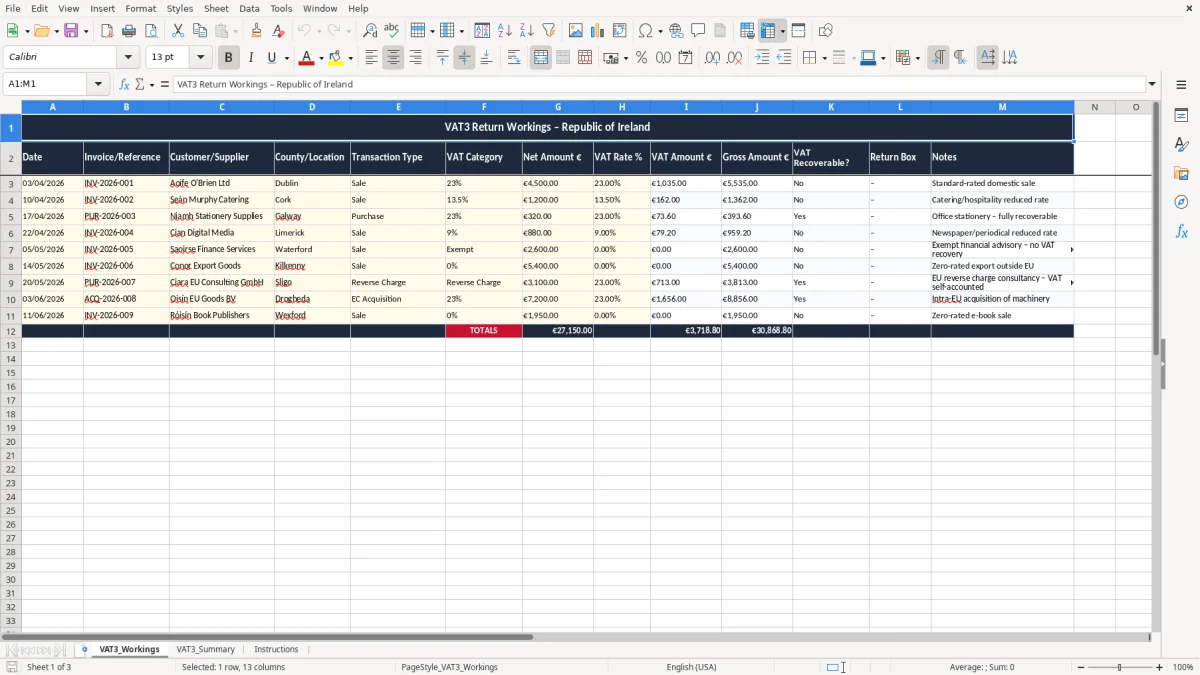
This VAT3 return workings Excel template helps you track sales and purchases, calculate VAT at each rate, and build the figures you need for your VAT return in Ireland. It includes a detailed workings sheet, a summary sheet, and an instructions sheet.
Use it to keep a clean record of each invoice, the VAT rate, the net amount, the VAT amount, and whether the VAT is recoverable. It is set out for the way Irish businesses actually work when preparing a bi-monthly return for ROS.
The template is useful if you want one place to check your figures before you file, rather than trying to piece them together from bank statements and old invoices. It is especially handy for a sole trader, a small Ltd company, or a bookkeeper handling several clients at month-end.
This template is built for the people who are actually preparing a return: a sole trader at the kitchen table, a bookkeeper in a small Ltd company, or an office manager in a trades firm trying to close the books before the next VAT deadline. If you are gathering April and May invoices for a bi-monthly return, the workings sheet gives you one line per transaction instead of a pile of scraps.
The first sheet, VAT3_Workings (image 1), has columns for date, invoice or reference, customer or supplier, county or location, transaction type, VAT category, net amount, VAT rate, VAT amount, gross amount, VAT recoverable? and return box. That is the sort of structure you need when a carpenter with 4 employees buys €3,200 of materials and charges €4,500 plus VAT on sales in the same period.
If you are handling 40 or 50 rows, you can see at a glance which entries are sales, which are purchases, and which VAT is likely to be claimed back. That is much safer than pulling figures from memory two days before you file on ROS.
Say you have 18 sales invoices at €450 net each at 23%, plus 6 purchases at €320 net each at 23%. Your sales VAT is €1,863 and your input VAT is €441.60, so the workings sheet helps you see the net VAT payable before you ever open the return form.
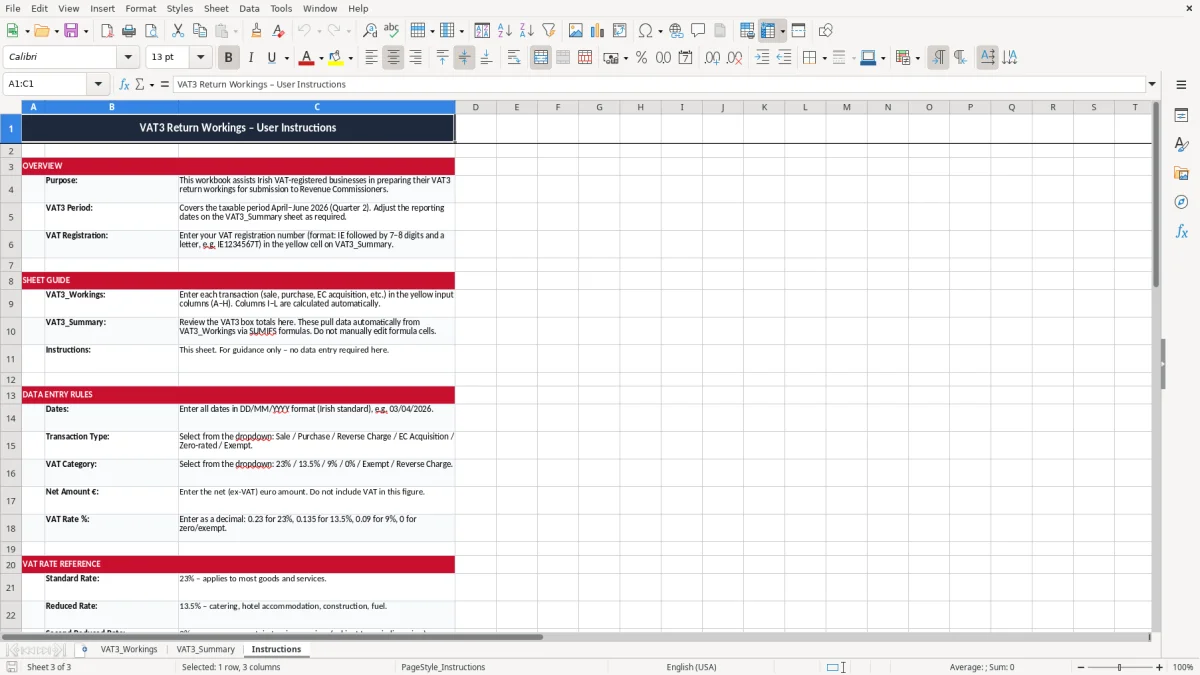
Revenue expects you to keep proper VAT records for 6 years, and this template is arranged so you can do that without building a separate filing system from scratch. If you ever need to explain a figure on a VAT return, the date, reference, VAT rate and notes column give you the trail back to the source invoice.
Irish VAT is charged at the standard rate of 23%, the reduced rate of 13.5% for many construction and service items, and 9% for selected goods and services, with some supplies at 0% or exempt. The template is useful because it lets you tag each line to the correct VAT category instead of forcing everything into one bucket.
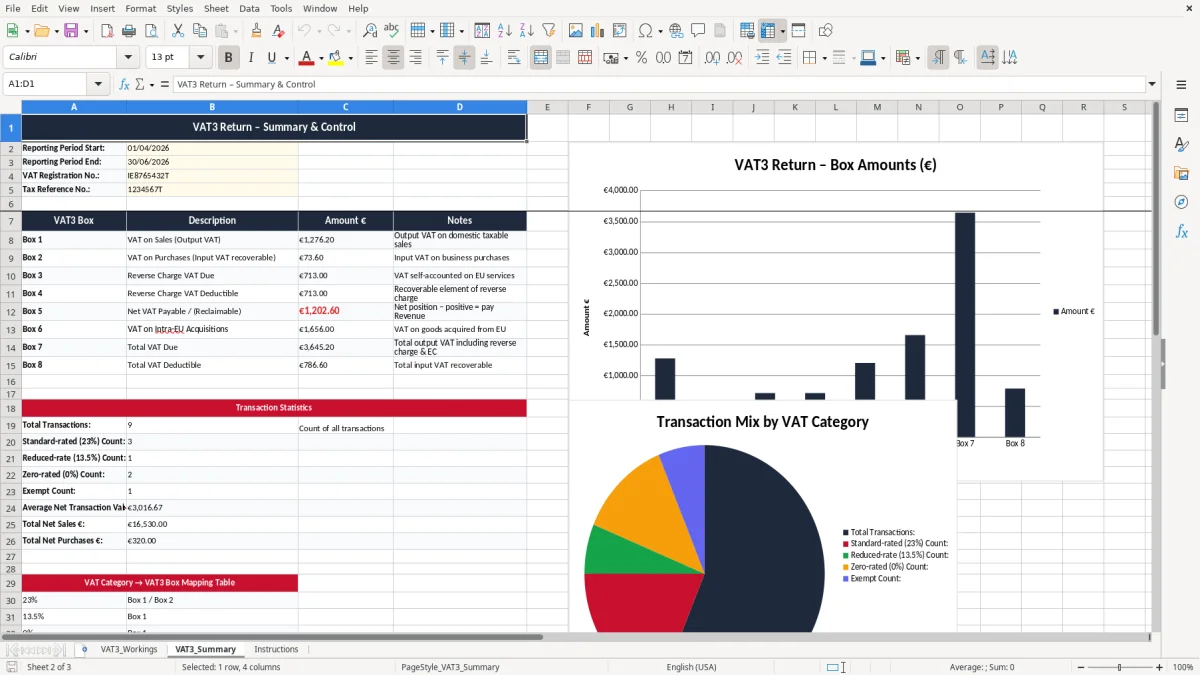
The summary sheet is there to gather the working lines into something you can use for the bi-monthly VAT3 return via ROS, with the annual Return of Trading Details following separately. If your services turnover passes €37,500, or your goods turnover passes €75,000, you are into VAT registration territory, so the discipline of clean workings matters from the start.
A small shop with 300 orders a month can easily create 120 VAT-bearing rows over a two-month period. If even 5 of those are mis-categorised, you are looking at the wrong VAT figure and extra work when Revenue asks for backup.
That same habit of keeping figures in one place carries through to corporation tax workings, where each adjustment has to be traceable before the return is filed.
The biggest mess starts with mixed-rate entries that are all typed at 23% because it is the default on the invoice. I see this with trades, retail and small service businesses: one wrong VAT rate on a €2,000 job can put you off by €270 if it should have been 13.5% rather than 23%.
Another common problem is claiming VAT on something that is not fully recoverable, or worse, claiming on the gross amount instead of the net amount. On a monthly batch of 20 purchase invoices averaging €180 net, that kind of mistake can distort your return by hundreds of euro and take an hour or two to unpick.
If you miss one supplier invoice and only find it after you file, you may have to adjust the next period’s figures and explain the gap later. That is not just admin; it can delay your cash flow if you overpay VAT by €600 to €1,000 and then wait to recover it.
The other bad habit is treating VAT as a memory exercise instead of a record-keeping exercise. A return built from bank feeds alone will miss supplier invoices, credit notes and bad date ranges, while this template keeps the evidence in one place and makes the box totals easier to defend.
Keeping the evidence in one place also means the trading details return stays tied to the invoices, credit notes, and date checks that support each box total.
The best way to keep this alive is to use it on the same day you do your bookkeeping, not as a separate job at the end of the period. For most small firms, that means a fixed weekly slot or a tie-in with payroll, bank recs or the VAT3 deadline.
If your business is moving beyond a few hundred rows a period, a spreadsheet still works well up to a point. Once you are dealing with high-volume sales, stock, or several VAT registrations, you may want a proper accounting system and let Excel remain the check sheet rather than the main record.

 Excel template built and verified by Ciara Byrne, Chartered Accountant (ACA) · builds the Excel templates.