
Cash Flow Projection Excel – Free Template (2026)
0
Free download
Track RCT contracts, invoice dates, deductions, net paid, VAT and ROS return dates in one Irish spreadsheet.
Download template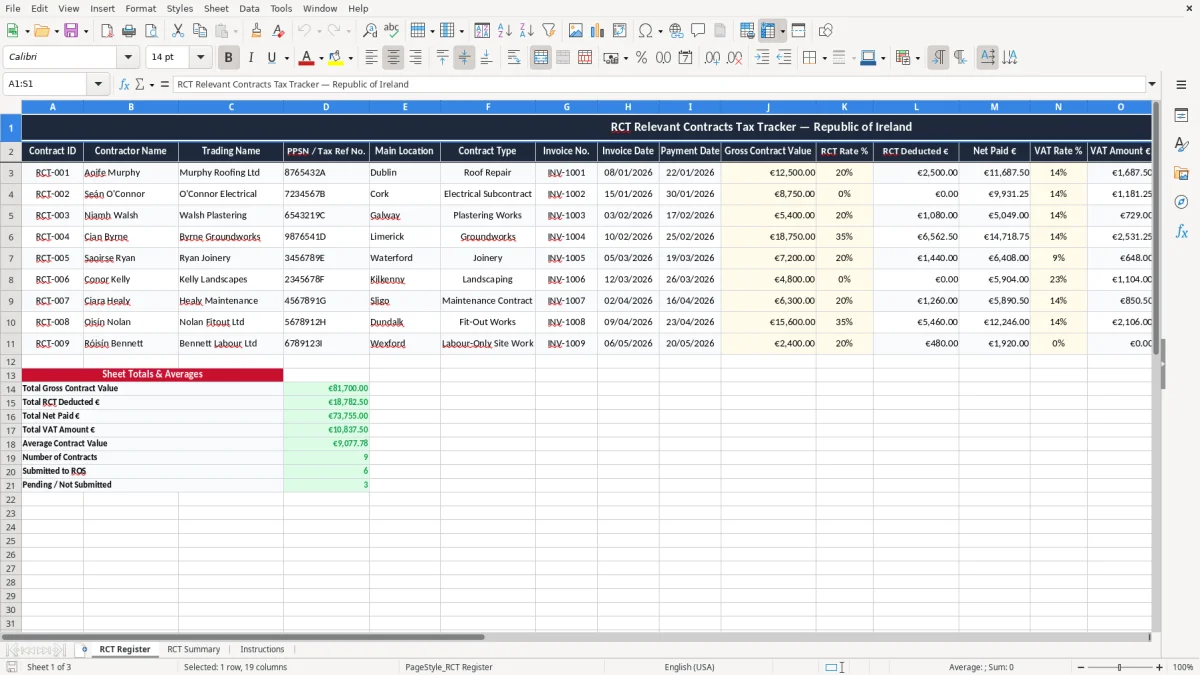
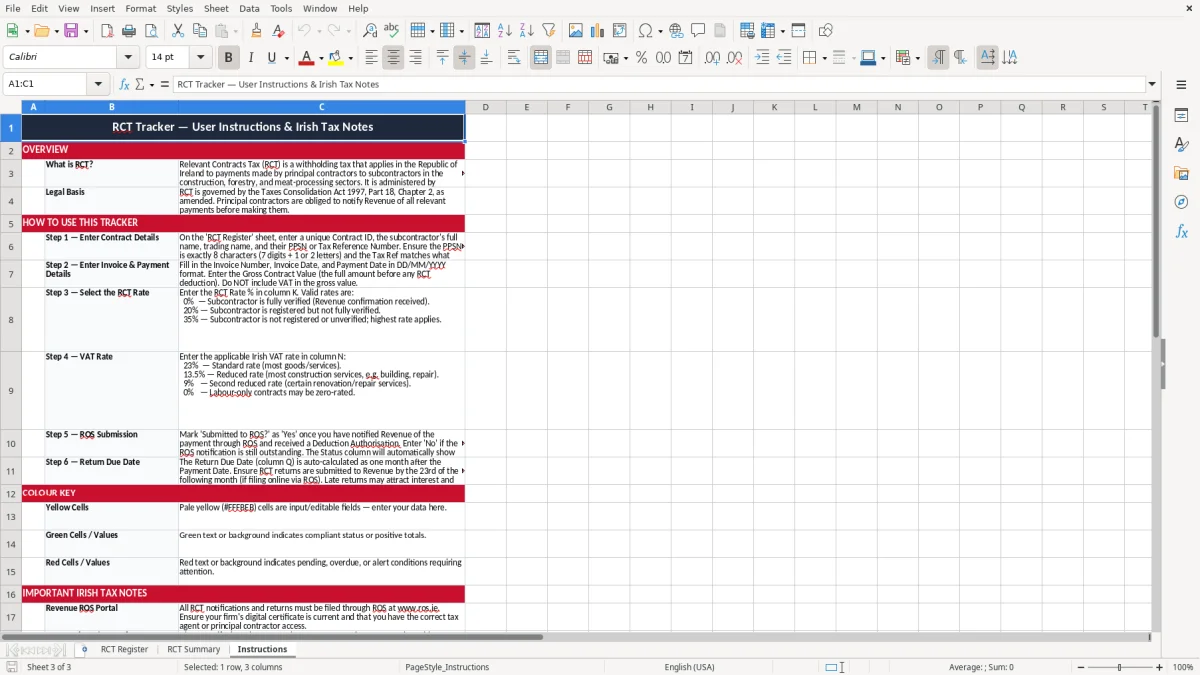
This RCT tracker Excel template helps you record Relevant Contracts Tax on each subcontractor payment, work out the deduction, and keep the return dates straight for ROS. It contains an RCT Register, an RCT Summary and an Instructions sheet.
Use it if you are a principal contractor, a small builder, or the person in the office who has to check invoices, payment dates and RCT deductions before money goes out. The register is laid out for Irish use, with fields for PPSN / tax reference number, gross contract value, VAT, net paid and submission status.
The point is to stop RCT being handled from memory or from scattered invoices. A €4,000 subcontract payment at 20% means €800 deducted and €3,200 paid, so one missed line can throw off both the books and the return.
This spreadsheet is for the people who actually have to deal with subcontractors in Irish businesses, not just the accountant at year end. A principal contractor, a small builder, a roofing firm, a landscaping company or an office manager in a trades business can all use it to keep RCT payments under control.
It is especially useful when you are paying several subcontractors in the same week. If you have four lads on site and each one has a €2,500 invoice, you are dealing with €10,000 of gross payments, and a 20% deduction means €2,000 has to be tracked properly before the next bank run.
You will use it when invoices land in the office, when the payroll person is checking what should be withheld, or when the bookkeeper is preparing the figures for Revenue. It also suits a volunteer treasurer or small company director who wants one record instead of five emails, three PDFs and a notebook.
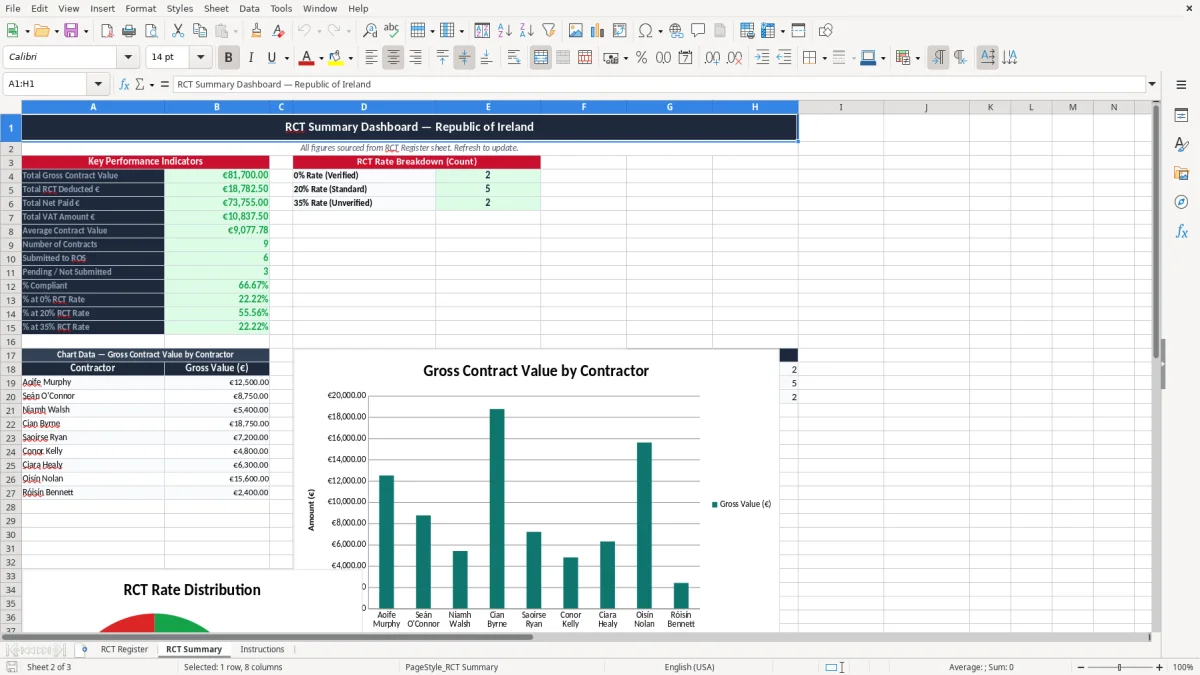
The RCT Register sheet keeps the basic facts in one line per invoice: contractor name, invoice number, payment date, gross value, deduction and net paid. The RCT Summary then gives you a cleaner view of what has been paid and what still needs attention, which is far better than hunting through the bank feed.
The simple rule is this: if you are paying subcontractors more than once a month, you need a tracker like this. It saves time, but more importantly it stops one missed deduction from turning into a messy correction later.
RCT sits inside the wider Revenue record-keeping rules, and you should keep the supporting documents for 6 years. That means the contract details, invoice dates, payment dates, deduction amounts and proof of submission all need to be easy to find later.
The key practical point is that the tracker should support the return, not replace the source documents. If a subcontract payment is €8,000 and the RCT rate is 35%, the deduction is €2,800, and you want the spreadsheet to show exactly how you reached that figure.
RCT operates on approved subcontractor work under Revenue control, and you need the contractor’s PPSN or Tax Reference Number on file. That is why the template includes a dedicated field for PPS number / tax ref no., because the record is no use if you cannot identify who the payment relates to.
For Irish businesses, the practical choice is to record the deduction at the time of payment rather than leaving it to month end. That approach gives you a cleaner trail for the ROS submission and avoids a scramble when several invoices are paid in one run.
If you also handle VAT, keep it separate from the RCT deduction. A €6,150 invoice may include €1,150 VAT at 23% and still have RCT deducted from the contract value, so mixing the two will distort both the supplier balance and the tax record.
Once VAT is kept apart from the RCT deduction, the next step is to capture the payment and deduction figures in a return of trading details record so the ROS submission matches the supplier balance.
The most common error is paying the subcontractor the wrong net amount because the deduction rate was not checked. On a €12,000 contract, the difference between 20% and 35% is €1,800, which is enough to upset both the supplier and your cash flow.
Another frequent problem is treating VAT and RCT as if they are the same line. They are not, and if you post the full invoice as a simple expense without splitting the amounts, you can end up with the books showing the wrong supplier balance and the wrong tax treatment.
A missing PPSN or tax reference number can mean time spent chasing paperwork after the payment is already gone through. In a small firm, that can easily waste an hour or two per invoice batch, and if you are doing this every week the lost time adds up fast.
Late or incomplete submissions through ROS can also create awkward follow-up work at month end. If you have five subcontractors and each return takes only 10 minutes to fix, that is nearly an hour gone before you even start on the bookkeeping.
The worst pattern is relying on memory. I have seen firms keep one figure in the bank, another in the spreadsheet and a third in the email trail, and by the time year end arrives nobody agrees on the net paid amount.
This template reduces that risk because every line forces you to set out the invoice number, payment date, gross value, deduction and submission status together. That is a lot cheaper than trying to reconstruct a €20,000 quarter from old statements and inbox searches.
That is exactly the point where a VAT3 return workings sheet keeps the invoice number, payment date, gross value, deduction and submission status in one place.
The spreadsheet works best when you tie it to a fixed weekly job. For most small firms, the cleanest point is the supplier payment run or the Friday invoice check, because that is when the numbers are already in front of you.
If you are handling dozens of subcontractors a month, or if you need approval workflows and live links to accounting software, the spreadsheet will start to feel tight. At that point, a proper bookkeeping or construction accounting system is usually the better move.
For a small or medium Irish business, though, this tracker is often enough to keep RCT tidy without adding another software bill. Used properly, it turns a messy tax job into a 10-minute routine instead of a monthly fire drill.

 Excel template built and verified by Ciara Byrne, Chartered Accountant (ACA) · builds the Excel templates.