Accounting & VAT
SUSI Grant Excel - Free Template
Track SUSI grant applications, household income, assessable income, eligibility and grant rates in one Excel sheet.
Download template
This SUSI grant income calculation Excel spreadsheet helps you work out whether a student’s household income sits within the SUSI limit, and records the figures behind the decision. It includes SUSI Inputs, SUSI Summary and Instructions sheets.
Use it to compare gross parent or guardian income, student income, disregarded income and the final assessable income before you look at eligibility. The template is laid out for Irish student grant checks, with example records, grant-rate fields and a clear summary view.
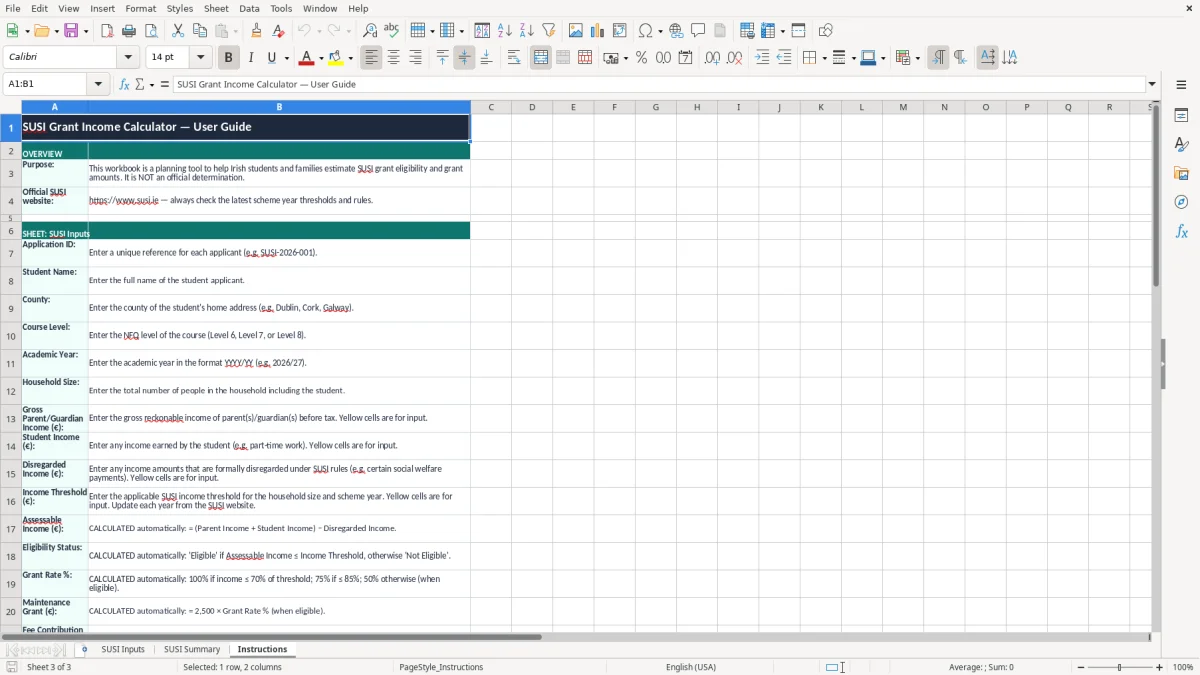
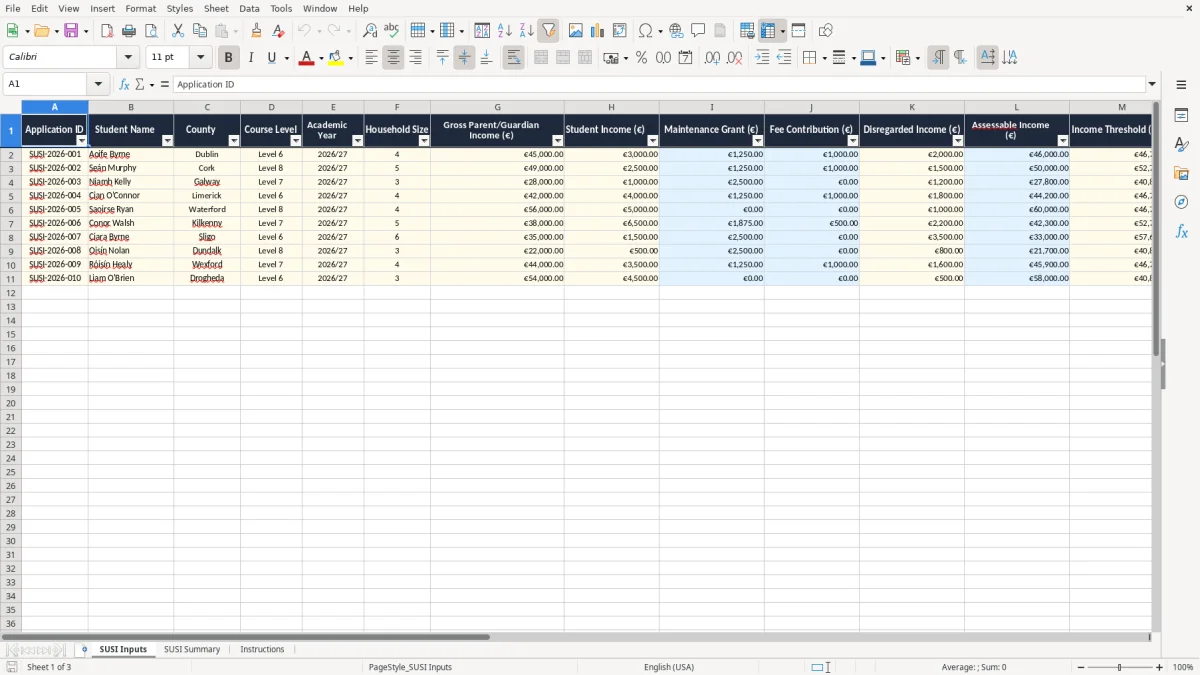
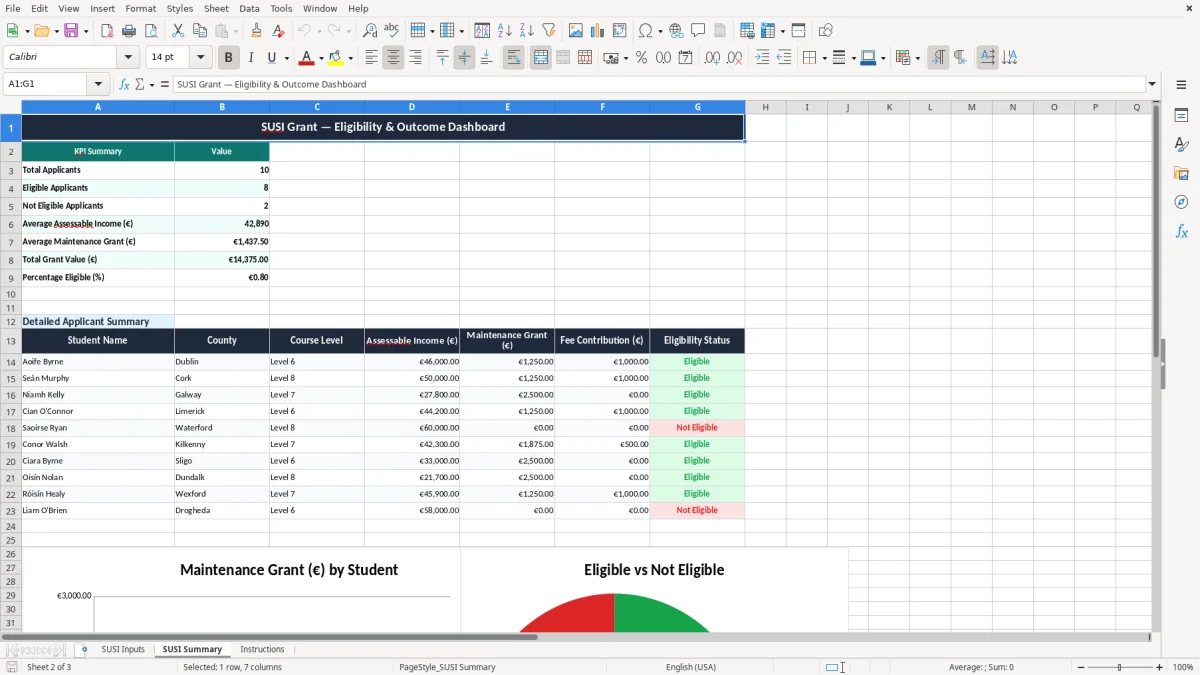
Image 1 shows the data-entry sheet, image 2 shows the summary dashboard, and image 3 explains how to use the workbook.
The key benefits of this Excel template
- Checks each application against an income threshold so you can see quickly who may qualify and who falls outside the limit.
- Keeps gross parent or guardian income, student income and disregarded income in one row, which makes reviews much faster.
- Shows assessable income and eligibility status side by side, reducing mistakes when comparing applications.
- Helps you manage multiple students at once, with columns for application ID, county, course level and academic year.
- Gives you a single place to record maintenance grant and fee contribution amounts for each case.
- Speeds up monthly or seasonal grant administration by keeping the same structure for every applicant.
- Makes handover easier for a school, college office or advice worker because the notes column captures the reason behind each result.
Step-by-step guide
- Open the SUSI Inputs sheet and enter each student on a separate row. Use the application ID, name, county, course level and academic year first so the record stays easy to trace.
- Fill in the household size, gross parent or guardian income, student income and any disregarded income. Keep the figures in euro and use the same source documents for every row.
- Check the assessable income and income threshold fields. In the sample rows, one applicant has €45,000 gross household income and €2,000 disregarded income, which shows how the worksheet is meant to be read.
- Review the eligibility status and grant rate fields. If a row should not qualify, record that in notes rather than deleting the line.
- Move to SUSI Summary to review the totals and the overall picture for all applications. Use it when you want a quick view before a meeting, deadline or phone call.
- Read the Instructions sheet if someone else is taking over the file. It explains the layout so you can keep the same method across the year.
What is included
A structured input sheet with 16 columns for application details, income figures, threshold data and notes.
Separate fields for gross parent or guardian income, student income and disregarded income so you can see the calculation clearly.
Eligibility Status and Grant Rate % columns for fast filtering and follow-up.
A summary sheet for a cleaner, management-style view instead of only raw rows.
Frozen header row and auto filter on the input sheet for easier sorting and review.
Colour-coded formatting that helps you spot input cells, results and summary areas at a glance.
An instructions sheet that makes the workbook easier to use for staff, volunteers or parents helping a student.
Who uses a SUSI income calculator in Ireland
What SUSI and Revenue records mean for the figures you enter
Where these spreadsheets usually go wrong
How to make the sheet part of your weekly routine
Frequently asked questions about this template
Related templates