
Cash Flow Projection Excel – Free Template (2026)
0
Free download
Irish profit and loss Excel template with transaction entry, VAT calculations, annual summary, monthly analysis and management charts.
Download template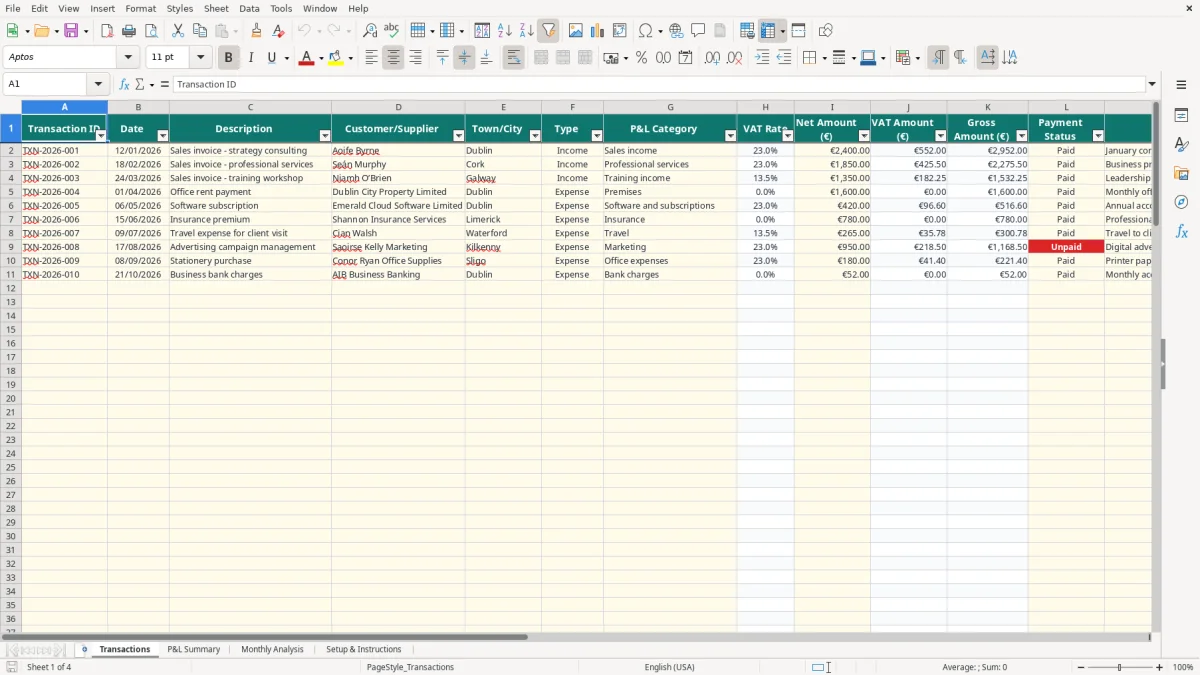
This profit and loss Excel template records income and expenses net of recoverable VAT, calculates VAT and gross amounts, and produces an annual profit and loss account. It contains a Transactions sheet, P&L Summary, Monthly Analysis and Setup & Instructions sheet for Irish businesses.
Enter each transaction once, choose its type and P&L category, and the workbook calculates the reporting totals. The populated examples include consulting, professional services, training, rent and other business costs; the remaining prepared rows run to row 111.
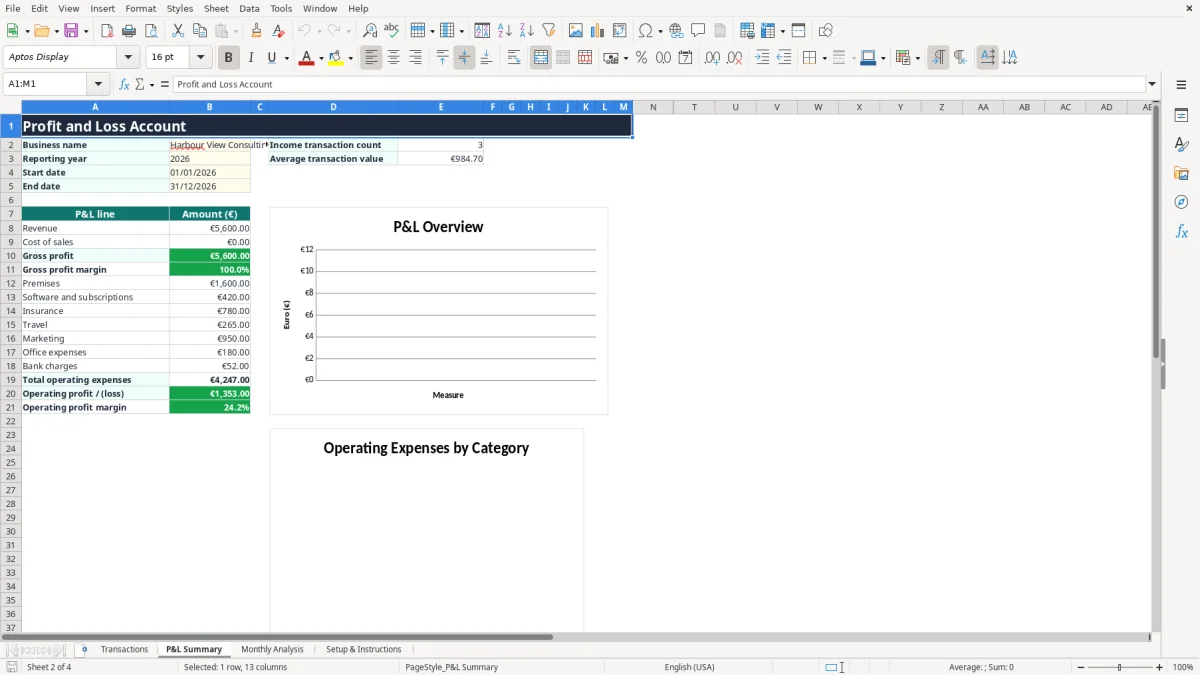
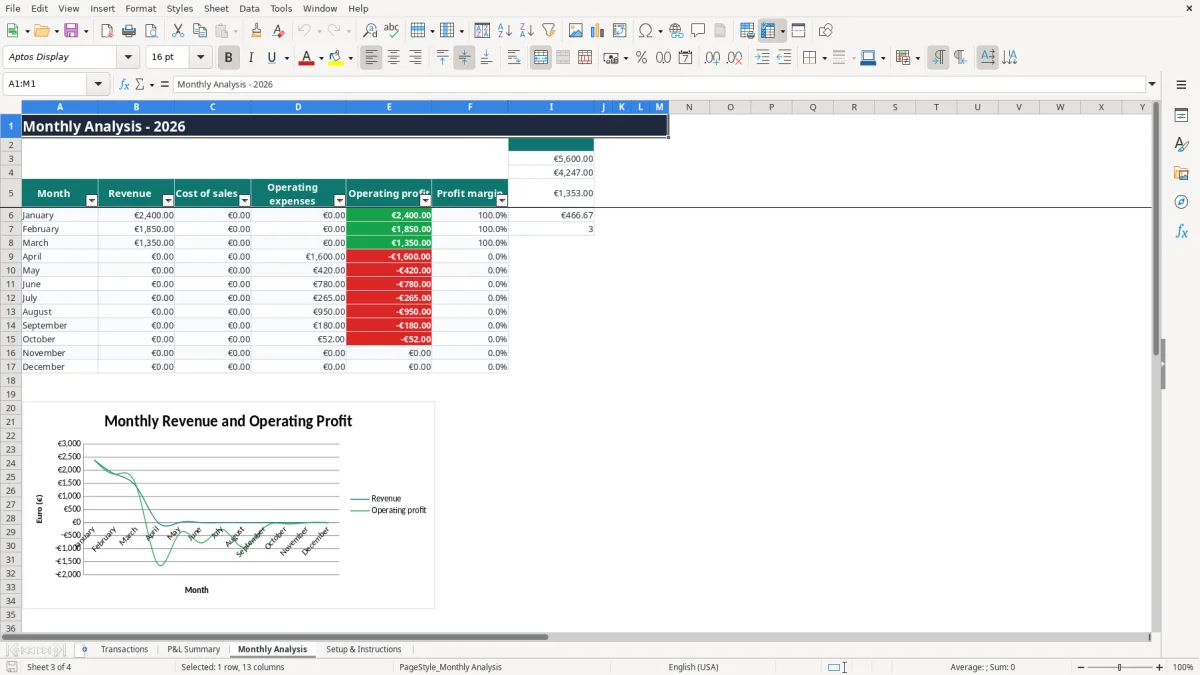
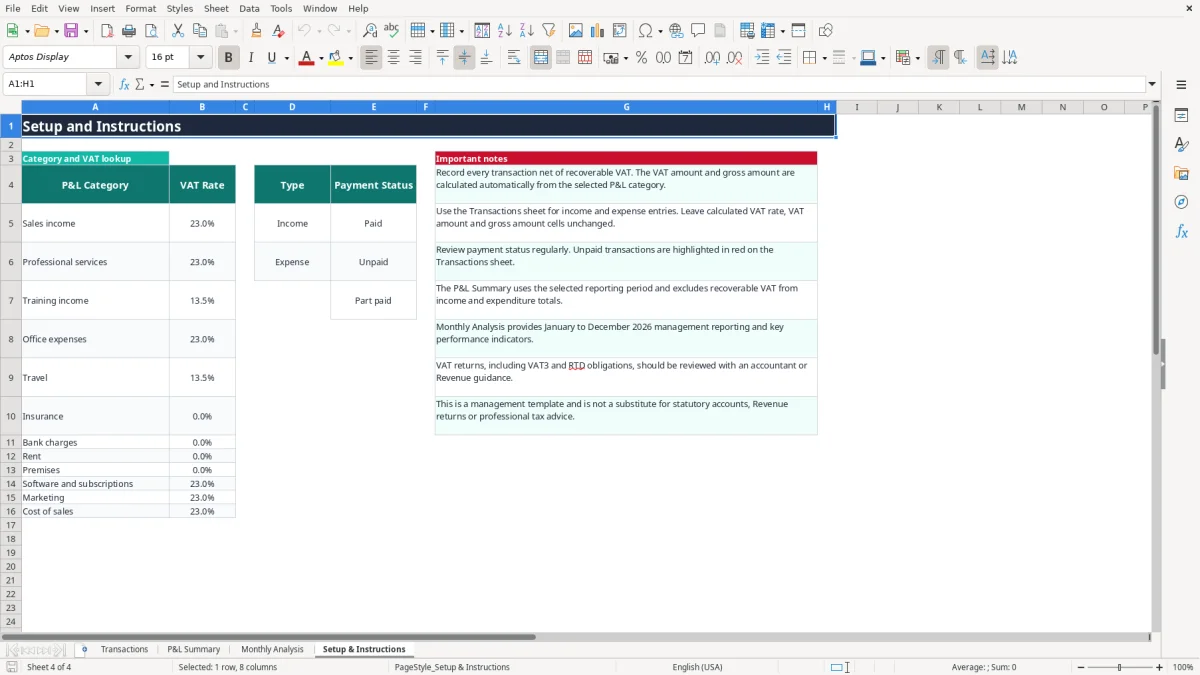
Image 1 shows the Transactions sheet with 13 columns, including date, description, customer or supplier, town or city, category, VAT rate, net amount, payment status and notes. Image 2 shows the annual summary, while images 3 and 4 show the monthly report and setup tables.
A sole trader usually needs a clear profit and loss report before reviewing preliminary tax, preparing a Form 11 or deciding whether a business is pricing its work properly. A bookkeeper in a small Ltd company may use it during month-end, while an owner-manager uses it before approving a new hire, vehicle or premises cost.
This workbook suits a service business with regular income and operating costs. The sample transactions show consulting, professional services and training income, followed by typical categories such as rent, insurance, travel, software and marketing. Those are realistic starting points, but the sample data must be replaced or supplemented with your own records.
Enter the transaction date and net amount rather than trying to type directly into the summary. For example, if a consultant records €2,400 of sales income in January and €1,850 of professional services income in February, the Transactions sheet feeds those entries into the date-based calculations on P&L Summary and Monthly Analysis.
The workbook has 110 prepared transaction rows after the header. That is enough for a small business making roughly 9 entries a month, but not a high-volume online shop with 300 orders each month unless you extend the formulas and table carefully.
P&L Summary reports revenue, cost of sales, gross profit, gross profit margin, operating expenses and operating profit or loss for the selected dates. Monthly Analysis then shows whether a weak annual result came from one difficult month or from a steadily low margin.
My practical view is to review the summary monthly rather than waiting for year end. A carpenter with four employees might accept a quiet January, but a falling operating margin for three consecutive months needs action on pricing, labour allocation or overheads.
This is a management profit and loss tool, not statutory accounts or a Revenue return. The Setup & Instructions sheet tells you to record transactions net of recoverable VAT; the workbook then calculates VAT and gross amounts from the selected category. Keep invoices, receipts and supporting records separately for at least 6 years, as Revenue record-keeping requirements apply beyond the spreadsheet itself.
The supplied VAT lookup includes 23% for sales income, professional services, office expenses, software and marketing; 13.5% for training income and travel; and 0% for insurance, bank charges, rent and premises. These are workbook settings, not a decision that every transaction in that category has that rate. For example, €2,000 net at 23% produces €460 VAT and €2,460 gross, while €2,000 at 13.5% produces €270 VAT and €2,270 gross.
VAT registration thresholds in Ireland are €37,500 for services and €75,000 for goods. The standard VAT rate is 23%, with 13.5%, 9% and zero-rated supplies applying to specified goods and services. VAT-registered businesses generally file bi-monthly VAT3 returns and an annual Return of Trading Details through ROS.
Do not treat the P&L total as the VAT3 figure. A VAT3 also requires the correct T1, T2 and other VAT return information, and the workbook does not calculate those boxes. Check that each invoice has the supplier details, sequential number, invoice date, supply date, VAT number where applicable and VAT shown separately by rate.
A sole trader uses the accounts information for self-assessment and the Form 11 deadline in mid-November on ROS. A company registered with the CRO may use the management result when preparing its Form CT1; corporation tax on trading income is 12.5%, but accounting profit is not automatically taxable profit because adjustments such as depreciation and disallowable costs may apply.
The most expensive error I see is entering a bank payment as the expense figure when the payment includes VAT. If a business records €1,230 instead of €1,000 net at 23%, its expenses are overstated by €230. Across 20 invoices, that can make the reported result €4,600 worse and obscures the VAT actually paid.
The opposite error is also common: a user marks every payment as an expense without checking whether it is a loan repayment, owner withdrawal, asset purchase or recoverable VAT. The workbook can total whatever is entered, but it cannot decide whether a transaction belongs in the P&L. That classification has to be correct before the summary means anything.
Putting stock purchases into Office expenses hides the difference between gross profit and operating profit. If an online seller has €30,000 of sales and €18,000 of stock costs, its gross margin is 40%. If the €18,000 is placed in general overheads, the summary may show a misleading gross margin of 100% and make pricing decisions unreliable.
Likewise, recording a €12,000 annual insurance premium entirely in one month may make March look loss-making even though the cover benefits the full year. This workbook does not create accruals, prepayments, depreciation or stock adjustments, so those year-end accounting entries must be handled outside it.
Blank or incorrect dates stop the SUMIFS formulas from placing transactions in the correct reporting period. A €4,500 December invoice dated 02/01/2027 will not appear in the 2026 report, even if the work was completed in December. Payment status also needs attention: unpaid income can make a cash-flow problem look like a profit problem, because this workbook is a transaction-based management report rather than a full cash-flow statement.
Finally, do not use the operating profit line as a tax liability. A company with €50,000 accounting profit may have taxable adjustments, and a sole trader still needs to consider preliminary tax, PRSI and USC separately.
The simplest routine is to update Transactions at a fixed time each week, then review the summaries on the first working day after month end. Attach the task to something that already happens, such as reconciling the bank feed, preparing payroll or checking supplier invoices. Leaving four weeks of receipts in a drawer makes category decisions slower and increases the chance of a missing date.
Use the drop-down lists rather than typing categories manually. The category choices drive the VLOOKUP VAT rate and the SUMIFS totals, so a spelling variation such as Software & Subscriptions instead of Software and subscriptions can leave a cost outside the intended line.
The workbook has prepared rows through row 111 and its formulas use fixed ranges ending at row 111. If you regularly exceed 110 transactions, do not simply paste below the table and assume the summaries will include them. Extend the table and every relevant formula range, or move to bookkeeping software that imports bank transactions and maintains an audit trail.
Keep a locked, dated copy at each month end rather than overwriting the only file. For a small consultancy, a 15-minute Friday update and a 30-minute month-end review is usually more useful than a detailed spreadsheet that nobody maintains.

 Excel template built and verified by Ciara Byrne, Chartered Accountant (ACA) · builds the Excel templates.