
Cash Flow Projection Excel – Free Template (2026)
0
Free download
Irish sole trader accounts Excel template with transaction tracking, VAT calculations, monthly profit summary, outstanding payments and category analysis.
Download template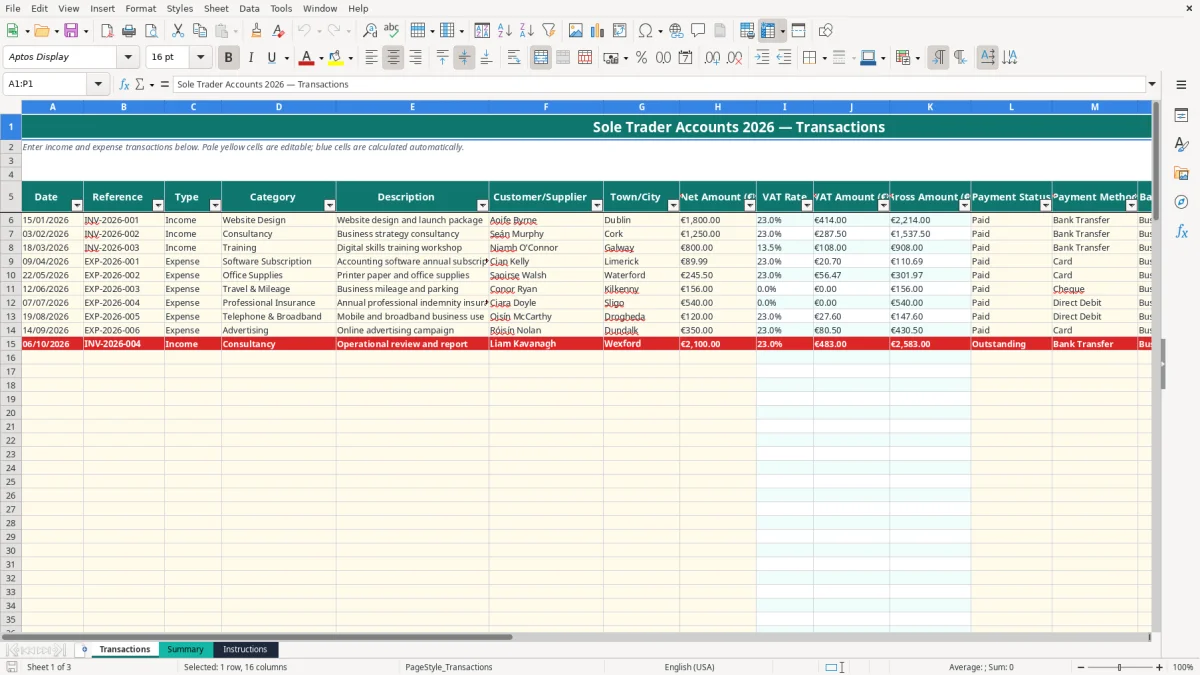
This sole trader accounts Excel spreadsheet records income, expenses, VAT and payment status for an Irish business. It contains a Transactions sheet for up to 100 prepared entries, a Summary sheet with profit, VAT, monthly and category totals, and an Instructions sheet with Irish VAT references.
Enter details in the pale yellow cells and let the blue calculated cells do the arithmetic. The workbook is set up for the 2026 tax year, with sample transactions such as website design, consultancy and training already included as examples.
A sole trader often needs more than a bank balance. You need to know which sales have been paid, how much has been spent on equipment or software, and what the records say before preparing your annual tax return. This workbook gives you one place to record that information without maintaining separate sales and expense lists.
Imagine a freelance web designer in Dublin who records a €1,800 client invoice, a €125 software subscription and €80 of bank charges. The Transactions sheet separates the income from the expenses, calculates the VAT treatment linked to each category and carries the gross figures into Summary.
The populated examples include a €1,800 website design sale, a €1,250 consultancy invoice and an €800 training transaction. These are sample entries, not your business records, so replace them or use them as a guide to the level of detail required.
A sole trader may update the sheet after each invoice, every Friday, or during a monthly bookkeeping session. The office manager of a one-person trades business could enter supplier bills after reconciling the business current account, while a consultant might record sales immediately after sending sequential invoices.
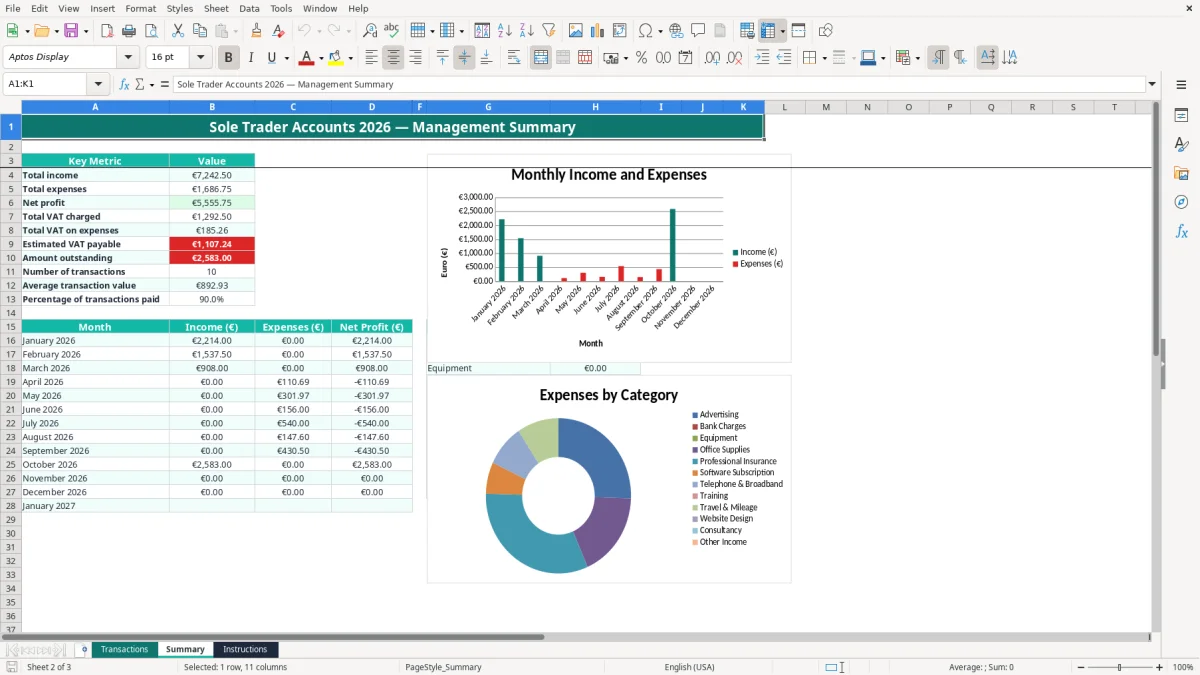
The Summary sheet is useful before a VAT3 period, at year end and while estimating preliminary tax. It shows total income, total expenses, net profit, VAT totals and outstanding amounts. For example, if gross income is €6,000 and gross expenses are €1,500, the displayed net profit measure is €4,500 before considering accounting adjustments or tax rules.
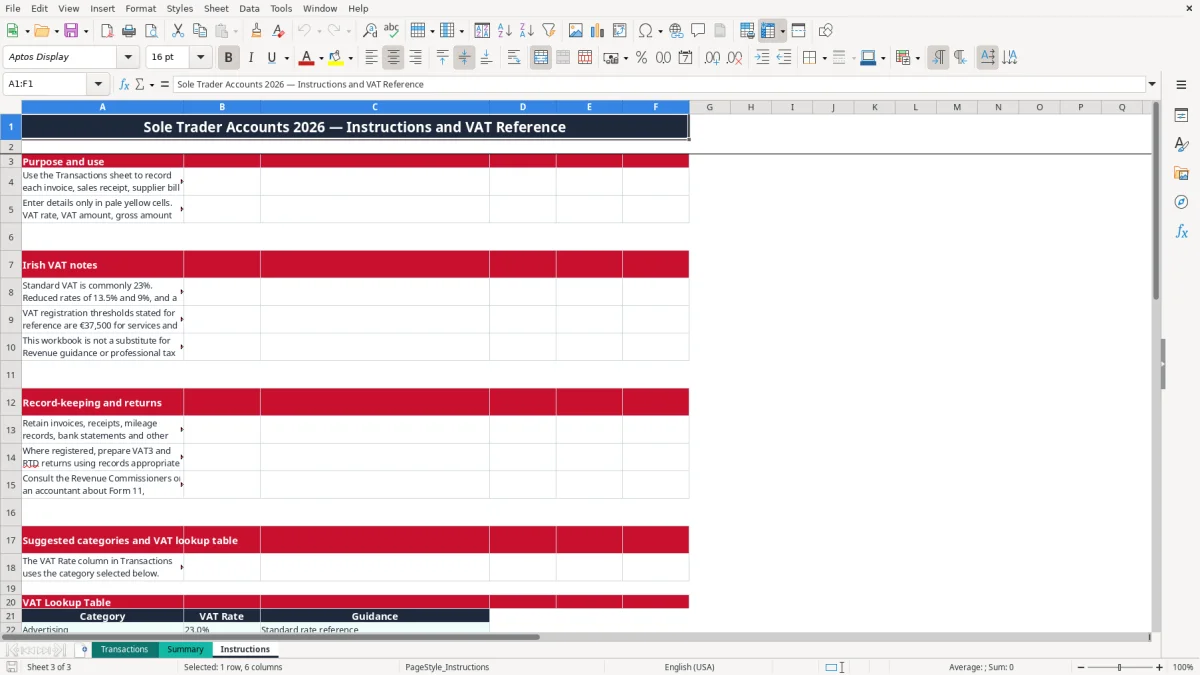
Image 1 shows the Transactions layout, including the Date, Reference, Type, Category, Net Amount (€), VAT Rate, Payment Status and Status Check columns. Image 2 shows the Summary metrics, monthly table, expense categories and charts. Image 3 shows the Instructions sheet, including the VAT notes and category lookup table.
This spreadsheet is a bookkeeping aid, not a tax return. It helps organise the information that a sole trader may need for Revenue, but the correct treatment still depends on the actual supply, invoice and business circumstances.
The Instructions sheet refers to the Irish standard VAT rate of 23%, reduced rates of 13.5% and 9%, and a 0% rate where applicable. The reference registration thresholds are €37,500 for services and €75,000 for goods. A business registered for VAT generally prepares a bi-monthly VAT3 return and an annual Return of Trading Details through ROS.
Do not assume that the workbook's category rate settles every transaction. For example, the lookup table assigns 13.5% to Training as a reduced-rate reference, 23% to Website Design and 0% to Bank Charges, but the Instructions sheet tells you to verify the treatment and supplier evidence.
If you enter net sales of €2,000 at 23%, the formula calculates €460 VAT and €2,460 gross. If you enter €1,000 at 13.5%, it calculates €135 VAT and €1,135 gross. The Summary sheet then uses the gross amount for total income and expenses, while separately showing VAT charged, VAT on expenses and estimated VAT payable.
Keep invoices, receipts, mileage records, bank statements and other supporting records for six years for Revenue purposes. The workbook does not file a VAT3, Form 11 or payment; it provides organised figures to review before filing. A sole trader should also consider preliminary tax and the mid-November Form 11 deadline on ROS when planning the year.
A sole trader is personally responsible for the business, unlike a limited company registered with the CRO. Whichever structure applies, the reference, description, customer or supplier and notes fields should make each amount traceable to an original document.
The most expensive errors are usually small entries repeated for months. A sole trader may enter a gross supplier bill in Net Amount, select the wrong category, or mark every invoice as Paid because the money is expected rather than received.
Suppose a €1,000 purchase is entered as gross when it should be net. At 23%, the expected VAT is €230 and the gross amount is €1,230. Entering €1,230 as the net figure produces €282.90 of calculated VAT, overstating the transaction by €282.90 gross and distorting both the VAT review and profit figures.
The category lookup is useful but not infallible. A training business may have a mixture of supplies, and insurance or bank charges may not carry recoverable VAT. Keep the supplier invoice and change the category table only when you understand the effect on existing calculations.
Entering the same invoice from both the sales list and the bank statement doubles turnover. A €2,500 invoice entered twice makes the Summary appear €5,000 higher, while an outstanding amount may remain hidden if one duplicate is marked Paid. Use the Reference column as a control and search it before adding a second row.
The Status Check formula labels Paid as Cleared and other entered statuses as Follow up. It does not reconcile your bank account or prove that a payment cleared. Compare the payment method, account and date with the actual statement.
A category total without receipts is not a reliable expense claim. If €600 of Travel & Mileage is entered but only €250 of receipts and mileage records can be produced, the unsupported €350 may be challenged and the resulting tax position may change.
Keep the original documents for six years and use Notes to identify unusual items, private-use proportions or missing evidence. The spreadsheet can expose a €4,000 expense total, but it cannot create proof that was never retained.
The best way to keep this workbook alive is to attach it to a routine you already perform. Set a fixed Friday time to enter invoices and receipts, then complete a month-end check after the business bank statement arrives. Ten minutes each week is easier than reconstructing twelve months before the Form 11 deadline.
The Transactions sheet has an auto-filter on row 5 and frozen panes at row 6, so the headings remain visible while you review the prepared rows. Use the drop-down lists rather than typing alternatives such as Paid in full or Bank transfer; consistent values are what make the formulas work.
Do not overwrite the blue formula cells in columns I, J, K and P. If a formula is replaced with a number, the workbook may stop updating when you change the category, net amount or payment status. Enter a €500 net purchase and select 23% as a quick check: VAT should show €115 and gross should show €615.
This file provides 100 prepared transaction rows, from row 6 through row 105. If your business regularly exceeds that volume, or you need stock, payroll, debtor ageing, bank feeds or full double-entry accounts, move to dedicated bookkeeping software rather than extending a fragile manual range.

 Excel template built and verified by Ciara Byrne, Chartered Accountant (ACA) · builds the Excel templates.