
Cash Flow Projection Excel – Free Template (2026)
0
Free download
Track Irish invoices, VAT, payments, overdue days, ageing bands and collection actions in a ledger with dashboard summaries.
Download template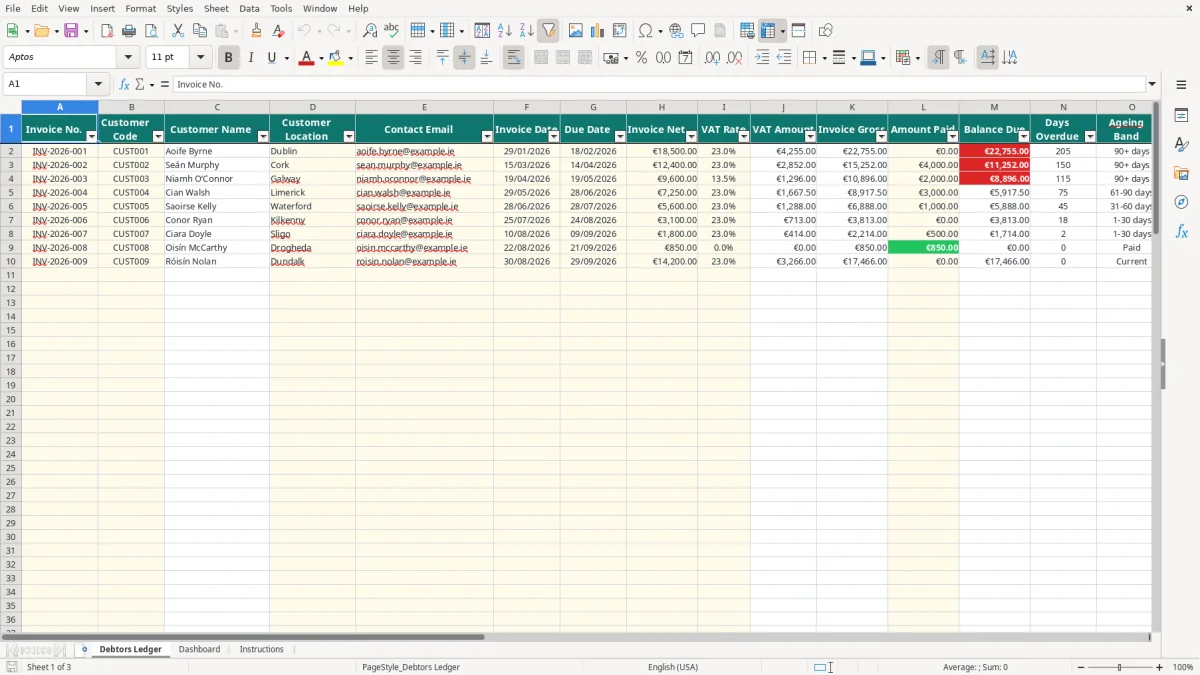
This debtors aged analysis Excel spreadsheet records customer invoices, VAT, payments and outstanding balances, then classifies invoices as Current, 1-30, 31-60, 61-90 or 90+ days. It includes a Debtors Ledger, Dashboard and Instructions sheet.
Enter the ledger inputs and the workbook calculates VAT, invoice gross, balance due, days overdue and collection status. The Dashboard summarises invoiced amounts, overdue exposure, open invoices, percentage overdue, balances over 90 days and customer balances.
A sole trader, credit controller or bookkeeper uses an aged debtor spreadsheet to decide which customers need attention. It is useful during a weekly credit-control review, at month end and before management considers whether unpaid invoices are putting pressure on cash flow.
Image 1 shows the Debtors Ledger. It includes Invoice No., Customer Code, Customer Name, Customer Location, Contact Email, Invoice Date, Due Date, Invoice Net, VAT Rate, VAT Amount, Invoice Gross, Amount Paid, Balance Due, Days Overdue, Ageing Band, Collection Status, Last Contact Date, Next Action Date and Notes.
A Cork plumber with four employees might enter €12,400 net at 23% VAT. The workbook calculates €2,852 VAT and €15,252 gross. After a €4,000 receipt, the balance due is €11,252; at 45 days overdue, the invoice falls into 31-60 days and receives Follow up status.
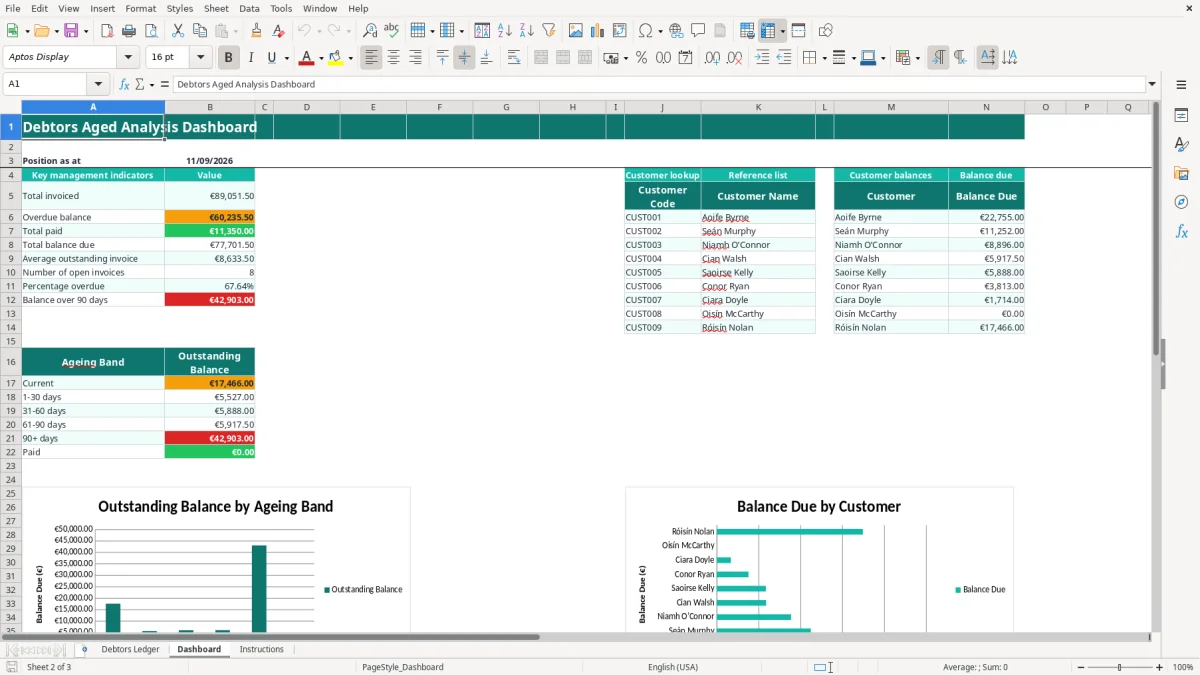
Image 2 shows the Dashboard, with the position date driven by TODAY(). It calculates total invoiced, overdue balance, total paid, total balance due, average outstanding invoice, open invoices, percentage overdue and balance over 90 days.
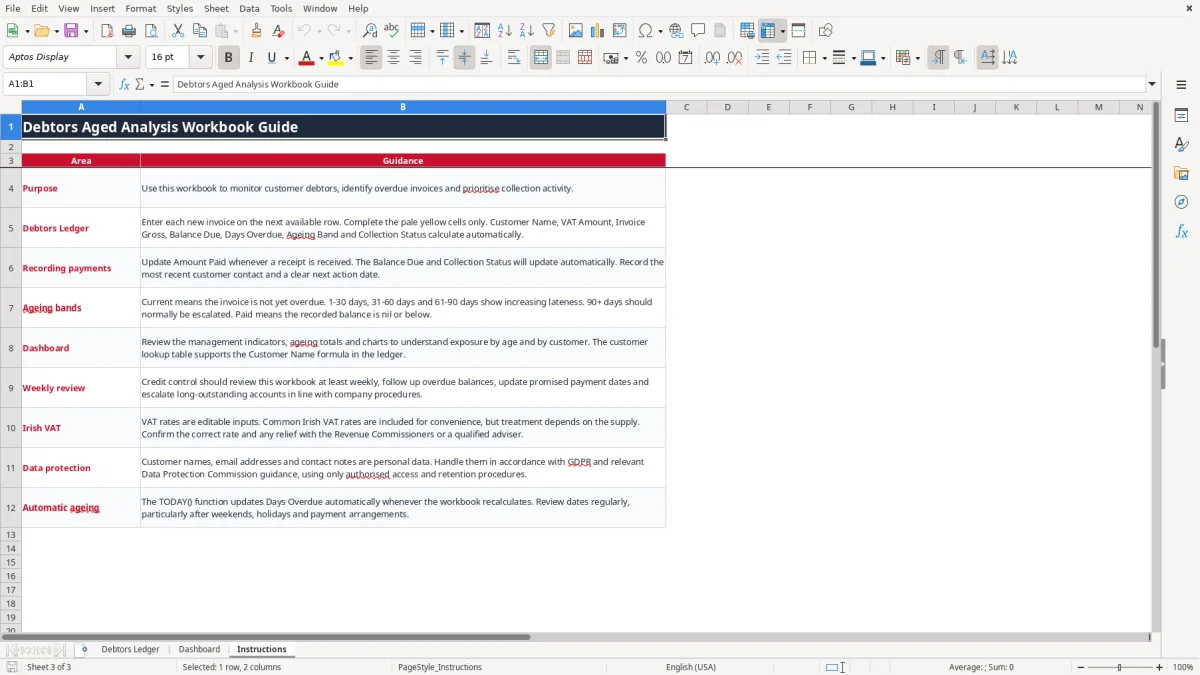
The lower section groups balances into Current, 1-30 days, 31-60 days, 61-90 days, 90+ days and Paid. Image 3 shows Instructions, including weekly review, payment entry, VAT and GDPR guidance.
The VAT Rate input list contains 0%, 9%, 13.5% and 23%. The standard Irish VAT rate is 23%; 13.5%, 9%, zero-rated and exempt treatments apply to specified supplies. Select the rate that applies to the actual invoice.
If Invoice Net is €10,000 at 23%, the workbook calculates €2,300 VAT and €12,300 Invoice Gross. A €5,000 receipt leaves €7,300 Balance Due. The spreadsheet tracks receivables, but it is not a VAT3 return.
VAT registration thresholds are €37,500 for services and €75,000 for goods. Registered businesses generally file bi-monthly VAT3 returns and an annual Return of Trading Details through ROS. Reconcile the ledger to your sales records before filing with Revenue.
Revenue records generally need to be retained for six years. Keep invoices, credit notes, delivery evidence, receipts and correspondence with the workbook. Customer names, email addresses and notes are personal data, so restrict access and follow GDPR, the Data Protection Act 2018 and Data Protection Commission guidance.
The most damaging mistake is allocating a receipt to the wrong invoice. If €4,000 is entered against another row, one customer balance is understated and another is overstated, leading to the wrong collection call.
If a €12,000 gross invoice is entered as Invoice Net, the workbook calculates €2,760 VAT and €14,760 gross, overstating the receivable by €2,760. Rate selection also matters: €9,600 net at 23% produces €11,808 gross, while 13.5% produces €10,896.
Days Overdue uses Due Date and TODAY(). A missing or text-formatted due date can prevent a useful calculation. Because TODAY changes when Excel recalculates, save a dated copy for each month-end review.
Called customer is weak evidence. Use notes such as payment promised for 13/09/2026 or dispute under review, then enter the next action date. Uncontrolled copies also create GDPR risk because the ledger contains customer emails and contact notes.
Attach the workbook to an existing finance task. A small Ltd company could update receipts every Friday and review the Dashboard on the last working day of each month. A sole trader could spend 20 minutes each Friday checking Follow up and Escalate rows.
If total balance due is €60,000 and €18,000 is over 90 days, the 30% exposure needs a focused payment-plan or credit-control decision. Use Customer Codes exactly as listed on Dashboard; correcting the reference list is better than typing over a calculated Customer Name.
This workbook has 100 prepared invoice rows and a small customer reference list. If you need bank feeds, multiple-user editing, automated reminders, credit notes or a full audit trail, use accounting software for the sales ledger and retain this file as a review tool.

 Excel template built and verified by Ciara Byrne, Chartered Accountant (ACA) · builds the Excel templates.