
Dental Recall Excel Template (2026)
0
Free download
Track civil service mileage claims in Ireland with dates, journeys, km, rates, claim amounts, approval status and summary totals.
Download template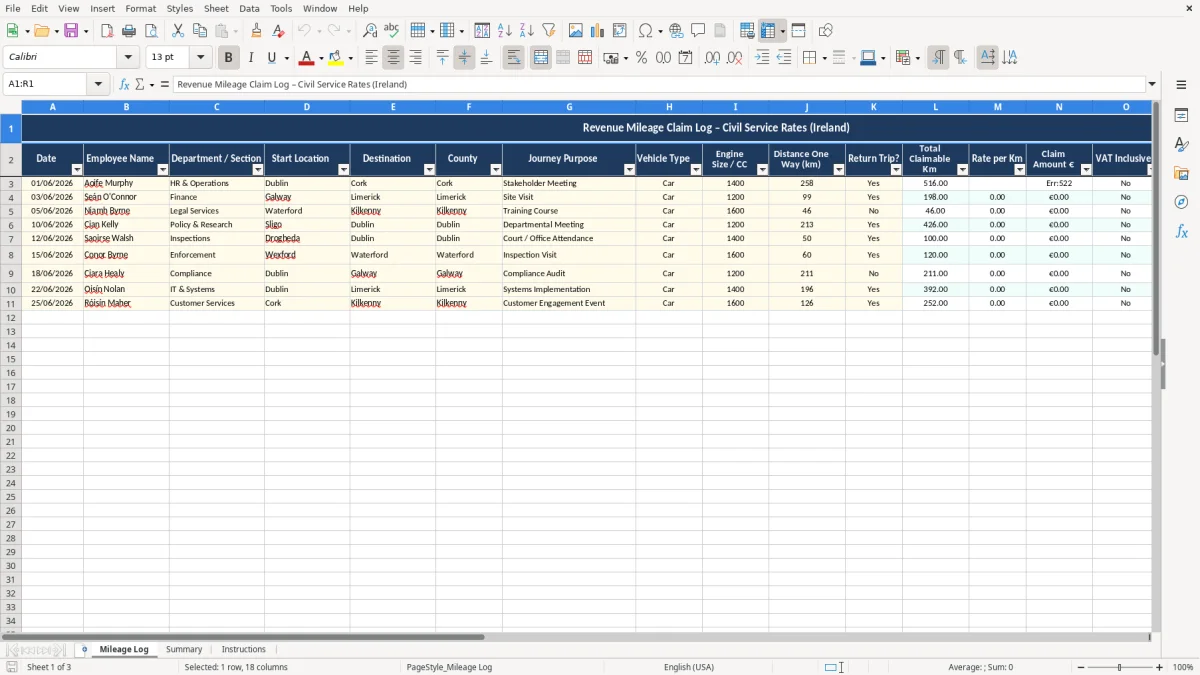
This Mileage Log Excel template records civil service journeys in one place, with a log sheet, a summary sheet and instructions. You enter the date, route, distance, rate per km, claim amount, approval status and notes, so each claim is ready for review or reimbursement.
It suits anyone claiming travel costs in Ireland, from an office administrator in a county office to a field-based employee who travels between sites. The template keeps the figures tidy, makes it easier to check cash flow on mileage claims, and gives you a simple audit trail if a manager queries a trip later.
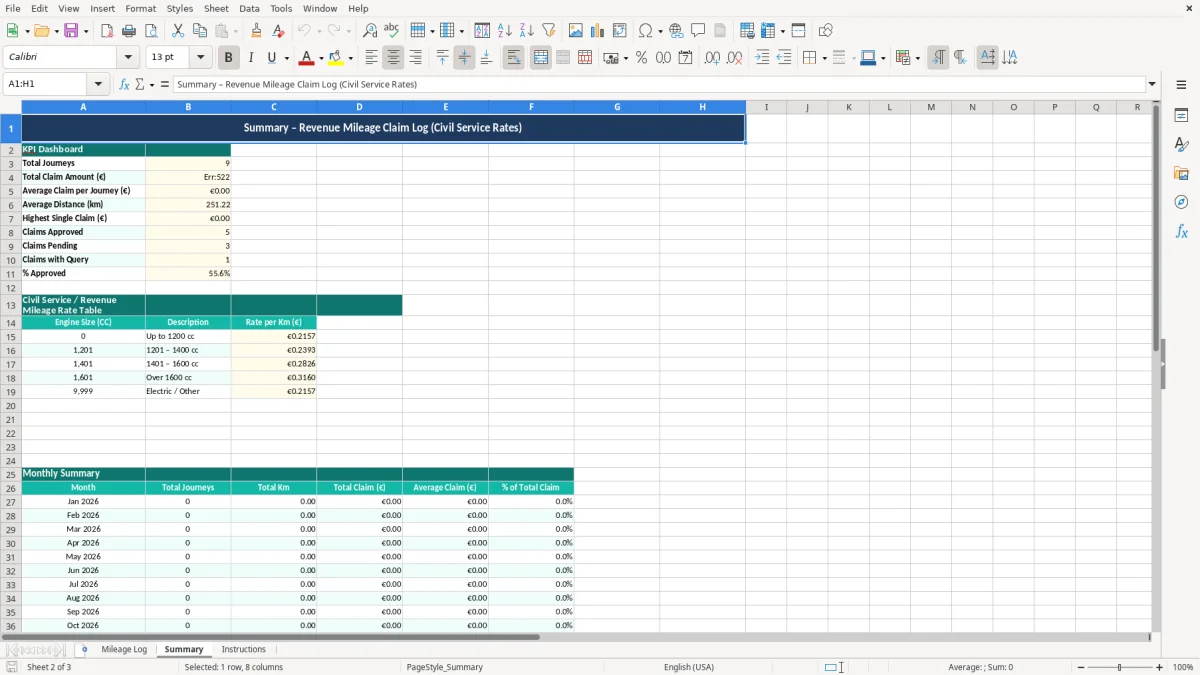
Image 1 shows the log layout. Image 2 shows the summary view with totals pulled through from the log, and Image 3 gives short guidance on how to fill the sheet in without breaking the formulas.
This kind of spreadsheet is used by office managers, payroll staff, section supervisors and employees who travel for work and need a clean mileage record. In practice, that means an inspector covering three counties, a technician moving between depots, or an administrator processing claims at the end of the month.
The log sheet in image 1 is set up for that kind of use: date, employee name, department or section, start location, destination, county, purpose, vehicle type, engine size or cc, distance one way, return trip, total claimable km, rate per km and claim amount. That is enough detail to check a claim quickly without rewriting the trip in email threads.
Say a field officer does 18 journeys in a month, averaging 42 km claimable per trip. That is 756 km in total, so if the rate per km is €0.45 the month’s mileage comes to €340.20. If you are signing off ten staff with similar claims, the difference between checking totals in a spreadsheet and checking them line by line in emails can easily be 1-2 hours a month.
Image 2 is useful at payroll cut-off or month end, when you need totals by employee rather than a long list of trips. For a team of 4 travellers making 20 claims each, the summary sheet is the fastest way to see who is near approval, who is missing a manager sign-off, and what total is heading into the reimbursement run.
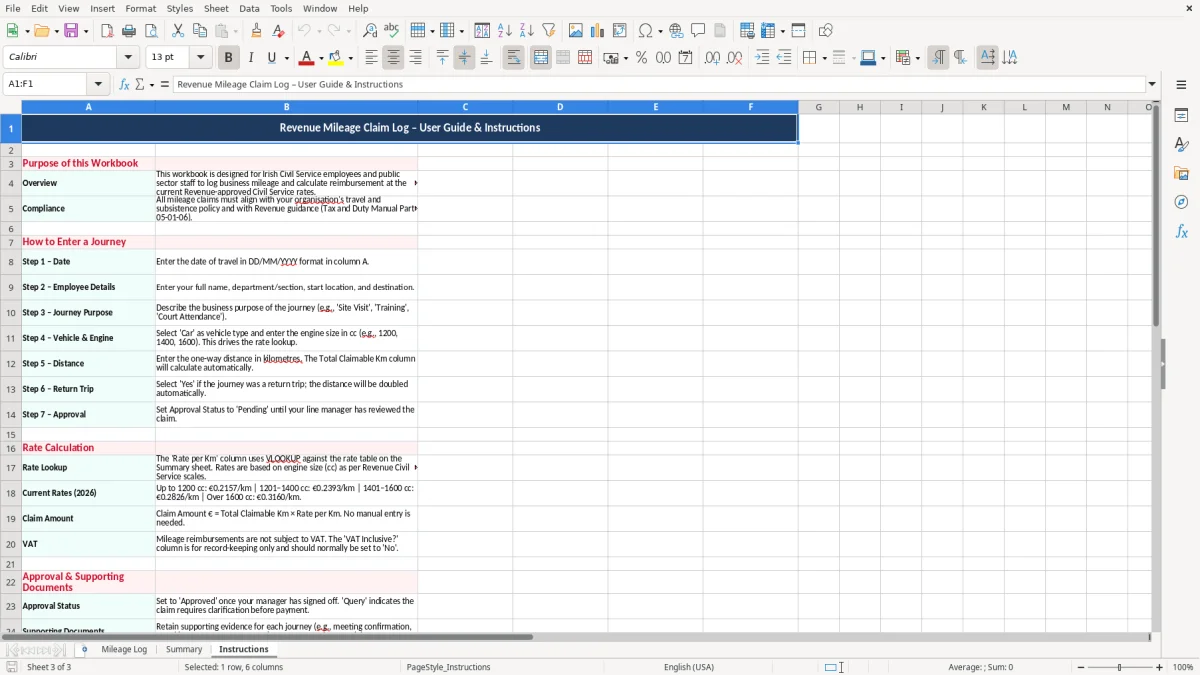
For civil service mileage, the important point is to use the approved mileage schedule rather than guessing a rate. The template includes a rate per km field so you can keep the log aligned to the current policy used by your organisation in 2026.
The tax angle also matters. Revenue expects good records to support any work travel claim, and you should keep business records for 6 years. If a claim is ever queried, the log should show the date, purpose, route and distance clearly enough that the trip can be traced back without guesswork.
A proper mileage record should match the journey to a real work reason, not a vague note like “site visit”. A better entry would be “meeting with contractor at depot”, “inspection of branch office”, or “deliveries to three client sites”. That level of detail is what keeps the record useful when a manager, auditor or payroll officer reviews it.
If you have 60 claims in a month and even 5 of them are missing one of the basics, you will spend time chasing the missing detail and delaying payment. A spreadsheet with fixed columns is cleaner than a notebook because it forces the same fields every time, which makes review faster and reduces the chance of a rejected claim.
The most common problem is a claim with no clear route or no proof that the journey was work-related. If an entry says only “travel” or “meeting”, it is much harder to defend than a line that names the destination, county and purpose. A weak record can turn into an unpaid claim, or at best a long delay while someone asks for more detail.
A second issue is mileage counted the wrong way round. If one-way distance is entered as return distance, a 36 km trip can be doubled by mistake and push the claim up by €16.20 at €0.45 per km. On a month with 25 such trips, that kind of error is no longer small — it becomes a reconciliation problem of several hundred euro.
Another failure point is approval status. If a manager forgets to sign off five claims of €120 each, that is €600 sitting in limbo, which affects the employee and the cash planning for payroll or reimbursements. The template’s approval, manager and notes columns are there to stop claims getting lost in inboxes.
People often rely on memory for short trips and then cannot explain the route a month later. That is risky when the log has to support a payment or be checked against schedules, rosters or site records. A short note entered on the day is worth more than trying to reconstruct a dozen journeys from bank statements later.
A dated note also becomes important when travel sits beside contract tax tracking, because both need a clear trail back to the job and the payment being justified.
The best way to use this spreadsheet is to tie it to a fixed moment in your week. For most small teams, that is Friday afternoon or the payroll cut-off day, because that is when travel is still fresh and a manager is already looking at timesheets or expenses.
If a team is logging 8 to 12 journeys a week, that routine takes minutes and saves a lot of chasing later. Once you are dealing with dozens of claims per person each month, or mileage linked to a larger expenses system, a spreadsheet starts to feel thin and you should move to dedicated expense software.
Once mileage is being folded into a larger claims process, the next practical step is a contribution estimate for the related calculations.

 Excel template built and verified by Ciara Byrne, Chartered Accountant (ACA) · builds the Excel templates.