
Dental Recall Excel Template (2026)
0
Free download
Track daily rooms, bookings, occupancy, ADR, RevPAR, room revenue and 9% VAT in an Excel template for Irish guesthouse owners.
Download template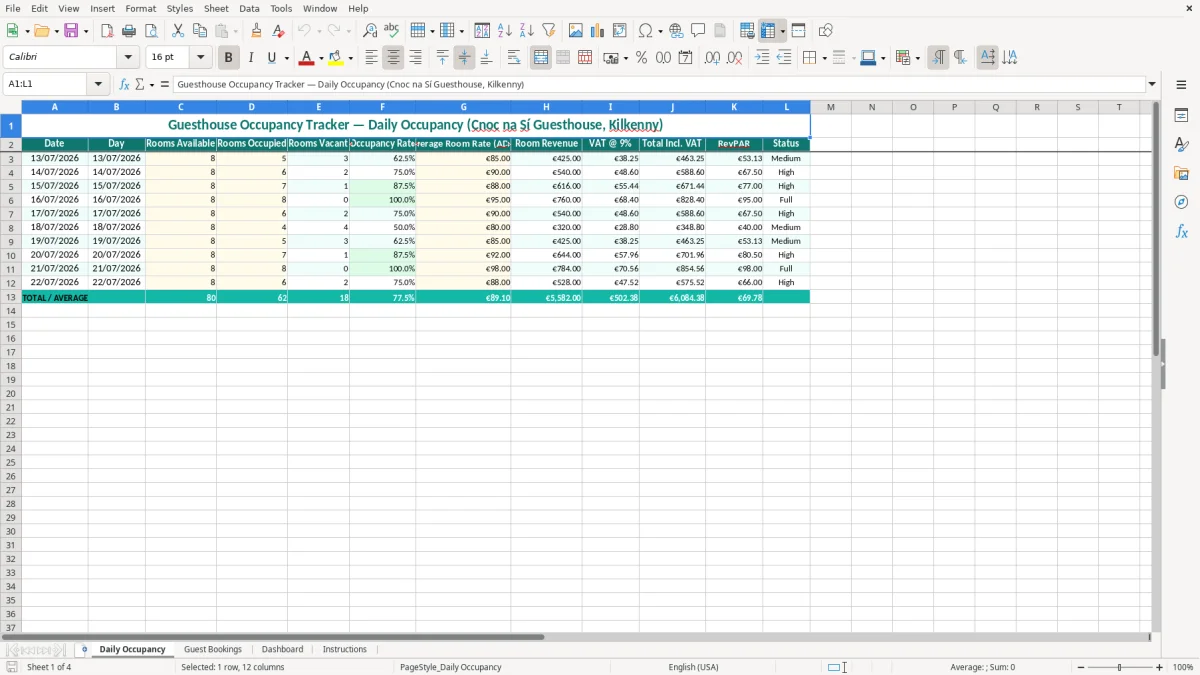
A guesthouse occupancy tracker Excel template records available rooms, occupied rooms, vacancies, occupancy rate, average daily rate, room revenue, 9% VAT, total income and RevPAR. It includes Daily Occupancy, Guest Bookings, Dashboard and Instructions sheets for an Irish guesthouse.
Enter your daily figures and booking information in the yellow input cells. The teal-formatted workbook then gives you a straightforward view of room utilisation and takings, whether you run a small B&B yourself or manage the figures for an accommodation business.
A guesthouse owner usually needs this record at two different times: during the morning check of arrivals and departures, and at month end when room income is being reconciled. A small B&B in Kilkenny, Galway or Donegal may not need a full property-management system, but it still needs more than a notebook if the owner wants to see whether a busy weekend actually produced a worthwhile return.
Image 1 shows the Daily Occupancy sheet. Its columns run from Date and Day through Rooms Available, Rooms Occupied, Rooms Vacant, Occupancy Rate, Average Room Rate (ADR), Room Revenue, VAT @ 9%, Total Incl. VAT, RevPAR and Status. The sample dates are 13/07/2026 to 22/07/2026, with 8 rooms available each day.
Suppose the guesthouse has 8 rooms and sells 6 on a Tuesday at an ADR of €90. That gives a 75.0% occupancy rate and €540.00 room revenue before the displayed 9% VAT calculation. On a Saturday with 4 rooms occupied at €80, occupancy falls to 50.0%, even though the owner may still have a reasonable flow of guests in the dining area.
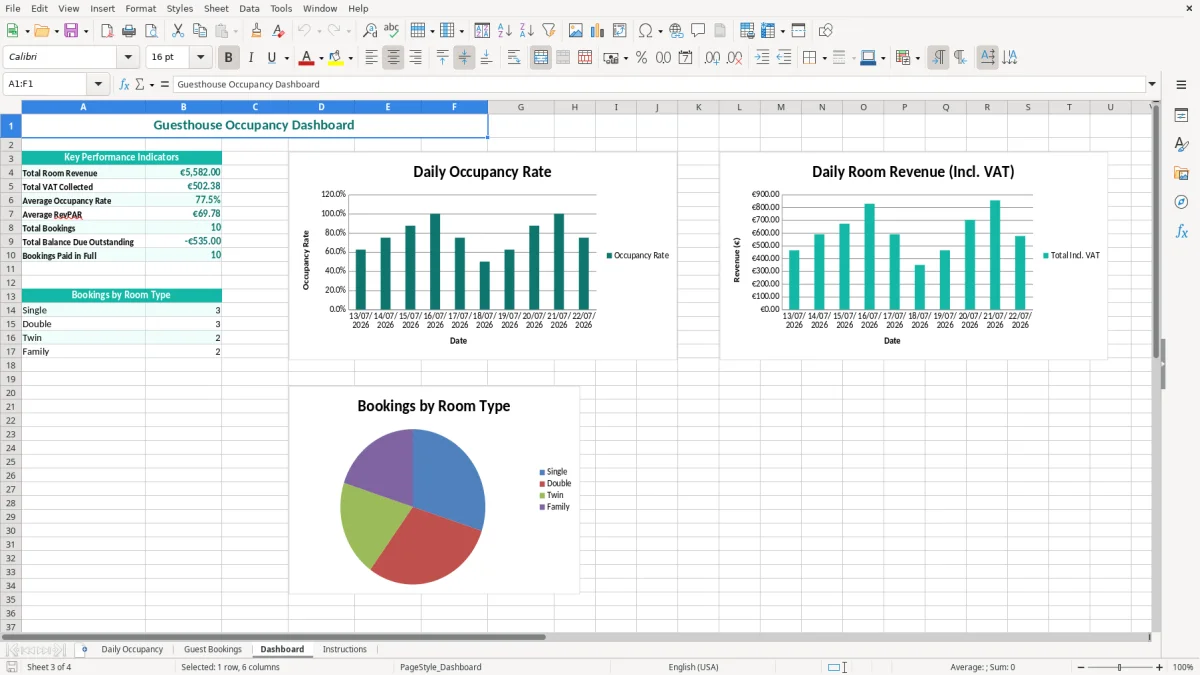
This distinction matters when you review pricing. The Dashboard, shown in image 3, helps you see whether revenue is coming from more occupied rooms, a higher ADR, or both. I would review the daily rows before changing prices: one wedding party or local festival can make a single night look stronger than the underlying booking pattern.
A bookkeeper in a small limited company can use the daily figures when matching accommodation income to the bank and sales ledger. An office manager in a country guesthouse can update the sheet after the morning arrivals, while the owner reviews the Dashboard every Monday.
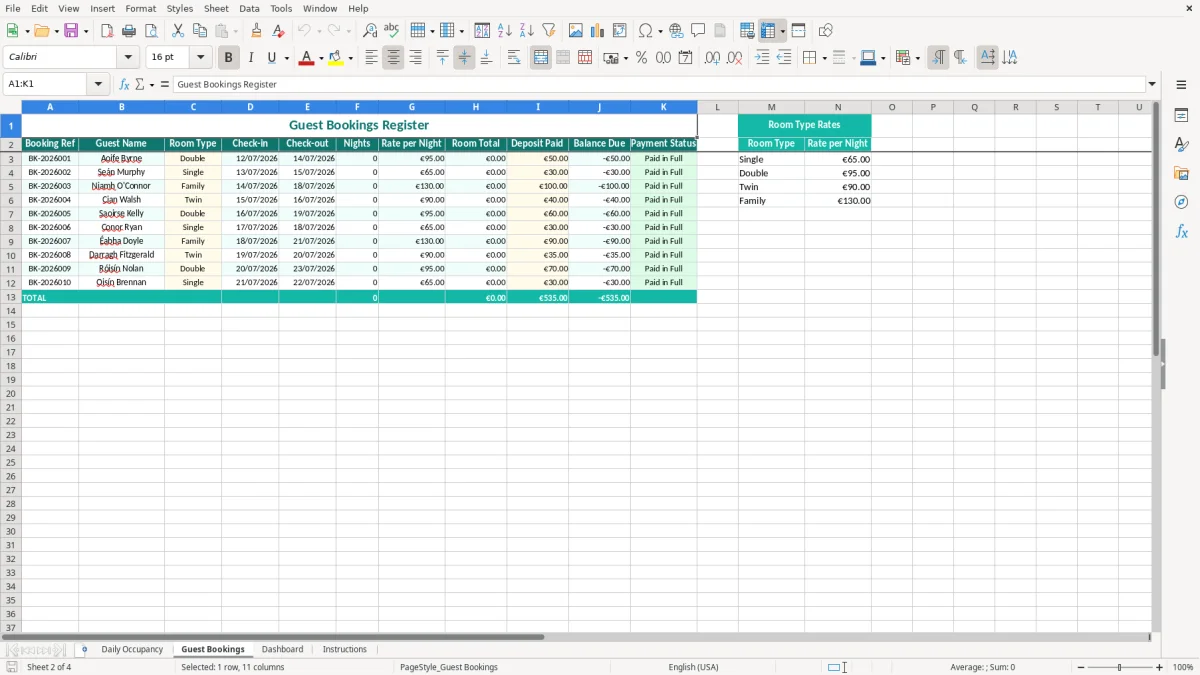
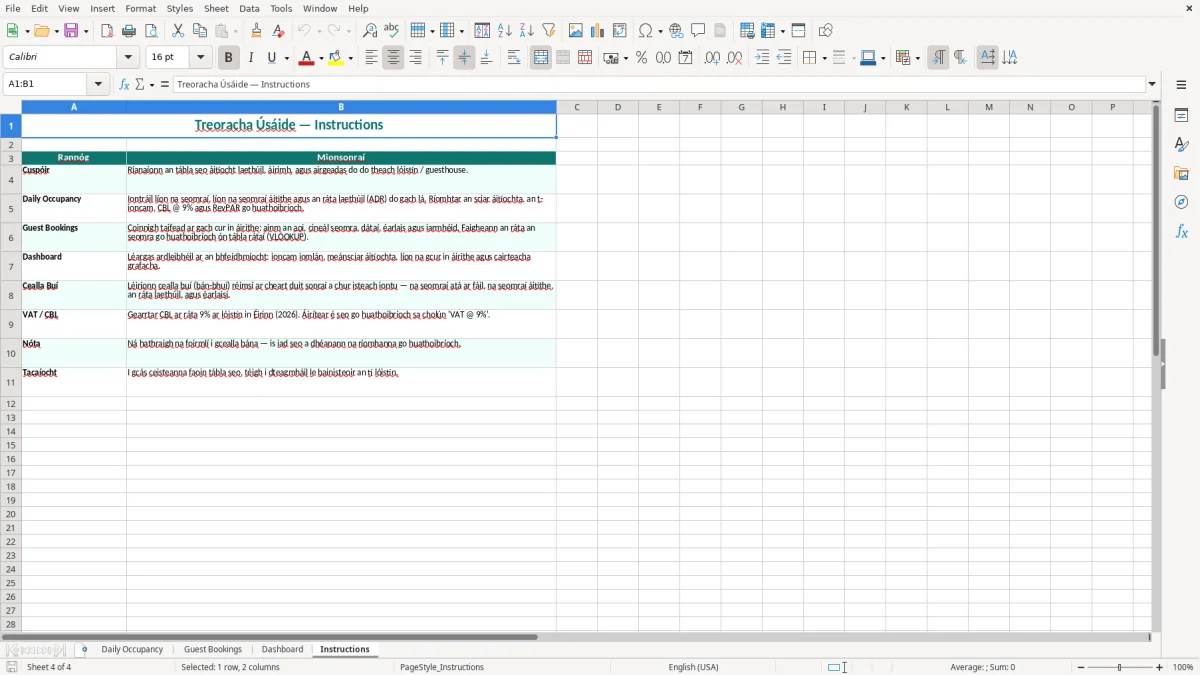
Image 2 shows the separate Guest Bookings sheet, which is useful when the daily total needs to be traced back to individual reservations. Image 4 shows the Instructions sheet; keep it with the workbook when another staff member takes over the weekly update.
Irish guesthouse accommodation is shown in this workbook with VAT at 9%. The standard Irish VAT rate is 23%, but the accommodation figures in this template use the 9% reduced rate specified in the Daily Occupancy heading. Do not change the rate simply because another sale in the business uses 23%, 13.5% or 0%: classify each supply correctly in your bookkeeping.
For example, €540.00 of room revenue at 9% produces €48.60 VAT and €588.60 including VAT when the €540.00 figure is treated as net revenue. If your quoted room price is already VAT-inclusive, the VAT extraction is different: €540.00 inclusive contains €44.59 VAT, calculated as €540.00 × 9 ÷ 109. Confirm which pricing basis your booking records use before comparing the sheet to the bank.
The Irish VAT registration threshold is €37,500 for services and €75,000 for goods. A guesthouse business should monitor its relevant turnover rather than waiting until the year end. Once registered, the VAT3 return is generally filed bi-monthly through ROS, with the annual Return of Trading Details also filed through ROS.
The spreadsheet is a management tracker, not a complete VAT return. Your VAT records should separate room income from other supplies and retain invoices, credit notes, booking-platform statements and receipts. Revenue expects business records to be retained for 6 years, so do not overwrite the only copy of a busy season's data.
Include the business name, VAT number and booking or invoice references in the supporting records used to reconcile the sheet. A room sale of €100 net should show €9 VAT and €109 total; if the platform remits €97 after a €12 commission, the gross sale and commission still need separate treatment in the accounts.
My practical preference is to use this workbook for occupancy and revenue control, then post a reconciled sales total to the accounting records. It is safer than treating the Dashboard total as the VAT3 figure without checking inclusive pricing, cancellations and booking-platform deductions.
The most expensive errors I see are not dramatic formula failures. They are small differences between the booking diary, the payment platform and the daily room count that accumulate until the monthly sales figure no longer explains the bank lodgements.
A guesthouse with 8 rooms can sell 8 rooms for 3 nights, creating 24 occupied room-nights. If someone records the reservation only on its arrival date, the occupancy for the first day looks correct but the next two days are understated. At an ADR of €95, missing 16 room-nights hides €1,520 of net room revenue before VAT.
The answer is not to inflate the daily number to match a target. Use the booking details to check every night between arrival and departure, then compare the resulting room count with the Daily Occupancy rows. A departure date is normally not another occupied night unless the guest actually stayed that night.
Another common mistake is entering €109 as ADR in one row and €100 in another, even though both are the same 9% VAT-inclusive room price. The Dashboard may then suggest that pricing improved when the only change was whether VAT was included. Pick one basis for ADR and apply it consistently.
For a €109 inclusive price, the net amount is €100 and VAT is €9. If a booking platform pays €103 after a €6 commission, that €103 bank receipt is not the room sale. Posting it as revenue loses the commission analysis and makes the occupancy tracker disagree with the sales ledger.
A cancelled booking left as occupied can turn 6 rooms into a recorded 7, making a 75.0% day appear to be 87.5%. Conversely, a room blocked for maintenance should not remain in Rooms Available if it could not have been sold.
Keep a short note or supporting booking reference for adjustments. A five-minute check before month end is cheaper than explaining a €2,000 difference between the workbook, the booking platform and the bank to your accountant or Revenue inspector.
That same month-end review is also where a mileage log matters, because the supporting reference for an adjustment should match the trip record before Revenue queries the €2,000 difference.
The template works best when updating it becomes part of the existing changeover routine rather than a task postponed until the end of the month. For a small guesthouse, I would set one fixed update time after departures have been checked and a second review on the same day as the weekly bank reconciliation.
On Friday afternoon, compare the Guest Bookings sheet with the next seven days of arrivals and departures. Then check that Rooms Occupied does not exceed Rooms Available and that a 0.0% or 100.0% occupancy rate has a plausible explanation. With 8 rooms, a recorded 9 occupied rooms is an obvious error; a recorded 8 may be correct during a festival weekend.
Review ADR, occupancy and RevPAR together. For instance, raising ADR from €85 to €98 while occupied rooms fall from 7 to 5 changes net revenue from €595.00 to €490.00, so the higher price was not automatically the better result.
After several months, add a controlled list for room status or booking source only if the workbook layout supports it. Do not create a second unofficial version for staff; that is how two different occupancy totals arise. If you are handling hundreds of bookings, multiple properties or live availability across online channels, move to a property-management system and retain this workbook as a review or export tool.
At that point, a booking calendar becomes the cleaner place to keep live availability and avoid split occupancy totals.

 Excel template built and verified by Ciara Byrne, Chartered Accountant (ACA) · builds the Excel templates.