
Dental Recall Excel Template (2026)
0
Free download
Record Irish mart cattle sales, weights, prices, commission, VAT and net proceeds, with a dashboard for marts, breeds and payment status.
Download template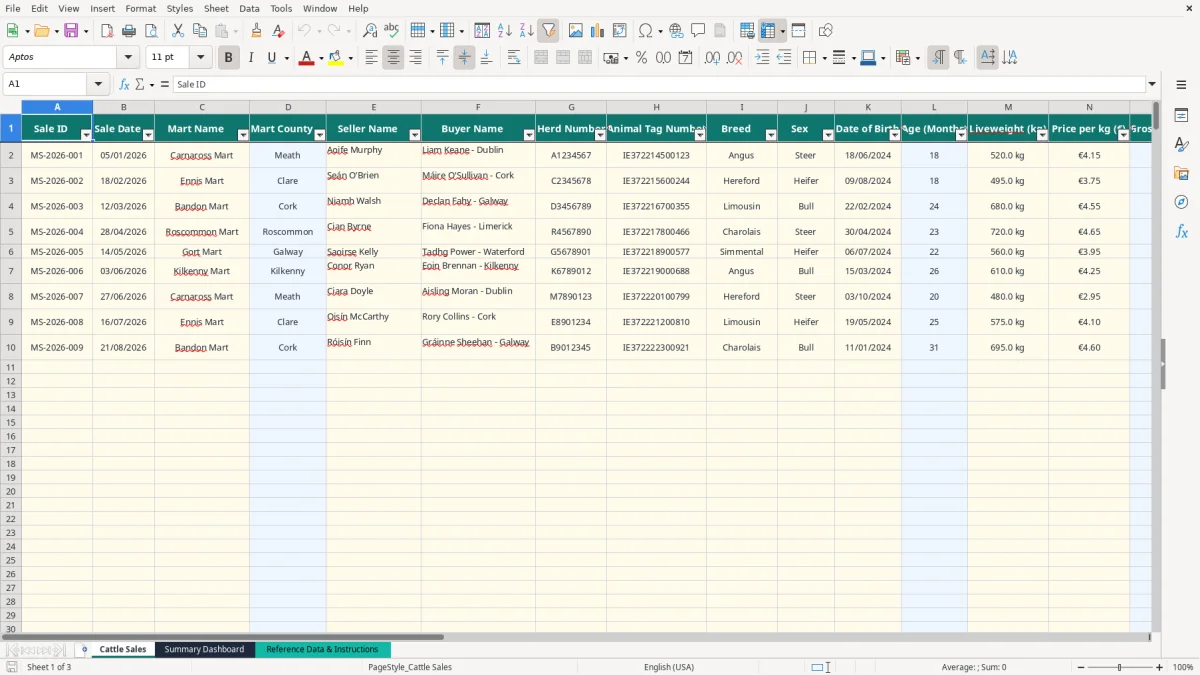
This mart cattle sales Excel spreadsheet records one animal sale per row, including the sale date, mart, seller, buyer, herd number, tag number, breed, weight and price per kg. It calculates gross sale value, commission, VAT on commission and net proceeds across 999 prepared entry rows.
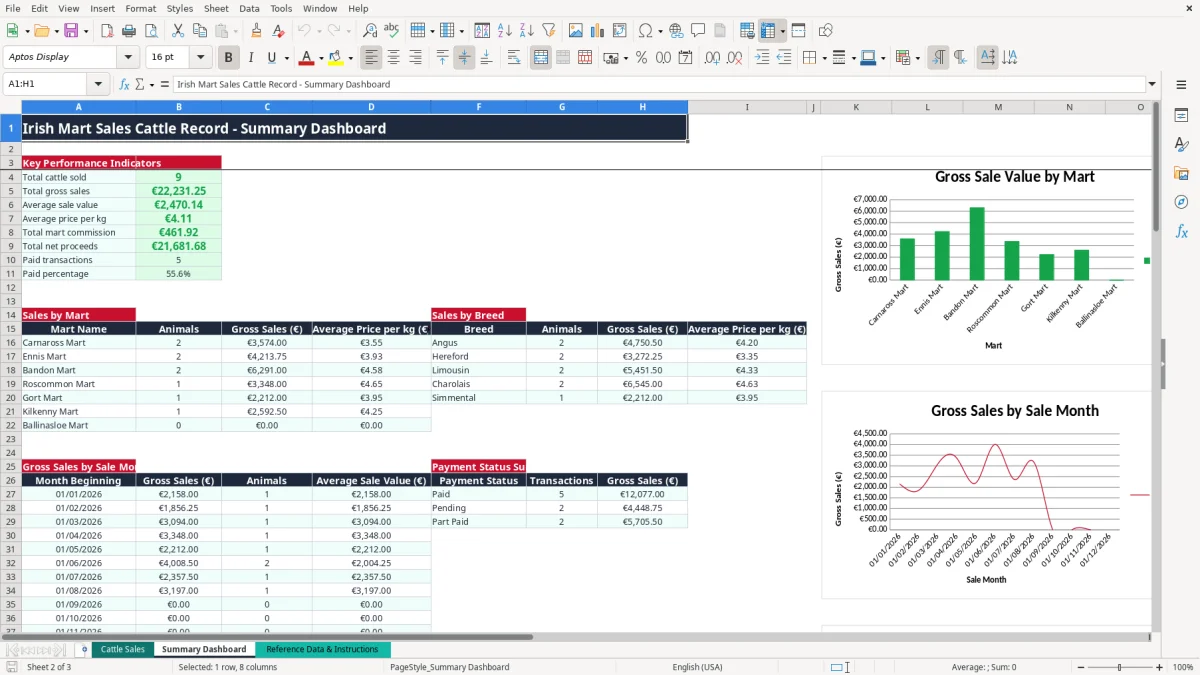
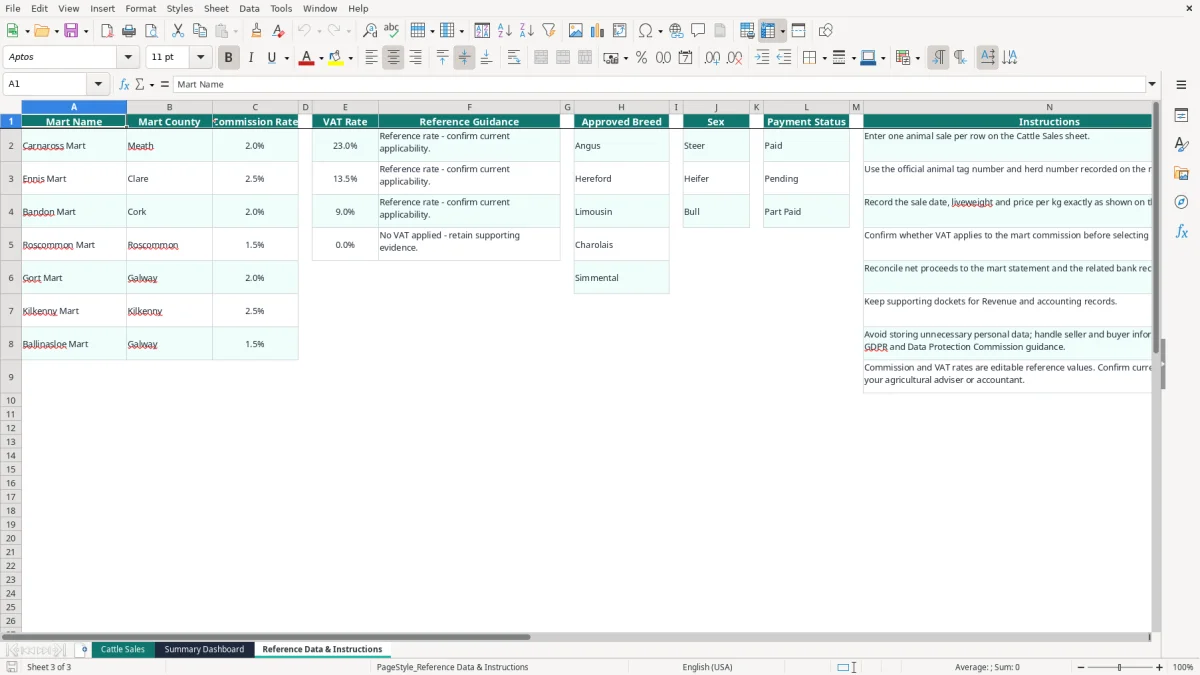
The workbook contains a Cattle Sales sheet, a Summary Dashboard and Reference Data & Instructions. Image 1 shows the main entry sheet with filters and frozen headings; image 2 shows the dashboard; image 3 shows the lists and guidance used for controlled entry.
It suits a farmer, livestock bookkeeper, mart office or farm administrator who needs a consistent record from the mart docket through to payment reconciliation.
A suckler farmer may be entering a handful of animals after a Saturday sale, while a livestock bookkeeper may be processing several dockets for different herds at month end. The practical difficulty is not recording that an animal sold; it is keeping the docket number, tag, weight, rate and eventual bank receipt tied to the same transaction.
Image 1 shows the Cattle Sales sheet arranged from Sale ID and Sale Date through to Payment Status and Notes. It has columns for Mart Name, Mart County, Seller Name, Buyer Name, Herd Number, Animal Tag Number, Breed, Sex, Date of Birth, Liveweight (kg) and Price per kg (€). The sheet is filtered from A1:V1000 and freezes row 1, which is useful when reviewing a long list.
Suppose a farmer sells an Angus steer at 520 kg and €4.15 per kg. The sheet calculates €2,158.00 gross. If the commission rate is 2%, commission is €43.16; at a 23% VAT rate on that commission, VAT is €9.93 and the calculated net proceeds are €2,104.91.
That example is a workbook calculation, not a claim about the correct rate for every mart or transaction. The mart list includes Carnaross, Ennis, Bandon, Roscommon and Gort, but you should update the reference values when your own mart statement shows different terms.
A farm administrator can enter sales as dockets arrive, then use the dashboard during the monthly bookkeeping review. Image 2 shows totals for cattle sold, gross sales, average sale value, average price per kg, commission, net proceeds and paid transactions.
The dashboard also breaks activity down by mart and breed and provides monthly gross sales, animal counts, average sale values and payment-status totals. For a farm with 40 sales across four marts, this is more dependable than sorting several handwritten lists.
A cattle sales record is supporting bookkeeping evidence, not a replacement for the official mart statement, docket or bank record. Revenue generally expects business records to be retained for 6 years, so keep the spreadsheet with the source documents and preserve a clear link between each Sale ID and its docket.
The workbook includes VAT rates of 23%, 13.5%, 9% and 0% in the reference data. These are selectable reference values for the VAT on commission calculation; they do not decide the tax treatment of a particular mart charge. The Reference Data & Instructions sheet explicitly says to confirm whether VAT applies to the commission before selecting the rate.
For a farmer, the cattle sale proceeds and the VAT treatment of the mart's commission are separate bookkeeping questions. A gross sale of 600 kg at €4.00 per kg is €2,400.00. A 2.5% commission is €60.00, and 23% VAT on that commission is €13.80, giving calculated net proceeds of €2,326.20.
That calculation shows how the sheet works. It is not an instruction to apply 23% in every case. Retain the mart invoice or statement and use the rate supported by that document. If you are VAT-registered, post the sale and commission correctly in your accounts and include the relevant figures in the appropriate VAT3 return via ROS.
The sheet has separate fields for Herd Number and Animal Tag Number. Use the official identifiers shown on the mart documentation, because an entry such as IE372214500123 is materially more useful for tracing a sale than a note such as red steer.
Record the sale date, liveweight and price per kg exactly as shown on the docket. The guidance also says to reconcile net proceeds to the mart statement and related bank receipt. For a sole trader completing a Form 11, or a limited company preparing its accounts and Form CT1, this audit trail makes the sales total easier to substantiate.
The most expensive errors usually occur between the mart docket and the bank statement. A weight of 495 kg entered as 459 kg changes the gross value at €3.75 per kg from €1,856.25 to €1,721.25: a €135.00 difference before commission and VAT are considered.
Commission is not necessarily the same at every mart. The reference sheet contains examples from 1.5% to 2.5%, so choosing the wrong mart can distort the result. On €50,000 of gross sales, using 2.5% instead of 2% overstates commission by €250; at 23% VAT on that difference, the calculated VAT is also €57.50 too high.
The workbook uses VLOOKUP to return the county and commission rate for the selected Mart Name. If you type a new mart into the entry row without adding it to the reference list, the lookup cannot return the missing details. My preference is to update the reference list first, rather than manually overwriting calculated cells.
Leaving the herd number or tag number blank makes a later query slow and can create uncertainty where two animals have similar descriptions. It is also easy to enter the buyer's name differently on separate rows, which weakens filtering and reconciliation.
For example, a bookkeeper reviewing 80 sales might spend an extra two hours matching abbreviated buyer names to dockets. Entering the name and tag directly from the official document takes seconds and prevents that rework.
A sale marked Paid when the bank receipt is still outstanding makes the dashboard's paid percentage misleading. If 18 of 20 sales are incorrectly marked Paid, the dashboard reports 90%, even if only 16 receipts have actually cleared.
Use Pending until the statement is checked, and Part Paid when the receipt does not settle the full amount. The Notes column is the right place for a docket or reconciliation reference; do not replace the calculated Net Proceeds figure with a manually adjusted number.
The spreadsheet works best when entry is attached to a task you already do. Set aside 15 minutes after the weekly bank reconciliation, or enter the docket before filing the mart statement, rather than allowing a month's paperwork to build up.
For example, 12 cattle sold in one week can be entered in roughly 20 minutes if the dockets are beside you. Waiting until 100 mixed dockets arrive at year end makes missing tags and duplicate entries much harder to identify.
Use the drop-down lists for Mart Name, Breed, Sex, VAT Rate and Payment Status. If a new mart or breed is needed, add it to the relevant reference area before entering the sale; this preserves consistent spelling and lets the formulas work as intended.
Do not delete the formula columns D, L, O, P, Q, S and T. The calculated fields are prepared through row 1000, while the input fields are the transaction details and notes. Make a dated backup before making structural changes.
This workbook is a sensible choice for a single farm or modest mart-sales register of up to 999 prepared rows. If you are importing several thousand transactions, managing multiple users, or needing formal document capture and permissions under GDPR, move to accounting or livestock software and retain this workbook as an export or review file.

 Excel template built and verified by Ciara Byrne, Chartered Accountant (ACA) · builds the Excel templates.