
Locum Hours Excel Template (2026)
20
Free download
Reconcile PAYE, PRSI and USC from payroll to Revenue with summary, payments and instructions sheets for Irish employers.
Download template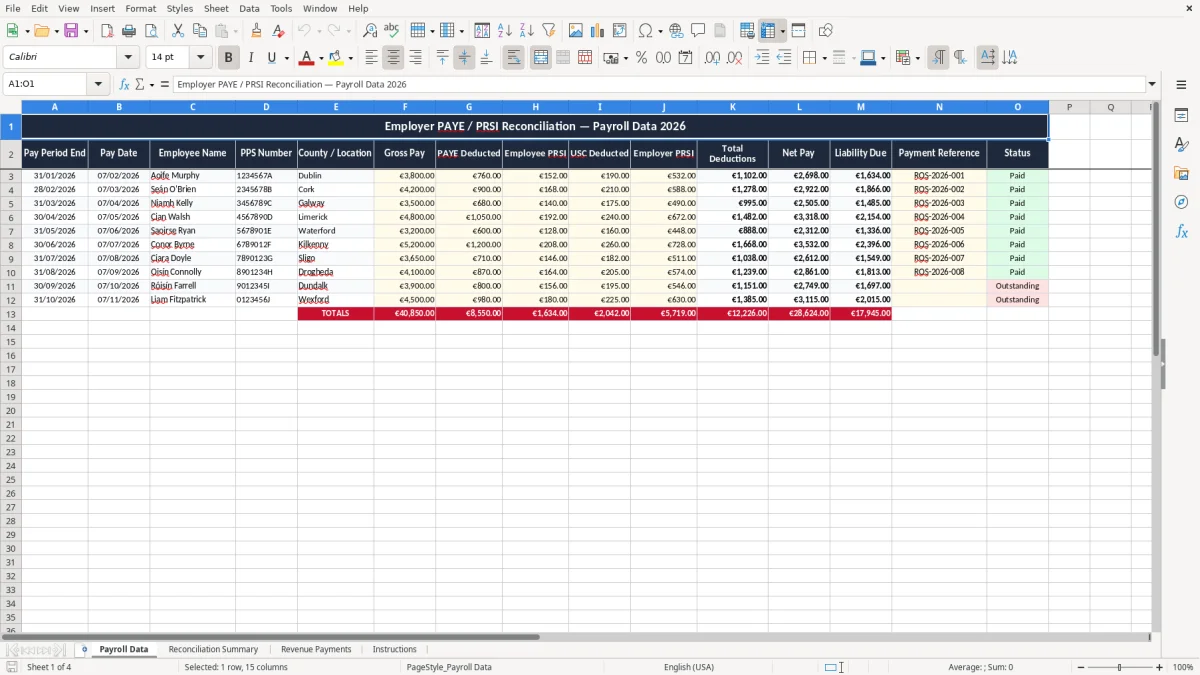
This Employer PAYE / PRSI reconciliation Excel template helps you match each payroll run to what you owe Revenue. It includes Payroll Data, a Reconciliation Summary, Revenue Payments and Instructions, so you can track gross pay, deductions, employer PRSI and the payment reference in one place.
It is built for Irish employers who want a clear check before the PAYE filing and payment deadline. If you run payroll for a small Ltd company, a trades firm or a household employer, this keeps the figures together instead of leaving you with scattered payslips and bank lines.
The workbook uses the 2026 payroll structure shown in the sheets, with rows for pay period end, pay date, PPS number, county or location, gross pay, PAYE, employee PRSI, USC, employer PRSI, net pay, liability due, payment reference and status.
This template is for the person who has to close the gap between payroll and the bank account at the end of the month. In practice that is often a bookkeeper in a small Ltd company, an office manager in a trades firm, or the payroll person in a 4-person workshop where one employee is on €3,800, another on €4,200 and the weekly run changes every Friday.
Image 1 shows the Payroll Data sheet with a clean table from columns A to O. The columns are set up for pay period end, pay date, employee name, PPS number, county or location, gross pay, PAYE deducted, employee PRSI, USC deducted, employer PRSI, total deductions, net pay, liability due, payment reference and status.
If you are reconciling a payroll of 12 staff, even a small difference of €25 on one line can leave you with a month-end total that is off by €300. If employer PRSI is running at about 11.05% on pay that is not exempt, a staff bill of €18,000 gross can easily create a liability that needs proper checking before you move cash.
A sole trader with one assistant, a café with weekend staff, or a plumber with 4 employees all benefit from the same thing: a simple check that the payroll figures, the deduction totals and the payment reference line up. That matters most at the payroll run, because once the bank payment is sent you do not want to be untangling which amount related to which pay date.
For payroll, the main expectation is that you keep a clear record of what was paid, what was deducted and when it was remitted. Revenue record-keeping runs for 6 years, and payroll submissions sit inside the PAYE Modernisation system through ROS.
That means you need a trail from the employee’s gross pay to the deduction totals and onward to the payment. If a monthly payroll of €24,000 gross produces PAYE, PRSI and USC deductions plus employer PRSI, your reconciliation sheet should show the amount due with enough detail that you can explain it line by line.
In 2026, employer PRSI is a key cost because it sits on top of gross pay, not out of net pay. For example, 10 employees earning €3,000 gross each is €30,000 of payroll before you add employer PRSI, so a reconciliation sheet is the fastest way to see the real cash outflow.
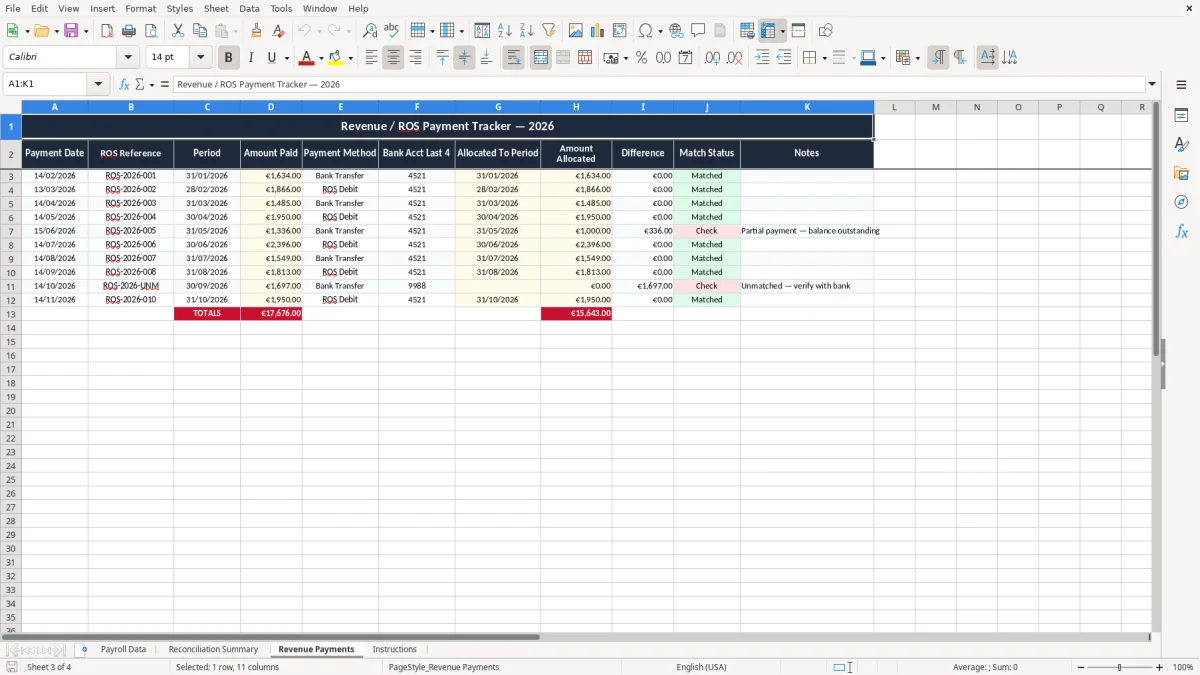
The Revenue Payments sheet is useful because a bank transfer with the wrong reference can slow down matching later. If you have a bi-monthly payroll pattern, a clean reference and status column saves time when you are checking the remittance before the next filing cycle.
The most common problem is a mismatch between what payroll says and what the bank actually paid. One missing pay line or a duplicated employee row can leave you with a liability that is short by €180 or over by €240, and that turns into a messy check when the next run is already due.
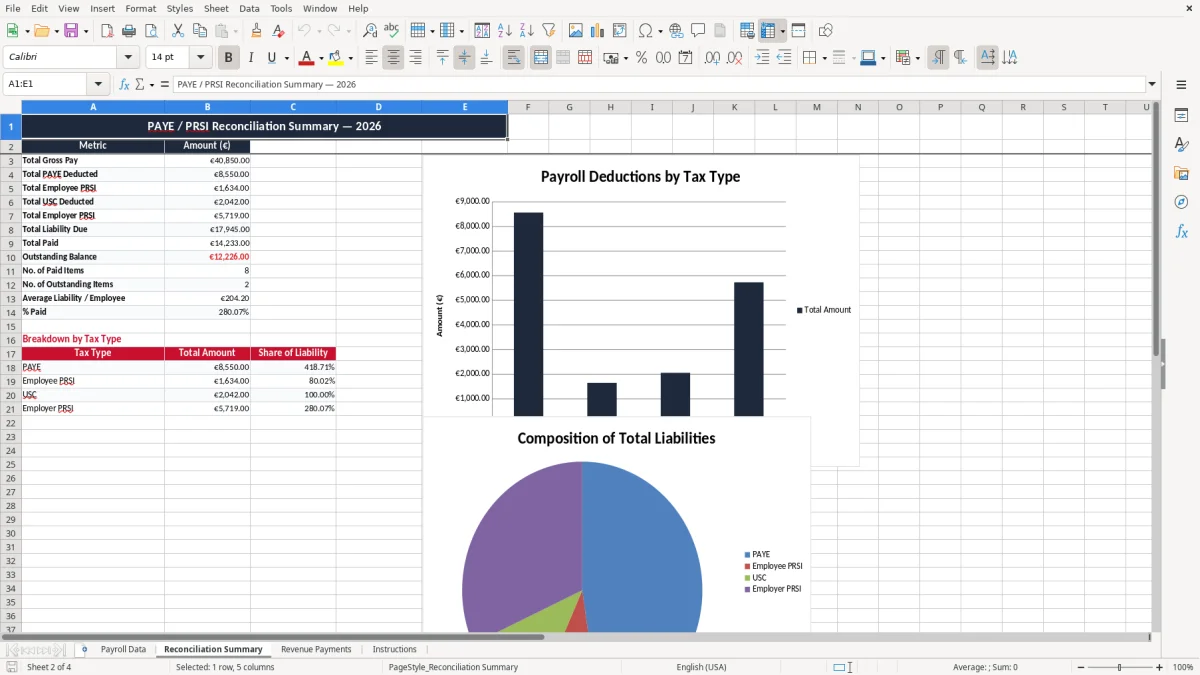
Image 2 would normally be the Reconciliation Summary sheet, and that is where the big value sits. If the summary is wrong by even a small amount, you can end up carrying an error forward for 2 or 3 pay periods before someone spots it, which means more work and a poor audit trail.
A wrong PPS number or a bad pay date may look minor, but it can break the chain when you need to explain an employee’s record. I have seen a 20-minute check become a 2-hour cleanup because the payroll was copied from the wrong tab and the deductions were posted twice.
The bigger cost is often cash flow. If employer PRSI and deduction totals are not tracked properly, a small company can believe it has €1,200 available when the real payroll liability due is closer to €1,580, and that gap can derail the bank balance for the rest of the week.
That same cash shortfall is easier to verify once the year-end figures are lined up in a trading details return.
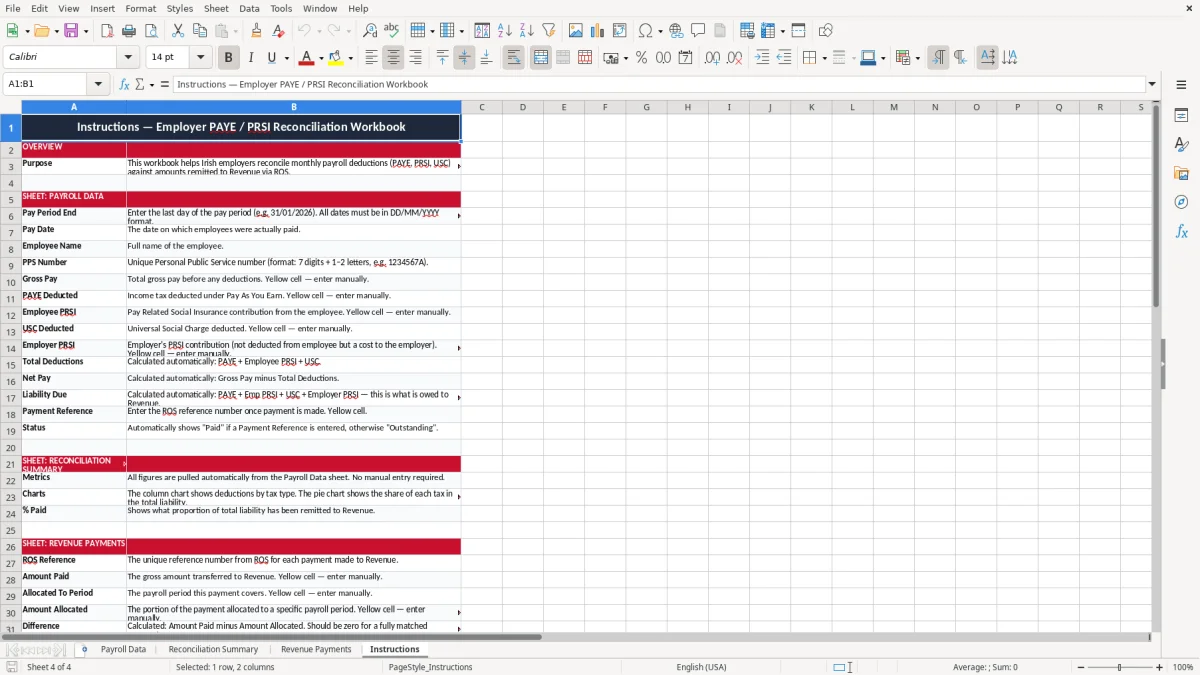
The easiest way to use this file is to make it part of the payroll cycle, not an extra job. Open it on the same day you run payroll, update the data sheet, check the summary, then record the payment before you move on to anything else.
If you are past 25 to 30 employees, or if you are doing weekly payroll with several joiners and leavers every month, a spreadsheet starts to get clumsy. At that point you usually need proper payroll software with live submissions, because the manual check is no longer the best use of your time.
At that point, the next practical step is a payroll tax calculator that keeps PAYE, PRSI and USC checks together before you move to live submissions.

 Excel template built and verified by Ciara Byrne, Chartered Accountant (ACA) · builds the Excel templates.