
Locum Hours Excel Template (2026)
20
Free download
Track weekly lounge bar hours, gross wages, employer PRSI and wage cost percentages against sales for Irish pub and bar managers.
Download template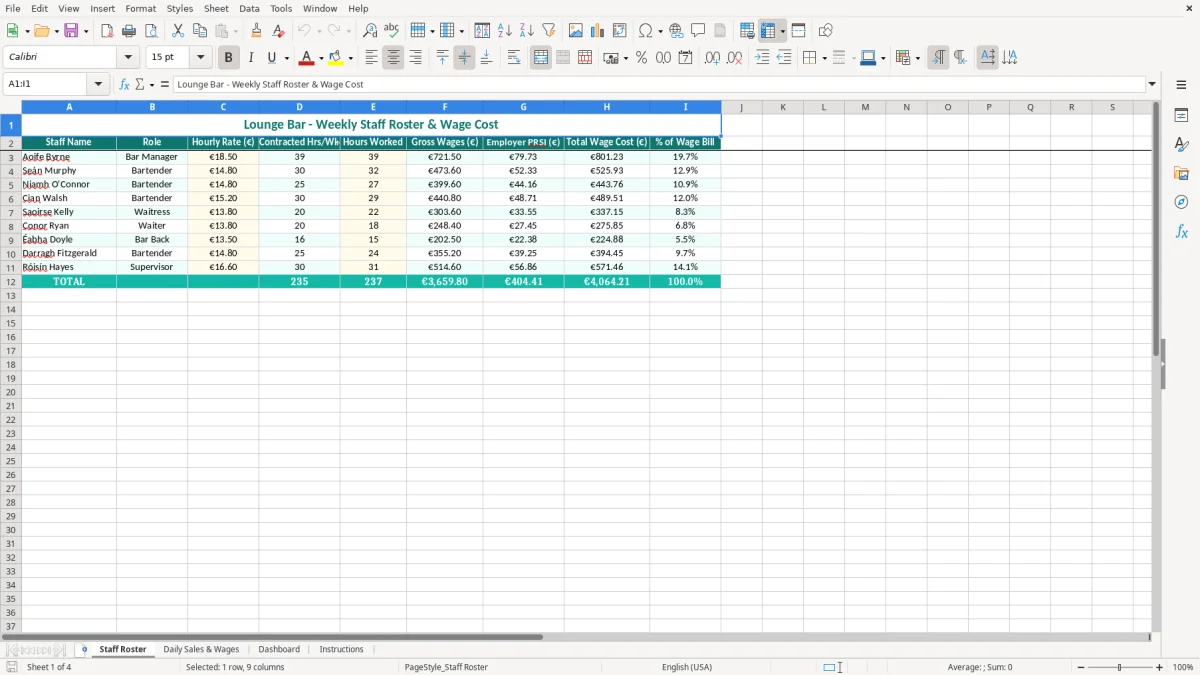
This lounge bar wage cost Excel template is a weekly staffing and payroll control sheet for Irish bars. It records each employee's role, hourly rate, contracted hours, hours worked, gross wages, employer PRSI, total wage cost and share of the wage bill.
The workbook contains four sheets: Staff Roster, Daily Sales & Wages, Dashboard and Instructions. Image 1 shows the roster with the staff-level wage columns; the other sheets help you compare staffing spend with sales and spot an expensive trading week.
This workbook suits the person who actually has to make the rota and protect the margin: a lounge bar owner, a general manager, a duty manager or a bookkeeper in a small hospitality company. The useful moment is before the weekly payroll is finalised, not three weeks later when the bank account shows that Saturday was overstaffed.
Take a Cork lounge bar with one manager, four bartenders, two waiting staff and a bar back. The Staff Roster sheet, shown in image 1, puts Staff Name and Role beside Hourly Rate (€), Contracted Hrs/Wk and Hours Worked. That makes it easy to see that a bartender contracted for 30 hours actually worked 36, while another worked 24.
At €15.20 an hour, 36 hours gives €547.20 gross pay before other payroll items. A second employee at €13.80 for 24 hours gives €331.20. The difference is not just €216: the employer also carries employer PRSI, so the Total Wage Cost (€) is the figure management should compare with sales.
Use the sheet after the final shift of the week, when a bank-holiday weekend, live music night or private function has changed the normal staffing pattern. A bar that takes €12,000 in net sales over a week and incurs €3,600 of total wages has a 30% wage-cost ratio; a €2,000 Tuesday with €700 of wages needs a different conversation from a €4,500 Saturday with €1,000.
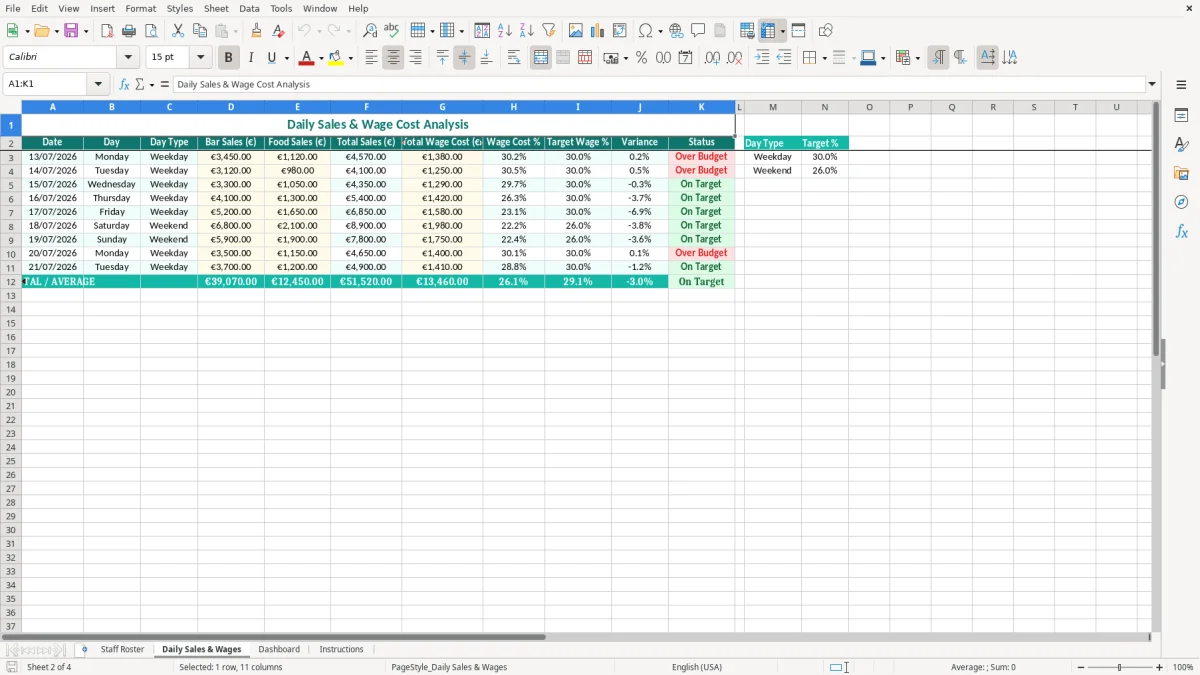
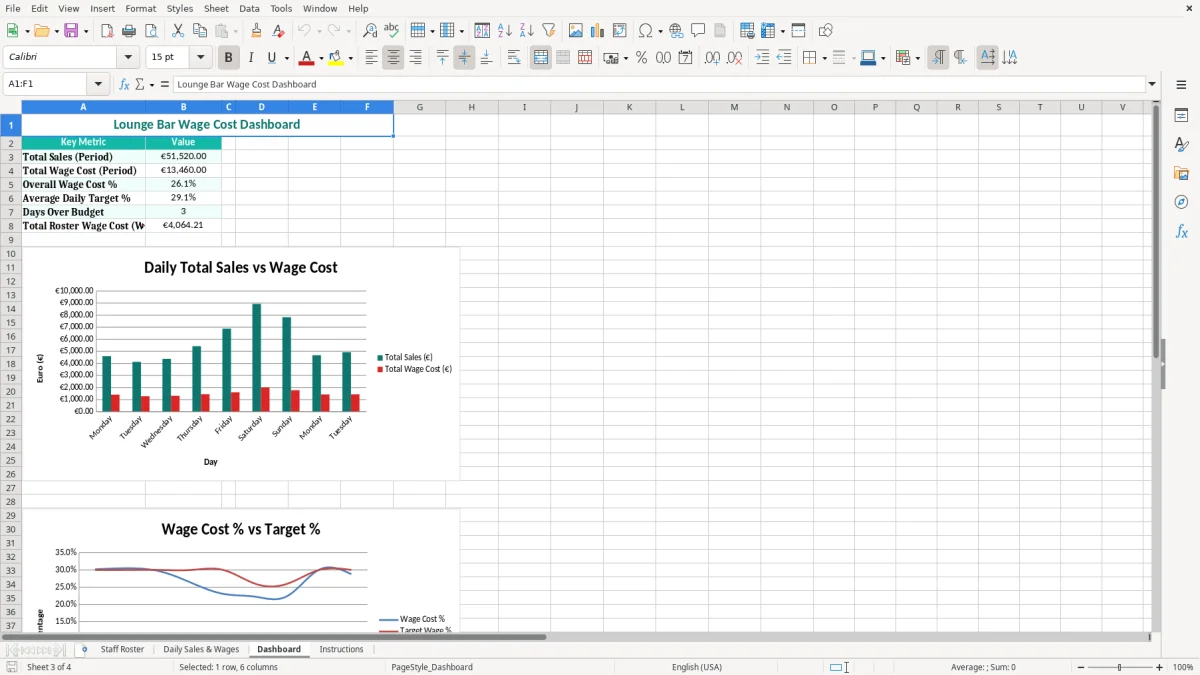
Image 2 shows the Daily Sales & Wages area, where the daily pattern can be reviewed rather than hidden inside one weekly total. Image 3 is the Dashboard, useful for the owner checking performance on Monday morning, while image 4 contains the Instructions sheet for the person taking over the weekly process.
The workbook is a management-control tool, not a replacement for the payroll submission. For 2026, the national minimum wage for an adult employee aged 20 or over is €14.15 per hour. A lounge bar must also deal with PAYE, employee PRSI and USC through Revenue's PAYE Modernisation process, with payroll information submitted in real time.
The Employer PRSI (€) column should be populated or checked against the actual payroll calculation for the employee's class and pay period. Standard Class A employer PRSI is 11.25% in 2026 on earnings above the relevant weekly threshold, while a reduced employer rate applies to qualifying lower weekly earnings. Do not simply multiply every person's gross wages by one percentage.
For example, €4,200 of gross weekly wages does not automatically mean €472.50 of employer PRSI: employee classifications, weekly bands and payroll treatment must be checked. If your payroll report shows €486.00, use that verified figure in the roster and let Total Wage Cost (€) reflect the real employer cost.
For wage-cost analysis, compare wages with sales on a consistent basis. If the bar records €12,300 including the 23% standard VAT rate, the sales excluding VAT are €10,000; comparing €3,000 wages with €12,300 would understate the ratio. The template's Daily Sales & Wages sheet should therefore follow the basis used in your management accounts.
VAT-registered businesses generally file VAT3 returns bi-monthly through ROS, and Revenue records normally need to be retained for 6 years. This spreadsheet does not calculate VAT, annual leave, public-holiday pay or pension deductions; retain the payroll reports and approved rosters that support the figures entered.
The same monthly records also feed an employer paye prsi reconciliation when PAYE, PRSI and payroll totals need to tie back to the payroll reports and approved rosters.
The most common failure I see in small bars is a roster that shows scheduled hours while payroll is based on clocked hours. A supervisor may enter 30 hours for each bartender, but four late finishes at 1.5 extra hours create 6 unrecorded hours. At €15.00 per hour, that is €90 gross before employer PRSI, and it repeats every week unless somebody compares Contracted Hrs/Wk with Hours Worked.
A weekly percentage can conceal a bad night. Suppose a bar records €10,000 of weekly net sales and €2,800 of wages: the headline ratio is 28%. If €900 of that wage cost falls on a Tuesday with only €1,600 of sales, that shift alone is 56.25%, while a Saturday may be comfortably profitable.
That is why entering Daily Sales & Wages matters. Reviewing only the weekly total can lead to the wrong decision: cutting staff on a busy Friday while leaving an unnecessary second bar team on a slow Tuesday.
Another costly mistake is mixing gross wages with total wage cost. If gross wages are €3,200 and employer PRSI is €360, the relevant labour cost is €3,560, not €3,200. Reporting 28% against €12,700 of sales instead of 28.03% is not disastrous once; doing it every week hides €360 of cost from the manager's decision-making.
Duplicate staff names, an hourly rate copied from an old contract and unapproved overtime are also easy to miss. My firm view is to check the roster against the payroll report every week, rather than trying to repair six months of wage figures before the year-end accounts.
That weekly payroll check should also capture the voucher log, so any small benefit exemption amounts stay aligned with the wages report before they drift into the year-end accounts.
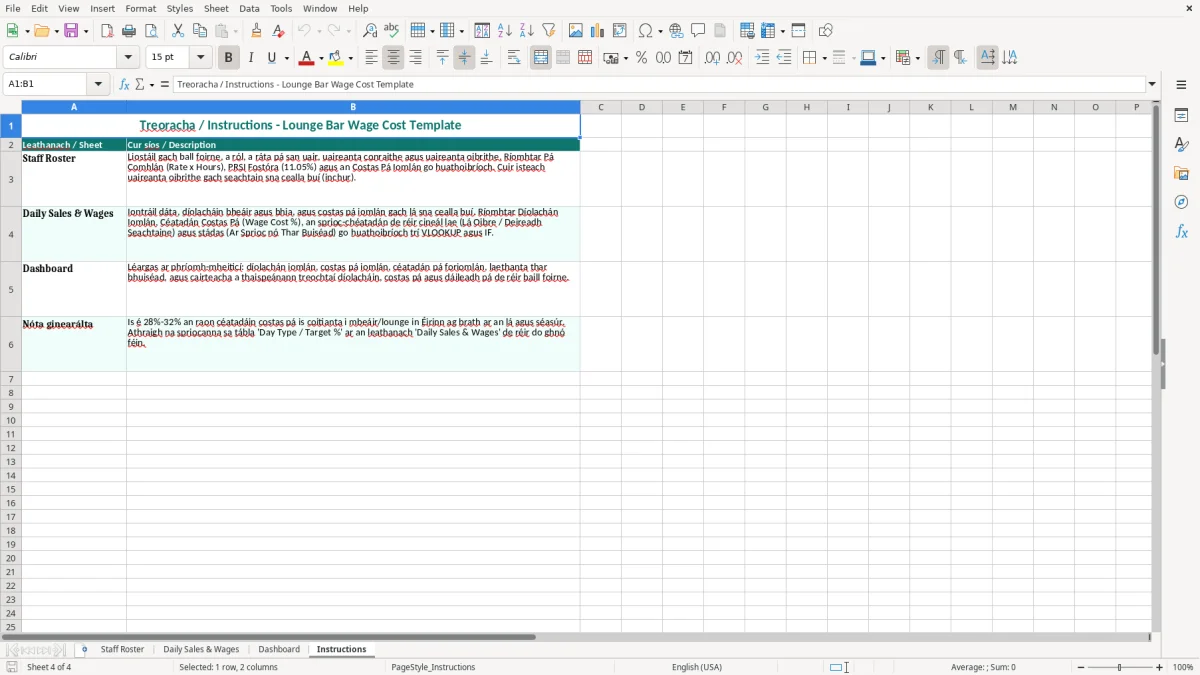
Give the workbook one owner and one deadline. The simplest routine is for the duty manager to update Hours Worked after the final Sunday shift, then for the bookkeeper to check the roster against the payroll report before the payment file is approved.
Use the same order every week: review staff names and rates, enter actual hours, verify Employer PRSI (€), enter daily sales and wages, then read the Dashboard. If the bar takes €8,000 of net sales and Total Wage Cost (€) is €2,640, record the 33% result and write a short note explaining a private function, training shift or sickness cover.
This template is practical for one bar and a manageable team. Move to a rota, time-and-attendance or payroll system when several venues share staff, daily clock-ins exceed a few hundred lines, or managers keep separate versions that cannot be reconciled.
Do not use the Dashboard as evidence on its own. Keep the approved rota, timesheets, payroll reports and sales reports together; the spreadsheet is the management summary that makes those source records easier to review.

 Excel template built and verified by Ciara Byrne, Chartered Accountant (ACA) · builds the Excel templates.