
Cash Flow Projection Excel – Free Template (2026)
0
Free download
Work out Irish company car BIK using fuel type, CO2 band, car value and annual mileage in a simple Excel sheet.
Download template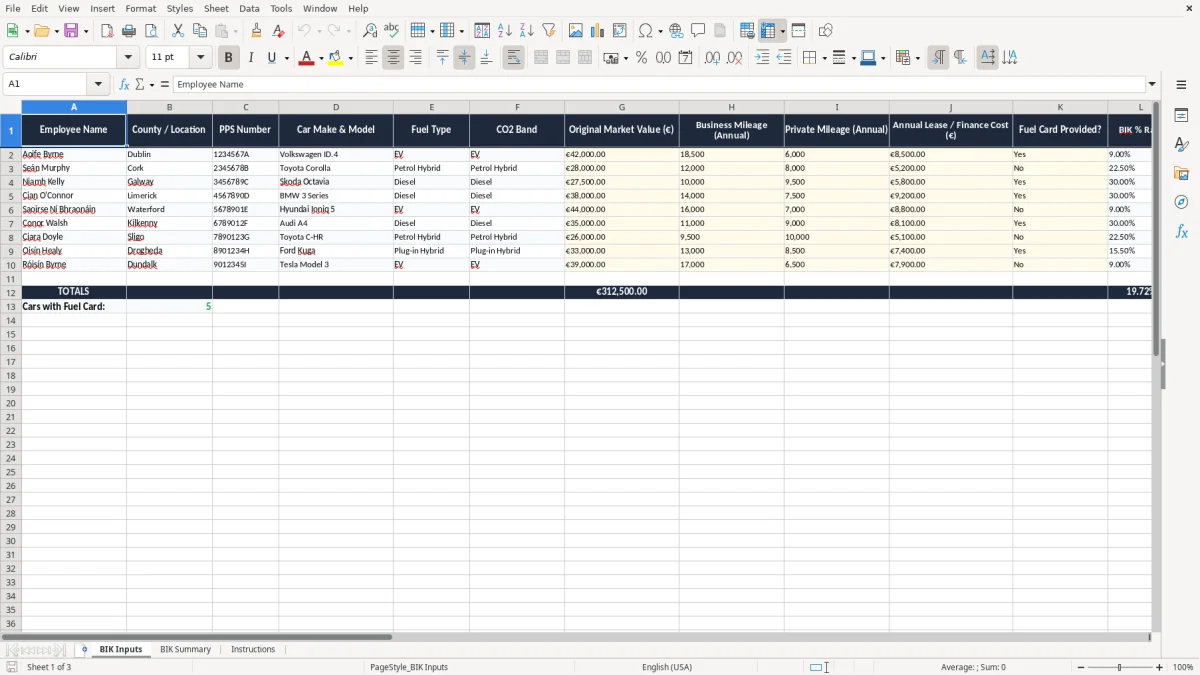
This Excel template calculates the BIK charge on a company car in Ireland from the car’s value, fuel type or CO2 band, and business mileage. It gives you a simple way to see the annual taxable benefit and the monthly figure you need for payroll.
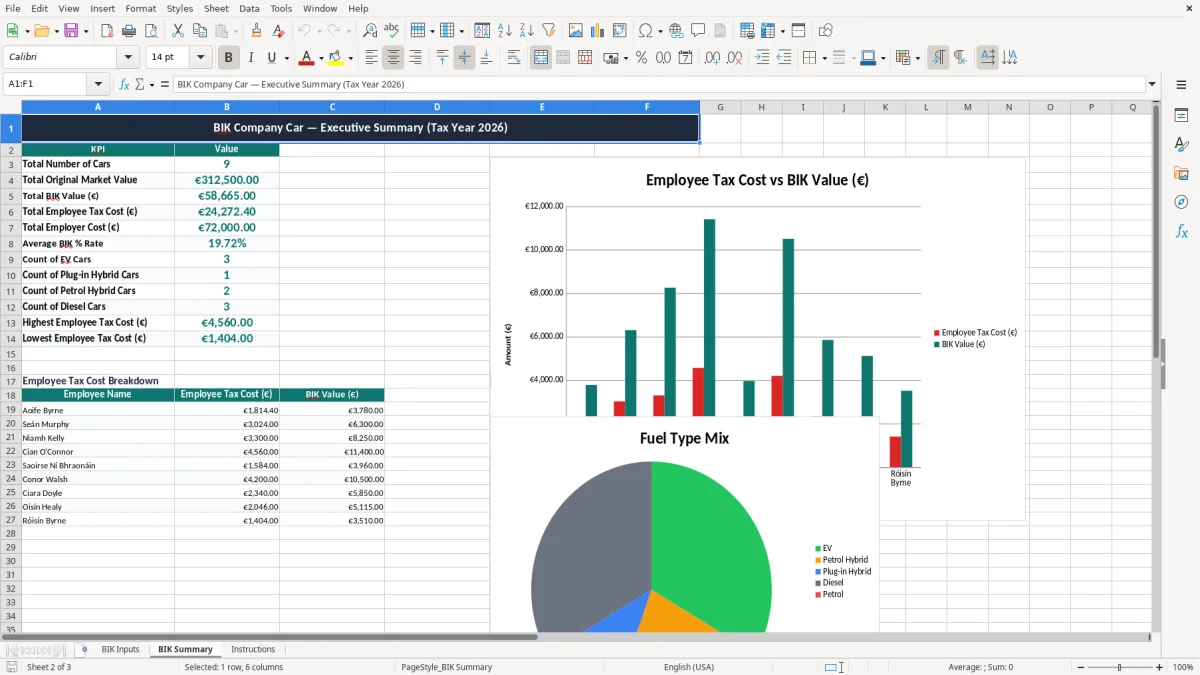
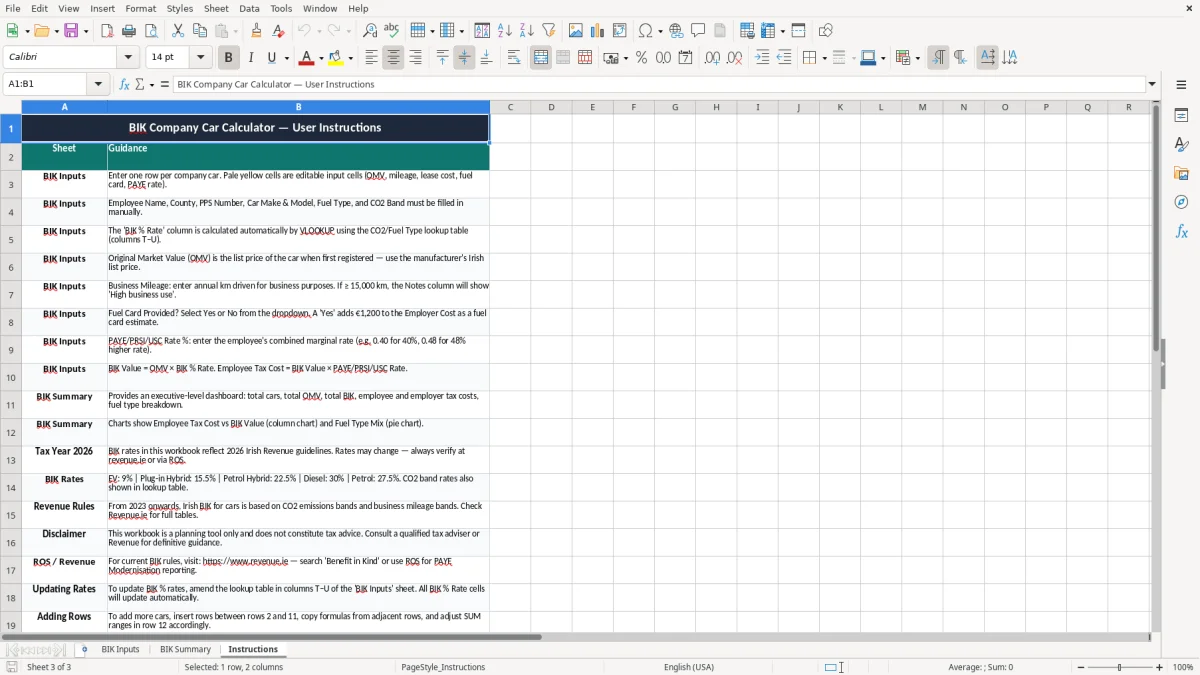
The workbook has three sheets: BIK Inputs for the car details and rate lookup, BIK Summary for the calculated result, and Instructions for setup. Image 1 shows the input sheet, image 2 shows the summary dashboard, and image 3 gives the working steps.
It is built for payroll staff, owner-managers, bookkeepers and anyone who has to put a real number on a company car benefit-in-kind before a PAYE run or a year-end review.
A company car BIK spreadsheet is usually opened by a payroll clerk, a bookkeeper in a small Ltd company, or an owner-manager who wants the numbers before a car is handed over. It is also handy for the accountant doing a year-end review when the director has used the vehicle privately all year.
The pressure points are the monthly PAYE run, the point when a new car is assigned, and the year-end file for the director. If a car is worth €42,000 and the BIK rate is 30%, the taxable benefit is €12,600 a year, or €1,050 a month before payroll adjustments.
Take a small plumbing firm with one director’s diesel car and four employees using vans. The director’s car might attract a 30% or 31.5% BIK rate depending on the band, so the difference between two models can be more than €600 a year in taxable pay. That is why you do the calculation before you commit to the vehicle, not after the first payslip goes out.
A paper note or phone calculator works once, but it falls apart when the car changes mid-year or you need to explain the figure to the director. This workbook keeps the inputs and the summary together, so you can trace the result back to the rate used on image 1 and the output on image 2.
In Ireland, company car BIK feeds into taxable pay under PAYE, PRSI and USC, so the monthly figure matters as much as the annual one. A benefit of €9,000 can easily add over €4,000 in real cost to the employee once the extra tax is applied, depending on their marginal rate.
The template includes a lookup table for EV at 9%, plug-in hybrid at 15.5%, petrol hybrid at 22.5%, diesel at 30%, petrol at 27.5%, and CO2 bands from 18% to 31.5%. That gives you a clear basis for calculation instead of guessing the percentage from memory when you are under pressure.
If you compare a €35,000 EV at 9% with a €35,000 petrol car at 27.5%, the annual BIK moves from €3,150 to €9,625. That €6,475 gap is big enough to influence the car choice, the payroll cost, and the director’s take-home pay.
Revenue expects supporting records to be kept for 6 years, so keep the vehicle value, assignment date and rate basis with the workbook. If you later need to defend the number in a review, the notes on the BIK Inputs sheet are more useful than a memory of what the dealer said at handover.
That same documentary trail becomes even more important when the figures feed into a trading details return, where the underlying records have to line up with the workbook.
The most common error is using the wrong BIK percentage, especially where a vehicle sits near the border between two CO2 bands. A 2.5 percentage point error on a €45,000 car changes the annual benefit by €1,125, which is enough to distort both payroll and director drawings.
If you do not update the calculation when business mileage rises or the car is swapped mid-year, the payroll figure stays wrong for months. On a director car, that can mean several €100 of under- or over-deduction before anyone spots the problem.
I have seen firms keep the benefit figure in a notebook, then lose the basis for the number when the accountant asks for support at year end. Once that happens, you spend time reconstructing the value, the date of assignment and the rate used, which is awkward and avoidable.
A simple mistake can ripple into a PAYE correction, a revised payslip and a frustrated employee or director. If the error sits for 12 months on a €9,000 benefit, the correction is not just a bookkeeping nuisance — it can also create an unexpected tax bill or refund at the worst possible time.
The same need for a clear audit trail applies when a disposal has to be unpacked line by line, so a capital gains worksheet keeps the acquisition details, disposal value and tax calculation in one place.
The easiest way to keep this spreadsheet alive is to tie it to something you already do, such as the payroll run or the monthly director review. If you always update it two days before payroll, the car figure stays current instead of becoming a forgotten file on a desktop.
If you are handling 10 or more cars, or you need live integration with payroll software, a spreadsheet will start to feel tight. At that point, a proper fleet or payroll system is usually cleaner, but for one to five cars this template is the simplest way to stay in control.

 Excel template built and verified by Ciara Byrne, Chartered Accountant (ACA) · builds the Excel templates.