
Locum Hours Excel Template (2026)
20
Free download
Track health insurance BIK for employees, PPS numbers, premiums, tax cost and employer PRSI in one Irish register.
Download template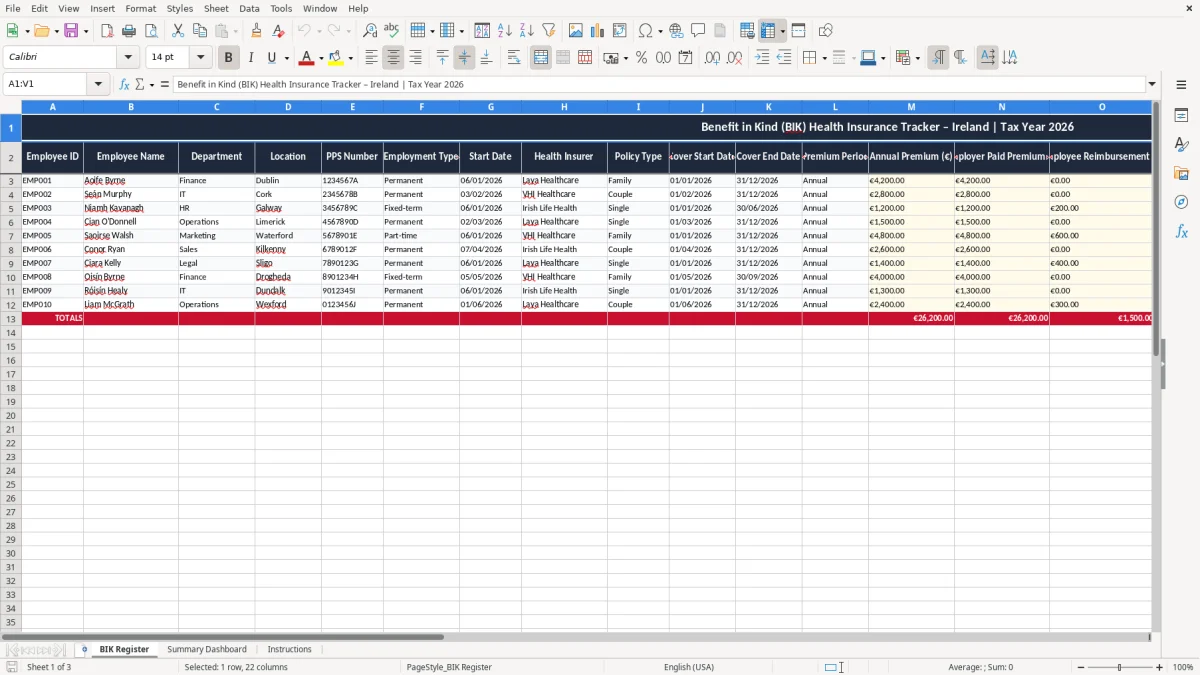
This Benefit in Kind health insurance Excel template tracks employee cover, premiums, the assessable BIK amount, and the estimated PAYE, PRSI and USC cost for each record. It is built for Irish payroll teams and small employers who need one clear register for 2026.
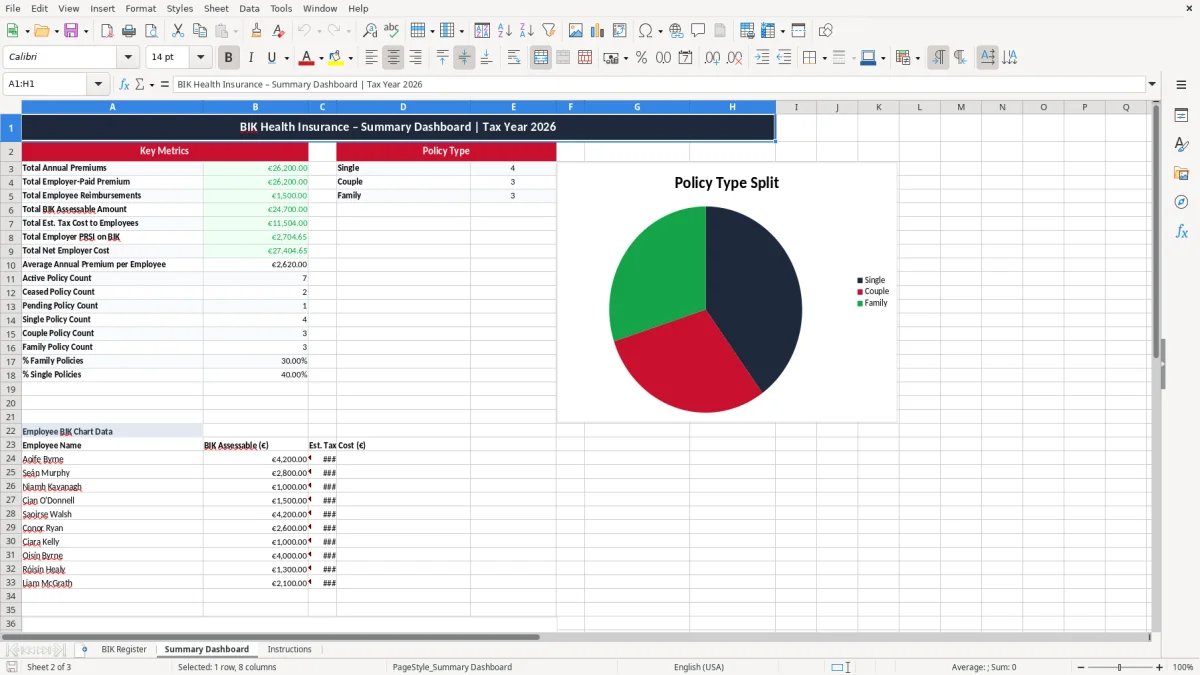
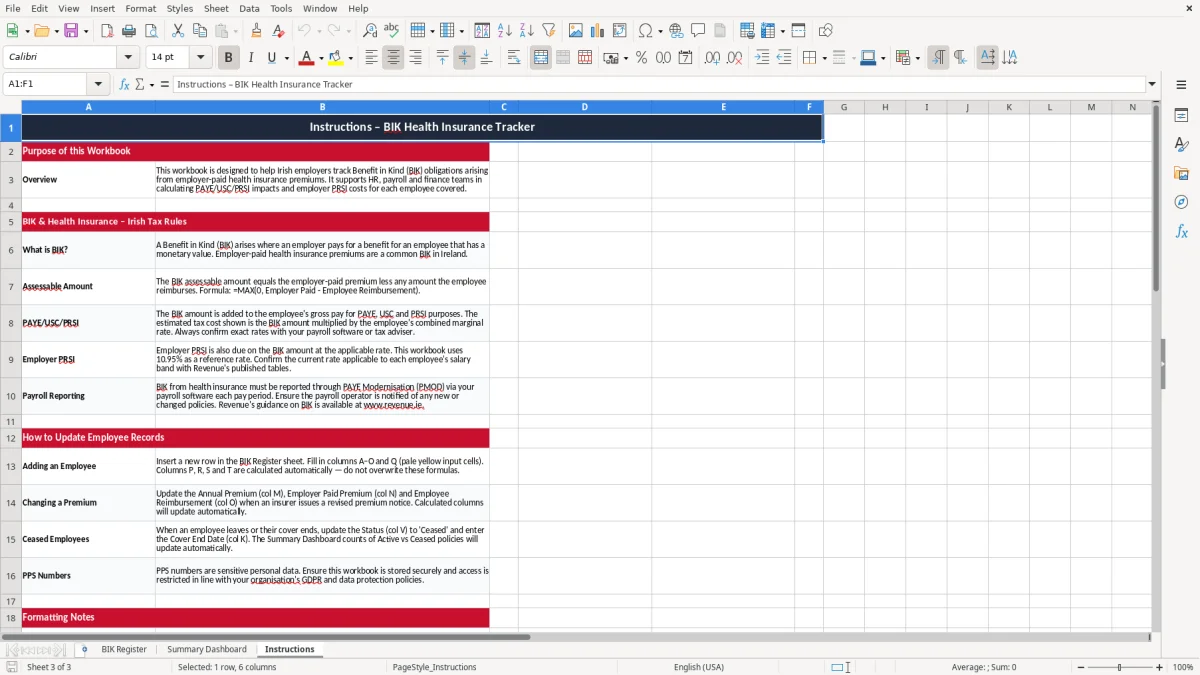
The workbook has three sheets: BIK Register, Summary Dashboard, and Instructions. You can log each employee’s policy details, see totals at a glance, and keep the paperwork tidy for payroll and year-end reviews.
The register is laid out for practical use, not theory. Enter the employee details, the insurer, policy dates, annual premium, any reimbursement, and the template calculates the amounts you need to review.
This template is for the person who has to keep payroll tidy when health insurance is paid by the employer. In practice that is often a bookkeeper in a small Ltd company, a payroll clerk in a Dublin office, or the office manager in a family business with 4 to 40 staff.
The need usually shows up when the policy renews, when payroll is being checked before a month-end run, or when the finance team wants a clean figure for year end. If you have 12 employees and the insurer charges €1,800 a head, you are looking at €21,600 of premiums before any employee reimbursement or tax adjustment.
A health insurance BIK line can look small on paper and still hit payroll hard. If an employer pays €2,400 for cover and the employee reimburses €600, the assessable amount is €1,800, and that amount then feeds into PAYE, PRSI and USC calculations.
Take a carpenter with 4 employees and a policy at €950 per person. That is €3,800 a year before tax handling, and if the company also covers a spouse plan for one director at €1,700, the file needs to show exactly who got what, when cover started, and what the taxable balance is.
A spreadsheet like this is better than a scribbled list because it keeps the policy dates, premium, reimbursement and tax fields on the same line. That matters when two people share the job and one needs to pick it up mid-year without guessing what the last person meant.
Revenue expects records to support the payroll treatment, and you should keep those records for 6 years. For health insurance BIK, that means the policy details, the calculation of the assessable amount, and the payroll entries that show how the taxable benefit was handled.
If the company pays the insurer directly, the premium and the benefit must still be traceable back to the employee. A register that shows the employee name, PPS number, policy type and dates is much easier to defend than a folder full of invoices with no clear link to the payroll line.
For payroll purposes, the benefit usually flows through PAYE, PRSI and USC, so the register needs to show the taxable value clearly. If the assessable amount is €1,200 and the combined employee tax rate is 40%, the employee cost is roughly €480, before you even think about employer PRSI.
Cover start and cover end dates matter because BIK can change during the year if someone joins, leaves or moves onto a different policy. A change in March on a €1,500 annual policy is not the same as a full-year benefit, and the register needs to make that obvious.
If you run payroll monthly, the safest approach is to keep the BIK file aligned with that month’s payroll cut-off. That way the taxable benefit is reflected in the same period as the policy change, rather than being discovered in a clean-up exercise after year end.
The same month-by-month cut-off matters in the payroll tax calculator, where any mid-year BIK change needs to land in the correct PAYE, PRSI and USC period.
The most common problem is a policy being paid by the company but never entered into payroll properly. If €2,000 of premium is missed for one director, the tax due can snowball into a painful correction later, and the cleanup can take hours across payroll, bookkeeping and management reporting.
Another one is using the wrong reimbursement figure. If the employee owes €250 back to the company and the file says €150, the assessable BIK is overstated by €100; if you have five similar errors, that is €500 of distorted payroll data before you even touch tax.
Without the PPS number, policy dates or insurer name, the line item is hard to prove and hard to explain. I have seen small firms spend half a day hunting through emails because the premium invoice and payroll entry did not match, and that is time that a 20-line register would have saved.
Errors also affect cash flow. If a company underestimates employer PRSI on BIK by €75 a month, that is €900 a year leaking out of the planning numbers, which makes month-end management accounts look better than they really are.
The biggest cost is usually not the tax alone, but the rework. When the benefit is reviewed late, you end up checking old payroll periods, re-tying figures to invoices, and explaining why the summary does not match the actual policy cost.
That rework is exactly what an employer PRSI reconciliation sheet is for when old payroll periods have to be tied back to invoices and policy costs.
The easiest way to keep this alive is to tie it to one fixed payroll task. If you run payroll on the 20th, update the BIK sheet on the 18th every month and you will stop it becoming a forgotten file after two weeks.
Use the same tab each month and copy the previous period forward instead of rebuilding it. That keeps the employee list stable and lets you spot a new joiner, a leaver or a premium change in seconds.
If you are handling 100 staff, multiple insurers or different policy types across locations, a spreadsheet will start to creak. At that point you usually need payroll software or a proper HR system, because the manual checking time becomes more expensive than the file itself.

 Excel template built and verified by Ciara Byrne, Chartered Accountant (ACA) · builds the Excel templates.