
Locum Hours Excel Template (2026)
20
Free download
Track small benefit exemption vouchers by employee, value, tax year and €1,000 limit in one Excel log for Irish payroll records.
Download template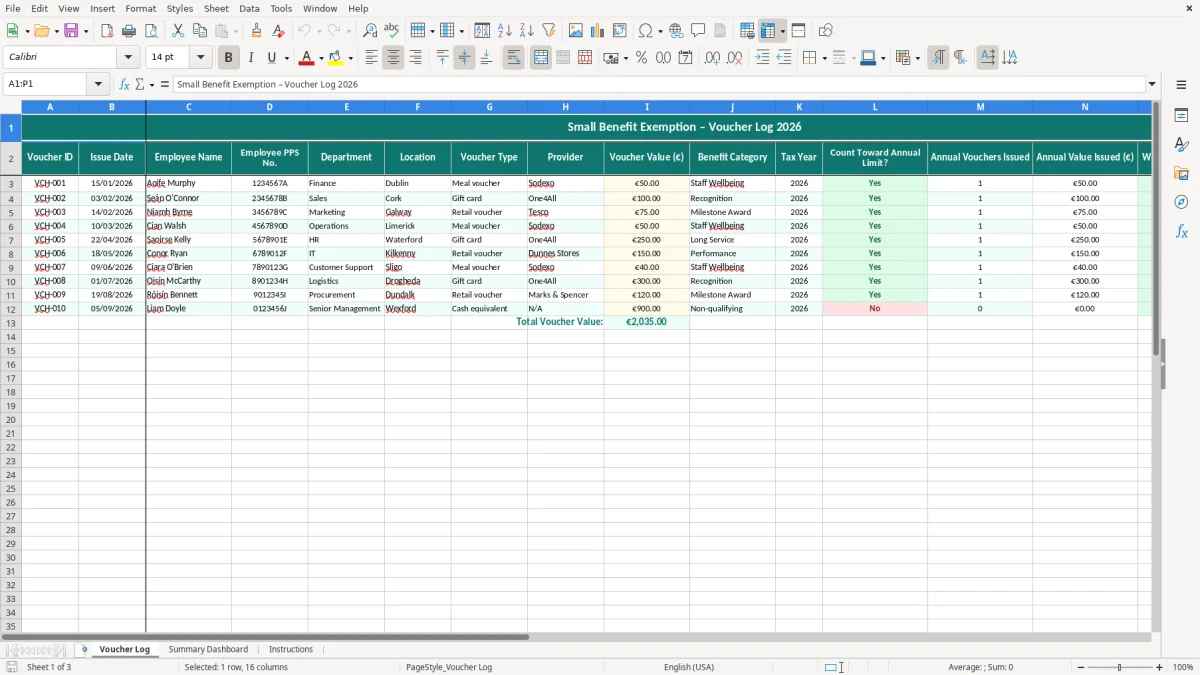
This is a small benefit exemption voucher tracker for Irish payroll records. It logs each voucher by employee, date, voucher type, value and tax year, and it shows whether the €1,000 annual limit is still intact.
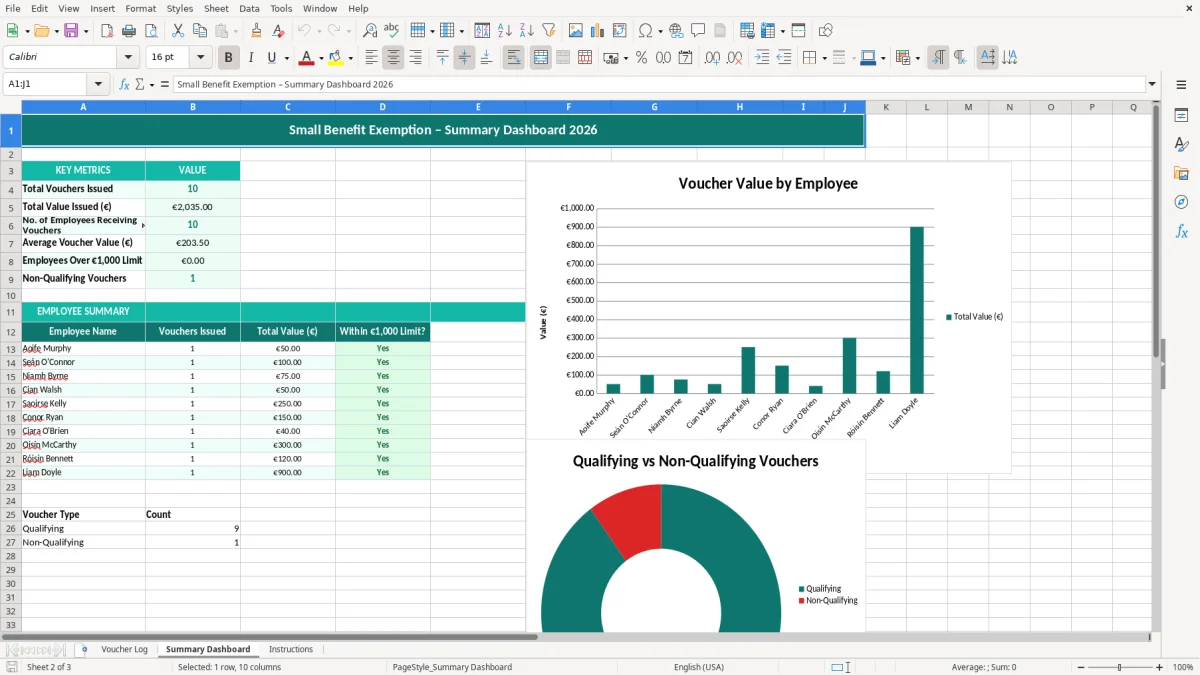
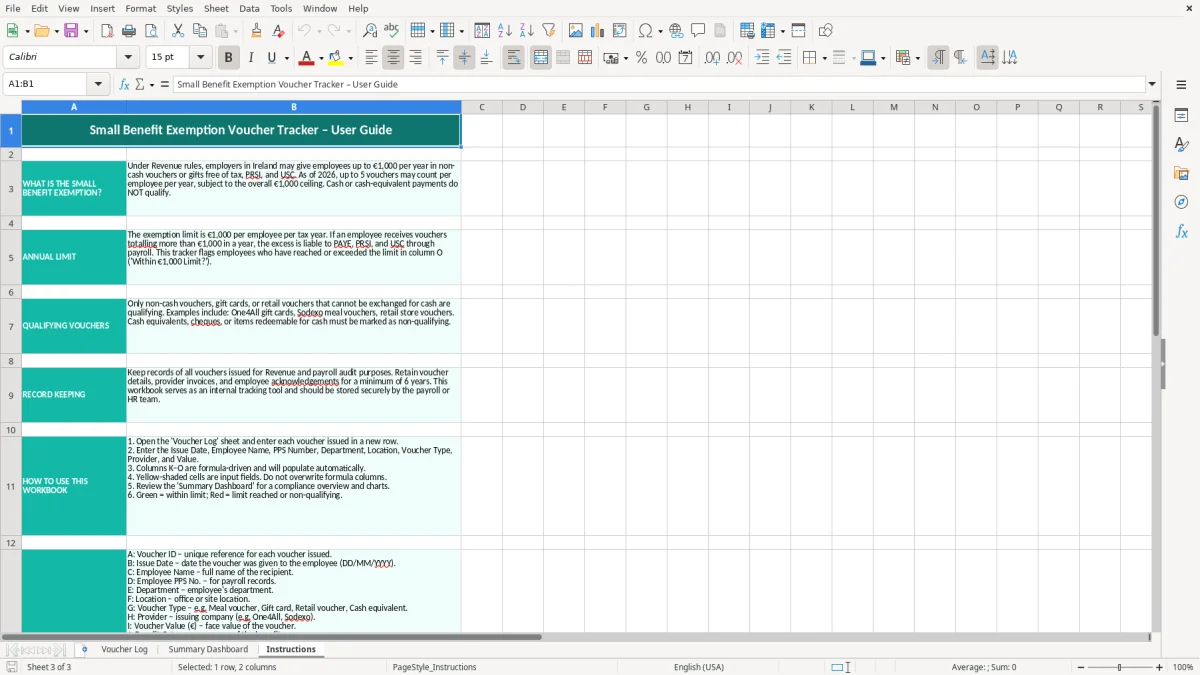
The template has three sheets: Voucher Log, Summary Dashboard and Instructions. Image 1 shows the entry sheet, image 2 shows the dashboard totals, and image 3 gives you the setup notes.
Use it if you give staff spot gifts, retail vouchers or other qualifying benefits and want a clean paper trail for Revenue and your own payroll files.
This tracker is for the people who actually have to keep staff benefits straight in a real Irish business: the office manager in a trades firm, the payroll person in a small Ltd company, or the owner of a café who gives out Christmas vouchers. It is also useful for a bookkeeper who needs a tidy backup at year end when the payroll file and the accounts have to agree.
The big practical moment is when you are handing out more than one voucher in the year. If one employee gets €250 in March, €250 in July and €600 in December, you are at €1,100 and the last voucher is no longer covered by the small benefit exemption.
The Voucher Log sheet records the issue date, employee name, PPS number, department, location, voucher type, provider and value. That means you can answer a query fast instead of trawling through card slips and emails.
Say you run a plumbing firm with 4 employees and you give each person two €50 vouchers and one €100 voucher during the year. That is €200 each, or €800 in total, which stays within the €1,000 limit. Once you start handing out bigger spot rewards, the tracker shows who is close to the ceiling before payroll turns it into a problem.
For Revenue, the point is not a fancy dashboard. The point is a clear record that shows who got what, when they got it and why it was treated as exempt rather than taxable pay.
You should keep the supporting records for 6 years. That is the same practical rule that applies to most business records, and it matters if you are ever asked to back up a payroll treatment after the year has closed.
The small benefit exemption is capped at €1,000 per employee per year. If you give an employee €1,250 in vouchers, the excess €250 is the piece you need to treat carefully in payroll rather than hoping it slips through unnoticed.
The template tracks both annual value and annual count because the same employee may receive several vouchers over the year. A person with five €100 vouchers is still at €500, while another with three vouchers of €400 is already at €1,200 and outside the exemption.
That separation helps you make the right call before the PAYE submission is due. It is much simpler to stop at €900 than to unwind a taxable benefit after the payroll run has gone out.
The usual mistake is not the voucher itself. It is the missed cumulative total, where one department gives a €100 token in January and another gives a €150 voucher in October without checking the earlier issue.
That can turn a harmless staff thank-you into a payroll correction, and the cost is time rather than just tax. If you have 18 employees and 4 of them are over the limit, you may be untangling 12 or 16 voucher entries instead of one clean annual total.
If the employee name is written one way in payroll and another way in the voucher log, the record becomes awkward to reconcile. A missing PPS number is worse, because it makes the sheet less useful if you need to tie it back to the payroll file or answer an internal review.
Another common slip is putting supermarket vouchers, store vouchers and cash-like rewards into the same basket. If you treat €300 of vouchers as exempt when they should have gone through payroll, you are not just €300 out — you may also have PRSI and USC corrections to make on the payroll side.
That is why the template has a category column and a limit check. It is quicker to fix the classification on the day than to discover the error at year end when everyone has forgotten who approved the reward.
The moment a voucher slips into payroll, the next check is the PAYE, PRSI and USC calculator so the taxable amount is carried through with the right deductions.
The easiest way to keep this file alive is to attach it to something you already do. For most small firms, the best hook is the payroll run or month-end review, because that is when staff payments and benefits are already being checked.
Excel is fine for a small team, especially if you are dealing with 5, 10 or even 25 employees. Once you have multiple sites, repeated approvals and large volumes of rewards, a payroll or HR system becomes safer because it reduces the chance of duplicate entries and manual drift.
A good rule of thumb is this: if you are spending more than an hour a month correcting the file, the spreadsheet has outgrown its job. At that point, you want a system that pulls the figures straight into payroll rather than relying on someone to remember the limit.
Once the figures are moving into payroll, the next check is a PAYE PRSI reconciliation sheet so the totals line up before month-end.

 Excel template built and verified by Ciara Byrne, Chartered Accountant (ACA) · builds the Excel templates.