
Profit and Loss Excel Template (2026)
4
Free download
Cash flow projection Excel template for Irish businesses, with VAT calculations, monthly forecasts, dashboard charts and minimum cash alerts.
Download template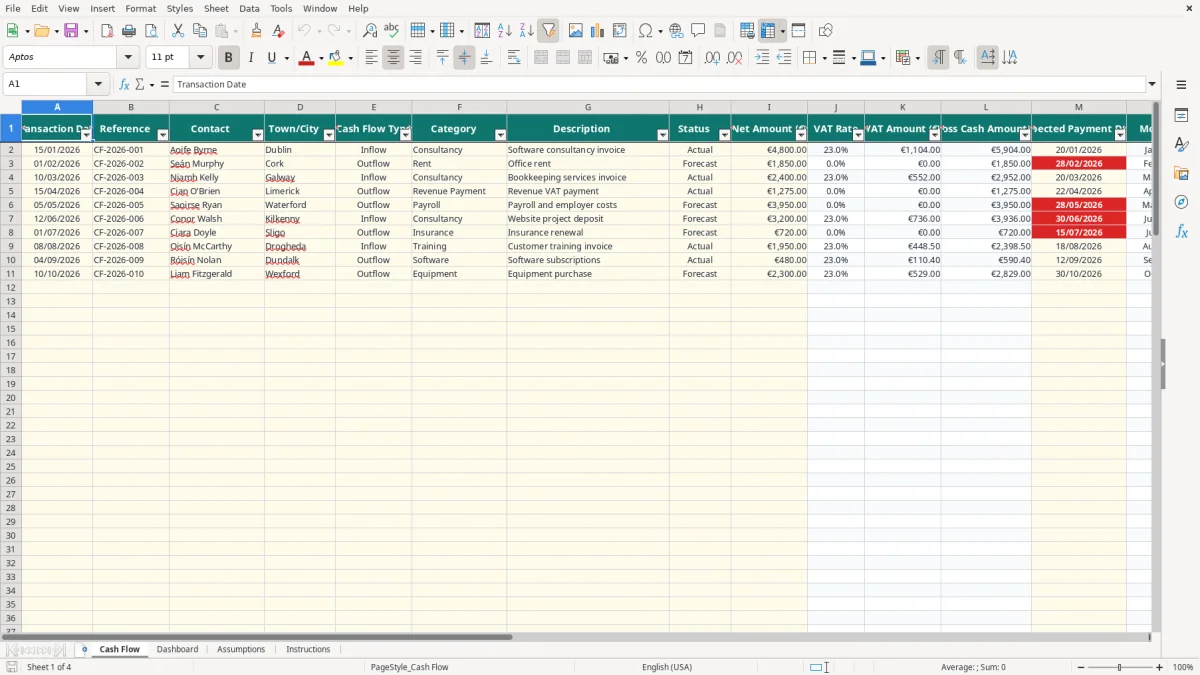
This cash flow projection Excel spreadsheet records expected and actual inflows and outflows, calculates VAT and gross cash amounts, and projects your cumulative cash balance. It contains Cash Flow, Dashboard, Assumptions and Instructions sheets for Irish business planning.
Enter net amounts and expected payment dates in the pale-yellow input cells. The workbook then applies the selected VAT rate, signs each transaction as an inflow or outflow, and compares projected cash with your minimum desired balance.
A cash flow projection is useful when the timing of money matters more than the profit shown in your accounts. A sole trader may have profitable work on paper but still need to fund VAT, rent and software before customers pay. A bookkeeper in a small Ltd company can use the file before a payroll run, a VAT3 payment or a large supplier bill.
Image 1 shows the Cash Flow sheet. Its columns run from Transaction Date and Reference through Contact, Town/City, Cash Flow Type, Category, Description and Status, followed by Net Amount (€), VAT Rate, VAT Amount (€), Gross Cash Amount (€), Expected Payment Date, Month, Signed Cash Flow (€) and Cumulative Cash Balance (€).
That layout is particularly useful for an office manager in a Cork tradesperson's firm. If four employees are paid €3,000 gross each, the business must plan for €12,000 of gross wages before employer costs and supplier payments are considered. Entering the expected payroll date as an Outflow makes the bank effect visible in the month it is likely to happen.
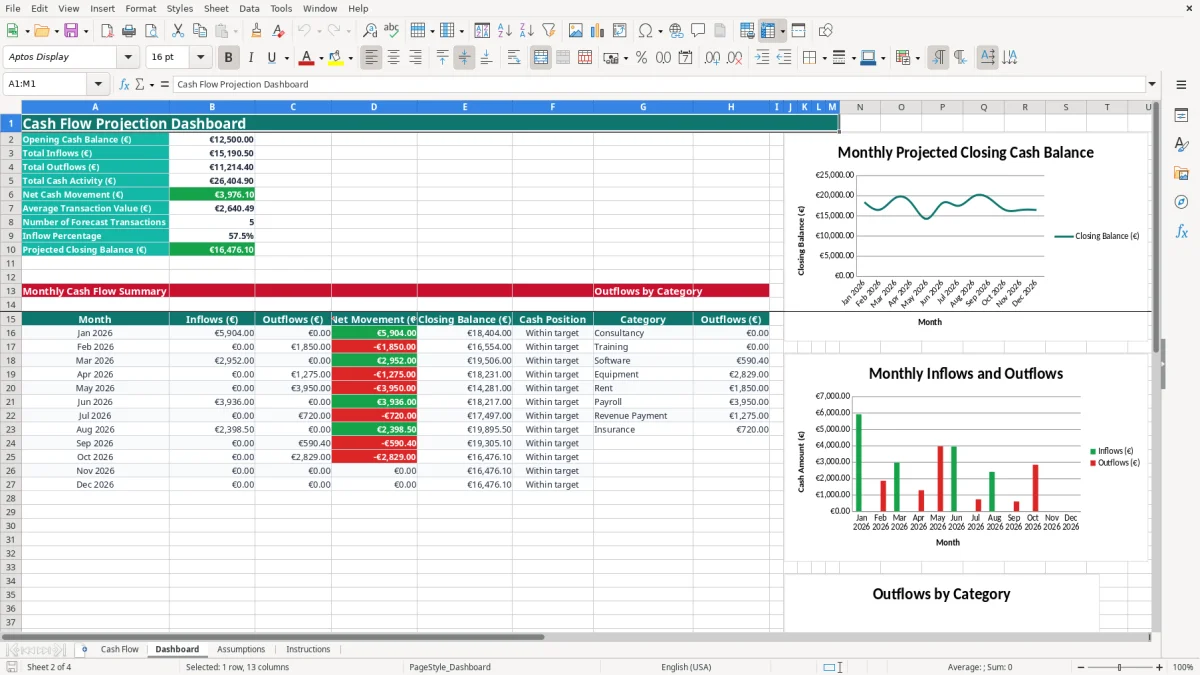
Image 2 shows the Dashboard with opening cash, total inflows, total outflows, net cash movement, average transaction value, forecast transaction count, inflow percentage and projected closing balance. Its monthly table covers January to December 2026, while the category area separates outflows such as Payroll, Rent and Revenue Payment.
For an online shop with 300 orders a month, this is best used as a planning summary rather than an order ledger. You can enter grouped expected receipts and major payments, then see whether a busy sales month still leaves enough cash after stock, payroll and VAT-related payments.
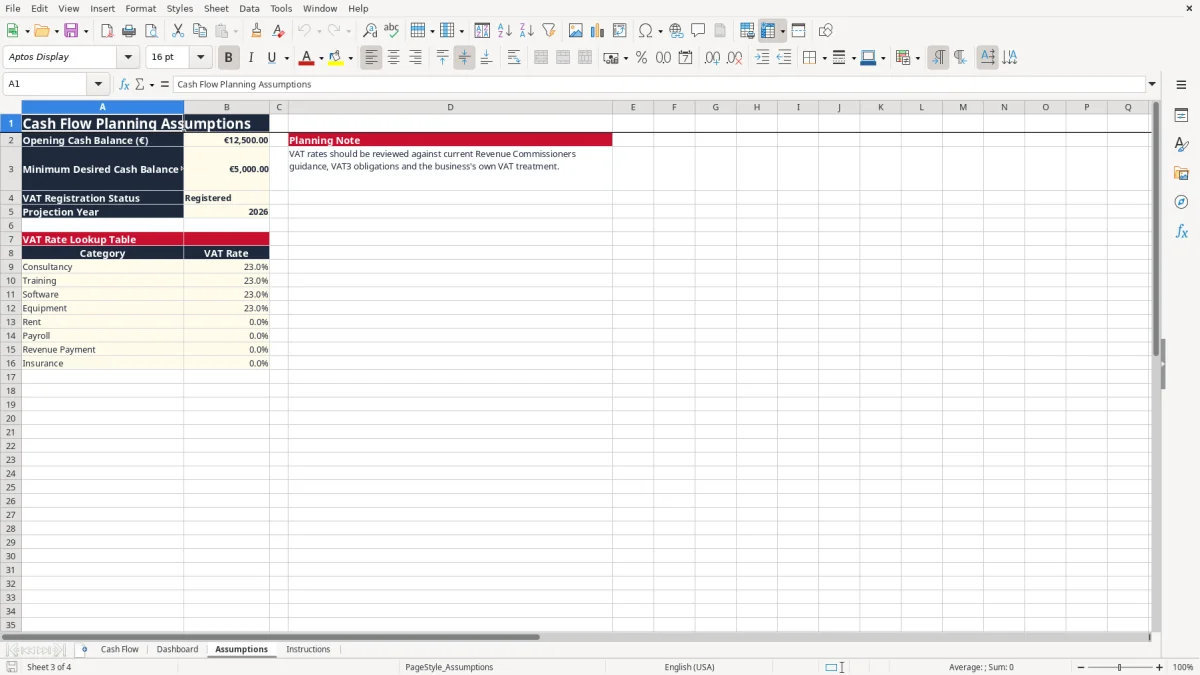
The workbook is designed around cash planning, not a replacement VAT3 return. The sample Assumptions sheet uses 23% for consultancy, training, software and equipment, and 0% for rent, payroll, Revenue Payment and insurance. Review every rate against the actual supply and current Revenue guidance before relying on the result.
Image 3 shows the Assumptions sheet, including Opening Cash Balance (€), Minimum Desired Cash Balance (€), VAT Registration Status, Projection Year and the VAT Rate Lookup Table. The sample opening balance is €12,500 and the minimum desired balance is €5,000. If you enter a €4,800 consultancy receipt at 23%, the VAT is €1,104 and the gross cash amount is €5,904.
The Cash Flow sheet uses VLOOKUP to find the category rate, then multiplies the net amount by that rate. This is a clear technical preference: enter net amounts once and let the workbook calculate the cash amount, rather than typing gross figures and risking inconsistent VAT treatment.
VAT registration is generally compulsory when turnover exceeds €37,500 for services or €75,000 for goods, subject to the relevant rules. The standard VAT rate is 23%, with reduced rates including 13.5% and 9%, as well as zero-rated and exempt supplies. VAT-registered businesses generally file bi-monthly VAT3 returns and an annual Return of Trading Details through ROS.
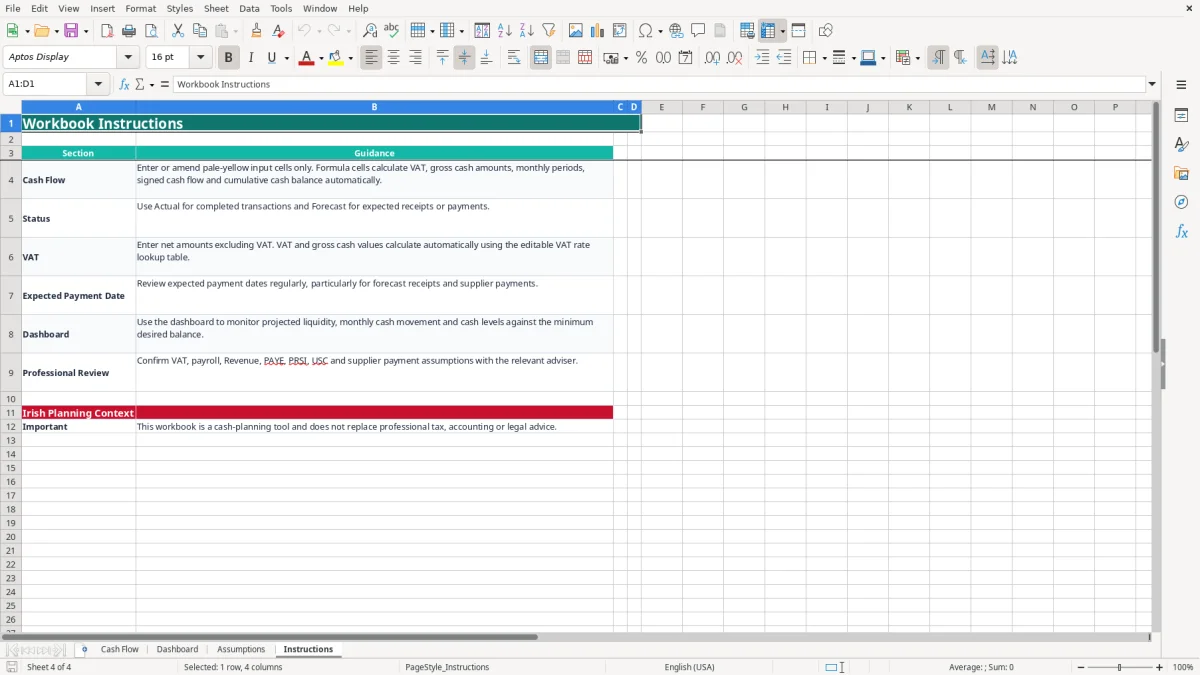
Keep supporting invoices, receipts and payment evidence for six years for Revenue record-keeping. A cash projection can show that €5,000 is needed for a VAT payment, but it does not calculate deductible VAT, payroll PAYE, PRSI or USC liabilities for you. Image 4 explains these limits and identifies the workbook as a planning tool.
The most expensive mistake is forecasting the invoice date instead of the payment date. A €10,000 invoice issued on 31 March may look like March income, but a 30-day customer term can put the bank receipt in April. If payroll of €12,000 and rent of €1,850 leave the account first, the difference can force an overdraft even though the profit and loss account looks healthy.
Entering a gross receipt as if it were net overstates the expected bank movement. For a €4,000 gross consultancy receipt at 23%, the net amount is approximately €3,252.03 and VAT is approximately €747.97. Entering €4,000 as net instead produces €4,920 gross, overstating the forecast by €920.
The opposite error is also common: a user leaves the category as Rent when the payment is actually a VAT-bearing service. Because the sample lookup gives Rent a 0% rate, the calculated VAT becomes zero. That may understate the cash requirement by €230 on a €1,000 net charge.
Marking every item Actual makes the dashboard's forecast transaction count meaningless. A manager may then assume the projected closing balance is secure when several receipts are still only expected. Use Forecast until the money has genuinely arrived or been paid.
Unrecognised categories create another problem. The VLOOKUP formula returns zero when a category is not found, so a newly typed category can silently produce no VAT. For a €2,000 net item at 23%, that hides €460 of VAT and understates the gross cash movement by the same amount.
Finally, do not read a positive cumulative balance as permission to spend. If the balance is €7,000 but a €5,000 minimum is required and a €4,000 supplier payment is due next week, the practical headroom is only €2,000. The Dashboard's Review status is a prompt to investigate timing, not an accounting conclusion.
The file works best when updating it is attached to an existing task. Set aside 20 minutes every Friday to enter new invoices, supplier bills and expected payment dates. Then spend a further 10 minutes before the payroll run and before each VAT3 payment reviewing whether the dates and statuses still reflect reality.
The yellow input cells should be the only cells you amend on the Cash Flow sheet. Image 1 shows the frozen header row and filterable columns; use the dropdowns for Inflow or Outflow, Actual or Forecast, and the listed categories. This is safer than typing variations such as Paid, paid, or Complete.
For a small business with fewer than 100 planned rows, this structure is manageable. If you are adding 40 transactions each week, the prepared range of rows 2 to 101 will fill in about two and a half weeks. At that point, use accounting software or extend the process only after checking formula ranges and references carefully.
Keep a dated copy at month end, such as 31/10/2026, rather than overwriting the only forecast. A sole trader can compare the October version with actual bank movements; a bookkeeper can retain the version supporting a management meeting. The Instructions sheet should remain with the file so another person knows which cells are inputs and which are calculated.

 Excel template built and verified by Ciara Byrne, Chartered Accountant (ACA) · builds the Excel templates.