
Dental Recall Excel Template (2026)
0
Free download
Excel template for organising Irish accommodation rates, VAT, approval details, seasonal pricing, review dates and revenue estimates.
Download template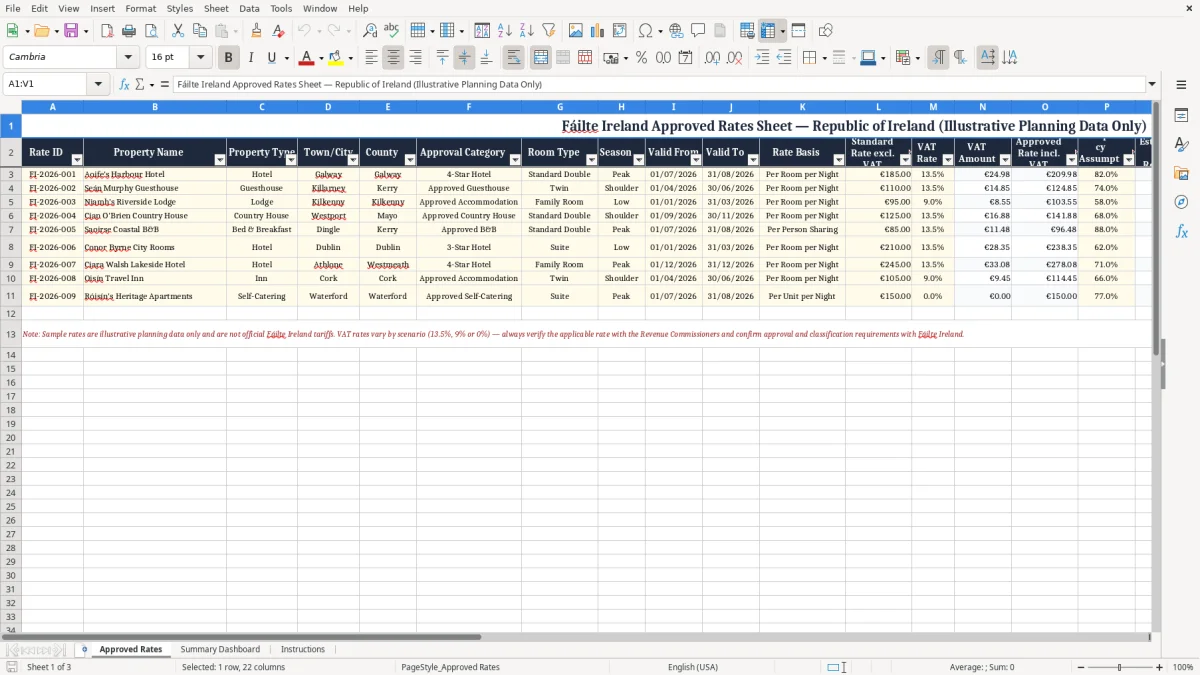
Manage accommodation pricing information in one structured Excel workbook with this Fáilte Ireland approved rates sheet template. Designed for hotels, guesthouses, B&Bs and other tourism businesses in the Republic of Ireland, the spreadsheet helps you record seasonal rates, VAT calculations, approval categories, review dates and operational status. Use it as an internal planning and administration tool for organising rate information across properties, room types and validity periods.
The workbook includes illustrative planning data only and is not an official Fáilte Ireland approval document, rate certification or substitute for current guidance. Always confirm applicable requirements, approved rates, VAT treatment and submission procedures with Fáilte Ireland, the Revenue Commissioners or another appropriate authority.
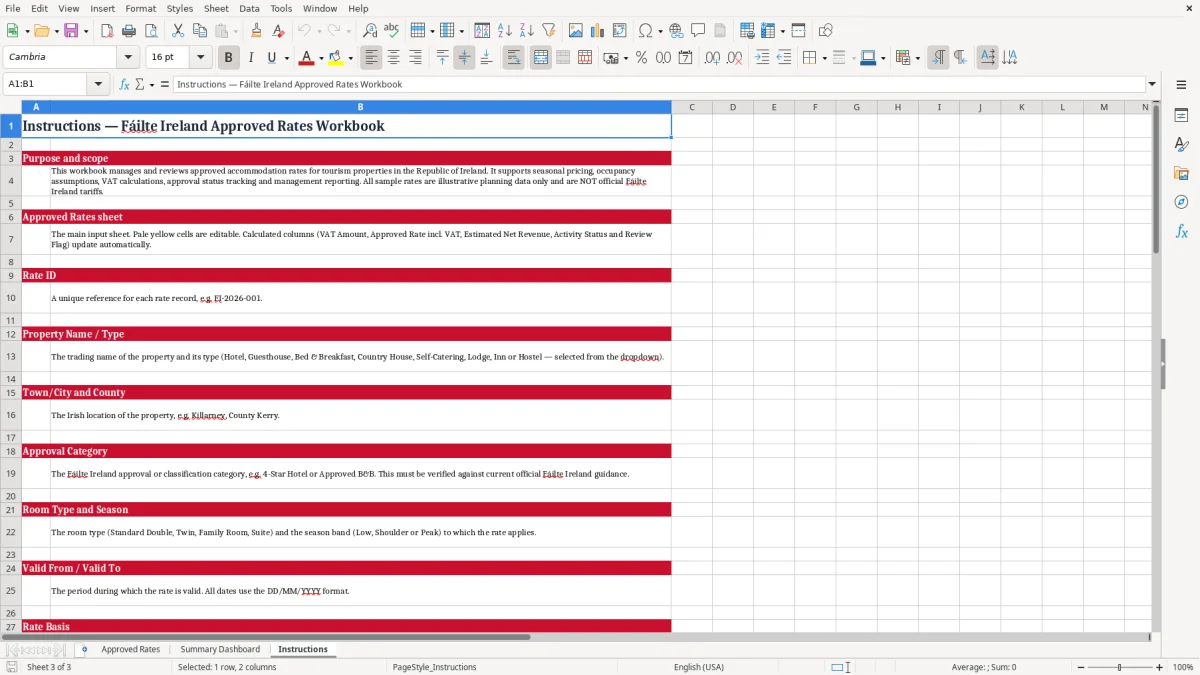
Start by entering a unique Rate ID for each property and rate record. Add the property name, property type, town or city, county, approval category and room type. Select the relevant season and enter the date range during which the rate applies.
Record the rate basis, such as per room per night, then enter the standard rate excluding VAT and the applicable VAT rate. Review the VAT amount and approved rate including VAT, checking all figures against current professional or official guidance. Add an occupancy assumption if you want to support estimated net revenue planning.
Complete the status, review date, activity status and notes fields so that the workbook also functions as an internal review register. Use Excel filters to find rates by location, season, property, status or review flag.
Add further rows when required, copying the established formatting and formulas. Replace every sample entry with verified information before using the workbook for customer communications, commercial decisions, regulatory work or formal submissions.
An approved rates sheet can give Irish accommodation businesses a practical way to organise pricing information without relying on scattered notes, emails or separate files. This Excel template is structured for properties such as hotels, guesthouses and bed and breakfast businesses operating in the Republic of Ireland. Each row can represent a particular room type, season, rate basis and validity period, allowing the user to build a clear register of rates for internal planning.
Property fields include the name, property type, town or city and county, making it easier to filter information for a single location or compare records across several properties. The template also includes an approval category field, which can help businesses document the category or classification used in their own administrative process. Seasonal fields support peak, shoulder and other pricing periods, while valid-from and valid-to dates help prevent outdated records from being used accidentally.
Because the workbook is built in Excel, users can sort, filter, copy, extend and customise the register to suit their own operating model. It may be useful for revenue managers, owners, administrators and tourism consultants who need a simple working document for rate reviews. The sample records are illustrative only and should be replaced with verified business information.
They are not official Fáilte Ireland rates, approvals or certifications. Before relying on any category, rate, date or classification, check current information with Fáilte Ireland and the relevant Irish authorities.
A well-maintained register can improve consistency, but it should form part of a broader pricing, compliance and review process rather than replace official advice. Businesses may also wish to retain supporting correspondence or approval references outside the workbook, particularly where multiple people contribute to rate management.
Pricing decisions often require more than recording one headline room rate. This Excel template separates the standard rate excluding VAT, the VAT rate, the VAT amount and the approved rate including VAT so that users can document the figures behind a displayed price. That structure can make internal checking easier and provide a clearer audit trail when rates are reviewed or updated.
The workbook uses euro formatting for financial values and percentage formatting for VAT and occupancy assumptions. Users can enter an occupancy assumption to support a simple estimated net revenue calculation, helping them consider how a rate might perform under different booking expectations. These estimates are planning figures and should not be confused with guaranteed revenue, accounting records or tax calculations.
Actual treatment may depend on the service supplied, the customer, the timing of the transaction and current Irish tax rules. For that reason, businesses should confirm VAT treatment with the Revenue Commissioners or a qualified adviser before publishing prices, issuing invoices or preparing formal reports. The rate basis field is also important because a price per room per night is not directly comparable with a price per person, package price or other commercial basis.
Recording the basis alongside the amount reduces ambiguity when information is shared with colleagues or reviewed later. Notes can be used to explain assumptions, source documents, seasonal conditions or approval discussions. By combining these fields in one register, the template supports more transparent conversations between owners, revenue managers and administrative teams.
It is particularly useful when several properties, room types or seasonal periods must be checked together. Keep calculations under review if rates, occupancy assumptions or tax treatment change.
Where rate assumptions change, a mileage rate log gives you a place to record the updated basis and keep the supporting notes in one reviewable register.
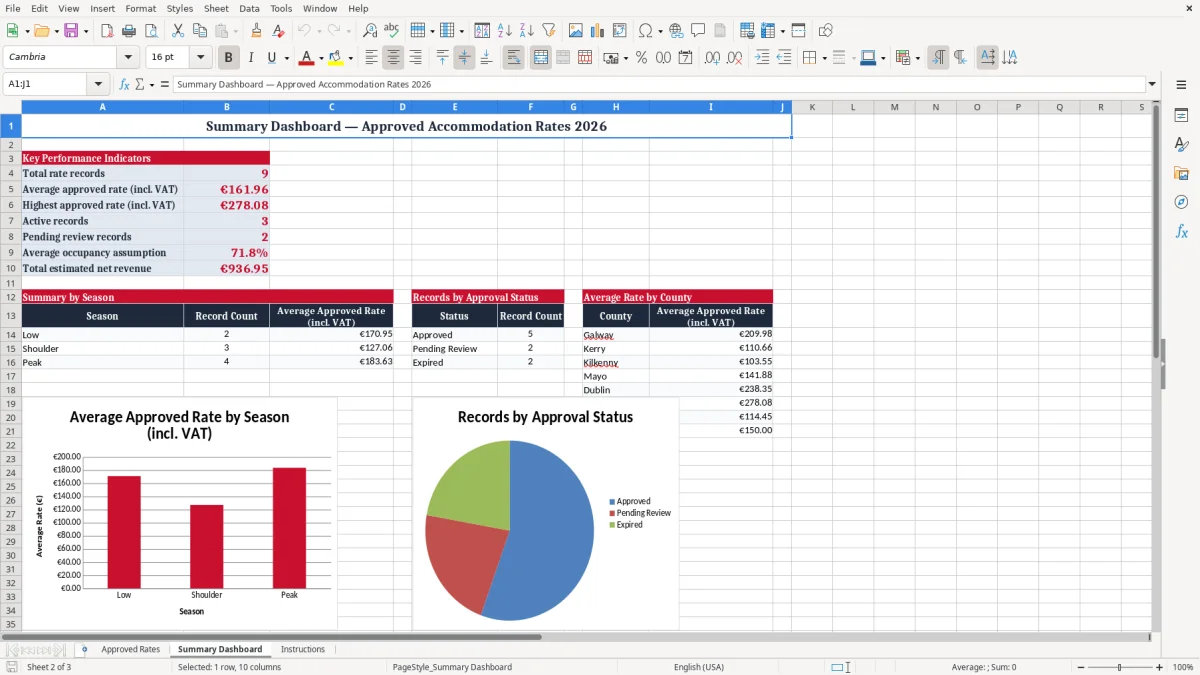
Accommodation rates change as seasons, costs, demand, tax rules, room offerings and business policies change. A rate register is more useful when it records not only the amount but also the period of validity and the next review date. This template includes valid-from and valid-to fields, a review date, status, activity status and review flag.
Together, these columns can help a team identify rates that are current, inactive, pending review or approaching a decision point. A property can filter the sheet to show records ending soon, rates assigned to a particular season or entries requiring updated notes. This simple workflow may reduce the risk of relying on an old figure stored in an unstructured document.
Businesses can also use the Rate ID to connect a spreadsheet row with an internal approval email, pricing file, booking system record or meeting note. The Notes column provides room for explanations such as the person responsible for a review, the reason for a seasonal adjustment or a reminder to verify VAT treatment. The workbook should be maintained by an identified owner, with changes checked before they are circulated.
Consider protecting formula cells, keeping a dated backup and using consistent naming conventions for properties and room types. If the file is shared, agree who can edit rates and who can approve changes. These controls are internal management practices rather than Fáilte Ireland requirements.
The template does not confirm that a property meets any official tourism standard, category or approval condition. Always compare the workbook with current official guidance and retain supporting documentation where appropriate. Used carefully, it can provide a convenient starting point for routine rate governance in an Irish accommodation business.
This spreadsheet is intended as an adaptable planning template for businesses that need to record accommodation pricing information in an Irish context. It may support discussions about seasonal rates, room categories, occupancy assumptions, estimated revenue and review schedules. It should not be presented to guests, agencies, auditors or public bodies as proof of Fáilte Ireland approval unless the relevant official documentation has been obtained separately.
The title refers to an administrative use case and does not mean that the workbook is issued, endorsed or validated by Fáilte Ireland. The included illustrative businesses, locations, categories, dates, rates and comments are examples for demonstrating how a register can be completed. Replace them with accurate information for the relevant property, and remove any row that does not apply.
Confirm the latest requirements for tourism accommodation, pricing displays, consumer information, VAT and record keeping before using the workbook in a live process. Information may change, and a spreadsheet can become inaccurate if it is not reviewed regularly. Businesses should also consider whether their internal procedures require additional fields, such as booking channel, cancellation terms, board basis, accessibility information, package inclusions or approval references.
Excel is flexible, so columns and formulas can be adapted without changing the basic purpose of the register. Keep a secure copy, restrict access where commercial information is sensitive and document significant changes. If financial or tax consequences are involved, seek advice from a suitably qualified professional.
The template can improve organisation and visibility, but responsibility for accurate rates, lawful pricing and appropriate compliance remains with the business using it. Verify every important detail before relying on the workbook for operations, reporting or formal communication.

 Excel template built and verified by Ciara Byrne, Chartered Accountant (ACA) · builds the Excel templates.