
Cash Flow Projection Excel – Free Template (2026)
0
Free download
Track flat rate expense claims, approvals, payroll status and claim totals in one Irish Excel log.
Download template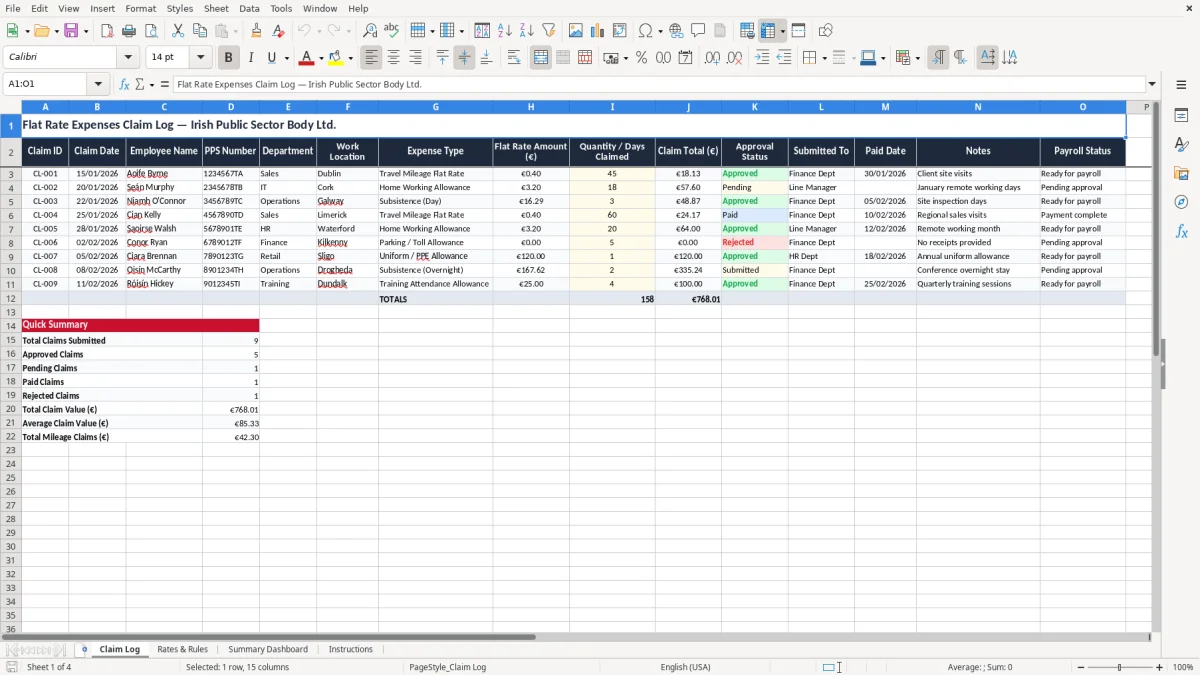
This flat rate expenses claim Excel template is a simple log for recording claims, checking approval status, and tracking what has been paid. It includes a Claim Log, Rates & Rules, Summary Dashboard, and Instructions sheet so you can keep the full process in one workbook.
Use it if you handle employee expenses, volunteer payments, or internal claims and need a clear record of the claim date, PPS number, amount, and payroll status. The layout is built for practical use: one line per claim, with totals you can review before payment runs.
The Claim Log sheet is the working file, the Rates & Rules sheet gives you the policy notes, and the Summary Dashboard shows the totals at a glance. If you are dealing with a small team, a busy office, or a body that needs a tidy audit trail, this keeps the figures in order.
This template suits the office manager in a trades firm, the payroll clerk in a small Ltd company, or the treasurer in a club who needs to record claims before money goes out. A carpenter with 4 employees might have 12 to 16 claims a month for travel, meals, or site allowances, and it is much easier to review them in one Claim Log than across email and paper slips.
Image 1 shows the Claim Log sheet, with columns for Claim ID, claim date, employee name, PPS number, department, work location, expense type, flat rate amount, quantity or days claimed, claim total, approval status, submitted to, paid date, notes, and payroll status. That structure works because you can sort by employee, filter by status, and see unpaid items before the payroll run.
If you are running weekly payroll, claims often arrive at the same time as timesheets and holiday checks. A file with 30 claims at €24.50 each is only €735, but if three are missed you are already out €73.50 and the staff member will notice immediately.
For a small team, one person can enter and track the file. In a larger office, I would keep the entry and approval steps separate, because that avoids the usual mix-up where a claim is paid before it is signed off.
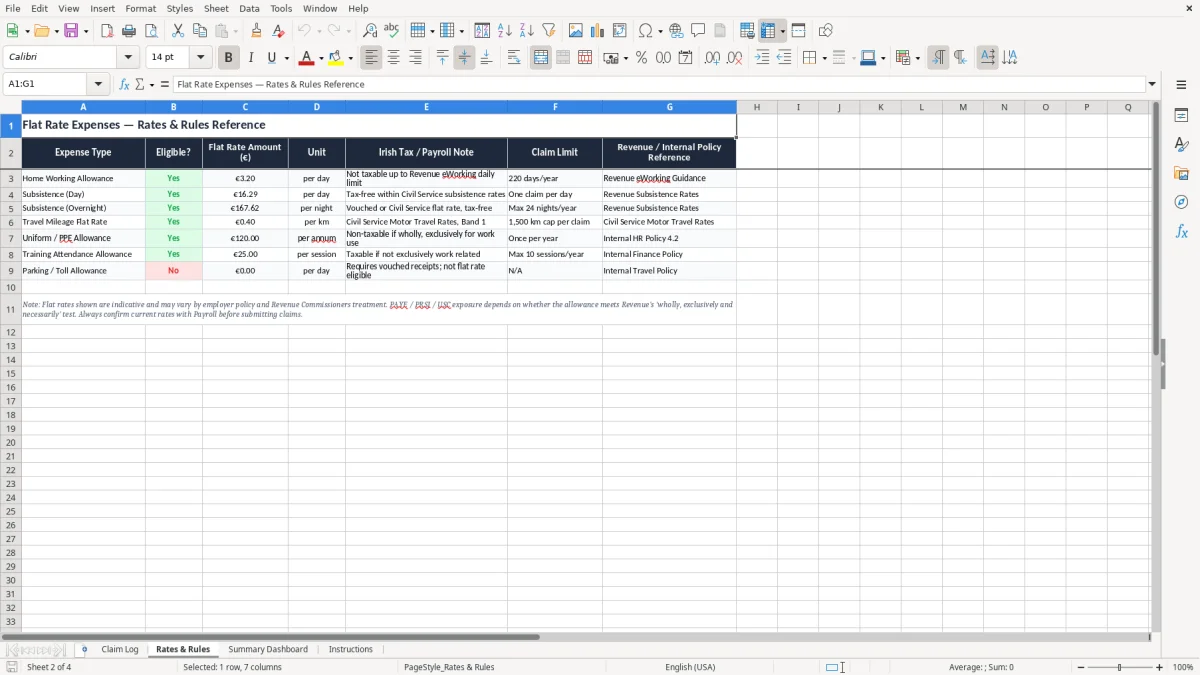
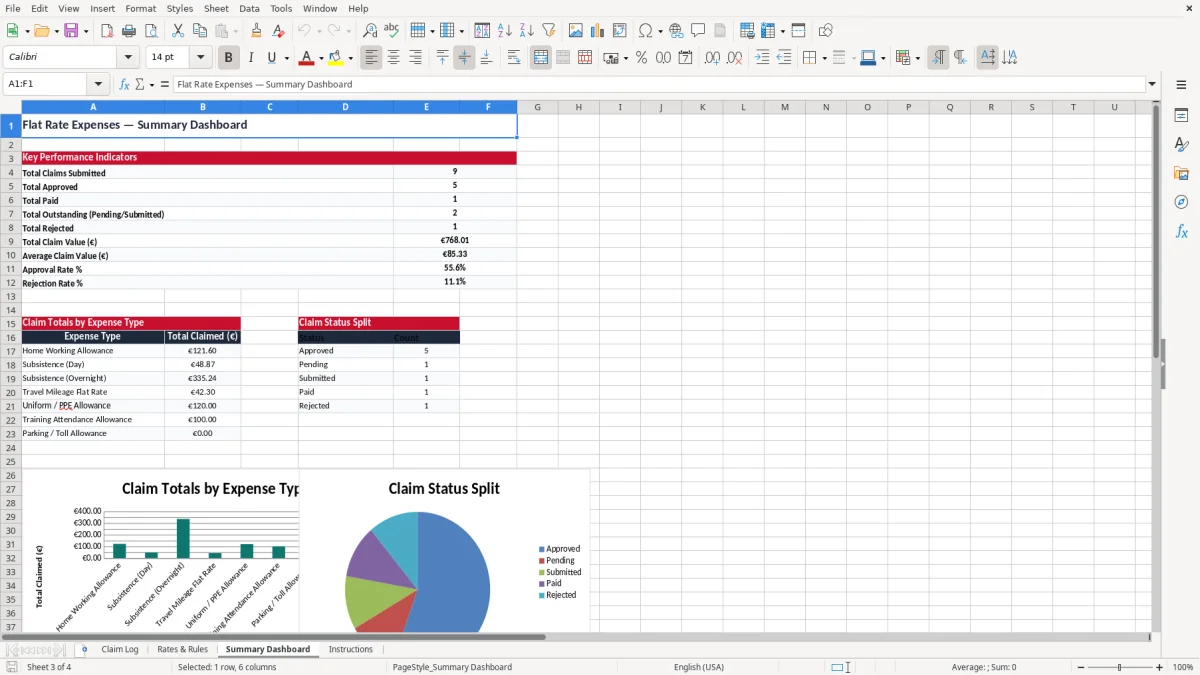
Image 2 is the Rates & Rules sheet, which is the right place to keep the standard allowances, internal policy notes, and any reminders about what counts as a claimable flat rate. The Summary Dashboard on image 3 then gives you the quick totals you need before you release payment.
The Summary Dashboard on image 3 then gives you the quick totals you need before you release payment, and the same figures can feed into the grant income check when you need to confirm eligibility.
Flat rate claims are not the same as VAT invoices, but they still sit inside your payroll and bookkeeping records, so the paperwork needs to be tidy. Revenue expects you to keep business records for 6 years, and that is the minimum standard you should build into the workbook process.
If a claim is paid through payroll, the person processing it may also have to think about PAYE, PRSI, and USC. A claim that is genuinely an expense reimbursement is different from an allowance or benefit, so the wording in your Notes column matters more than people think.
The PPS number and employee name identify who the claim belongs to, while the claim date and paid date give you the timeline Revenue or an auditor may want to see. If you have 60 claims in a month and 8 of them are missing a paid date, you will waste time at year end trying to reconcile them back to bank payments.
Keep the log tight and factual rather than making it decorative. For most Irish employers, a plain record with dates, amounts, and approval status is better than a complicated file with extra tabs nobody updates, because the real risk is not lack of style — it is missing evidence when you need it.
Image 2 also lets you keep the rules sheet close to the working log, which is useful if you are updating internal policy after a payroll review. That is especially helpful where the same file covers several departments or sites and you need one consistent approach.
The most common mistake is paying claims without a proper status trail. If 25 claims at €18.00 are marked as submitted but never approved, you are looking at €450 of spend that can drift through the month with no clear owner.
Another problem is using the wrong amount or quantity. One employee claims 3 days, another enters 5, and the total is off by €49.00 or €98.00 before anybody notices, which is exactly the sort of error that creates awkward payroll corrections later.
When the paid date is left blank, people assume the claim is still outstanding even when it has already been processed. That leads to duplicate payment requests, and a duplicate payment of €120.00 is easy to make if you do not have a simple check against the Paid Date and Payroll Status columns.
What also goes wrong is losing the context. If a claim says only “site visit” or “travel” with no location, no department, and no note, the person reviewing it may have to chase the employee two weeks later, which costs more in time than the claim is worth.
My view is simple: if your file does not let you explain a payment in under 30 seconds, it is not ready. The whole point of the workbook is to stop the small errors becoming €500 headaches at month end.
Use the workbook at the same point every month, ideally just before payroll or just before the claims payment run. If claims are checked on the first working day and paid on the fifth, the file stops being an afterthought and becomes part of the routine.
Excel is fine when you have a modest number of claims, a clear approver, and a predictable payment cycle. If you move into hundreds of claims a month, multiple approvers, or live links to payroll and finance systems, you have outgrown a spreadsheet and should move to a proper expense system.
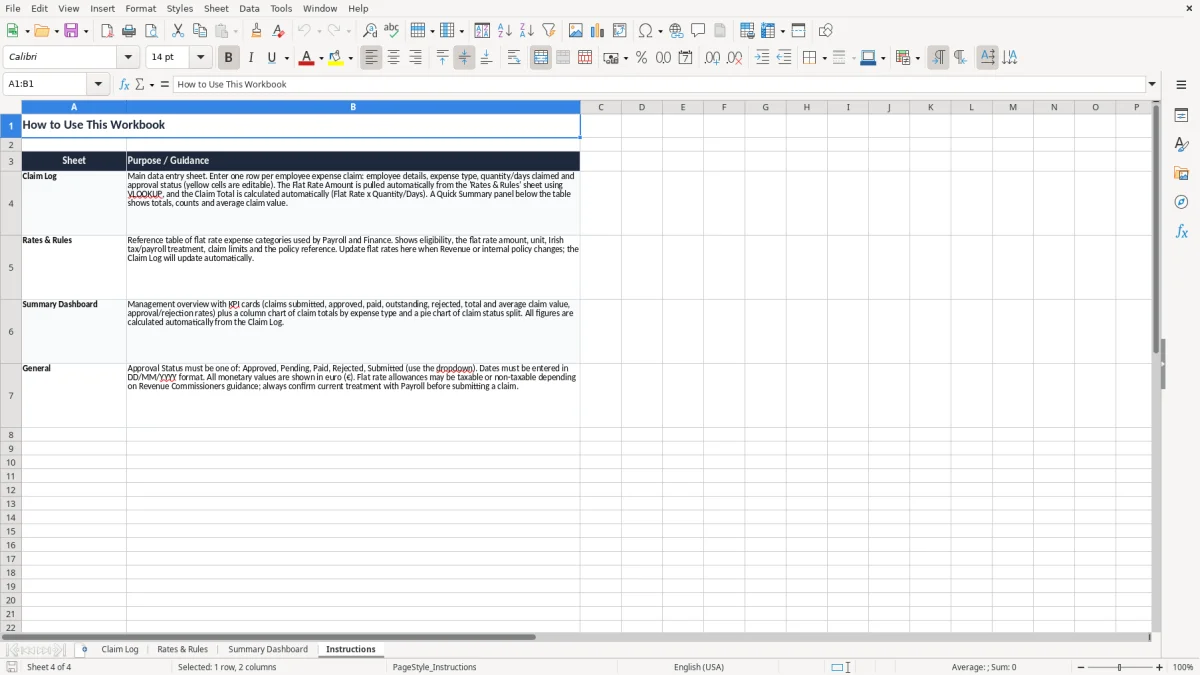
Image 4 shows the Instructions sheet, which is where you set the routine in writing. A file that is used every week for 12 months is far more valuable than a clever template that nobody opens after the first fortnight.

 Excel template built and verified by Ciara Byrne, Chartered Accountant (ACA) · builds the Excel templates.