
GP Out-of-Hours Rota Excel – Free Template (2026)
8
Free download
Track pharmacy locum shifts, hours, fees, expenses, VAT, invoices and payments across Irish pharmacies with a dashboard and instructions sheet.
Download template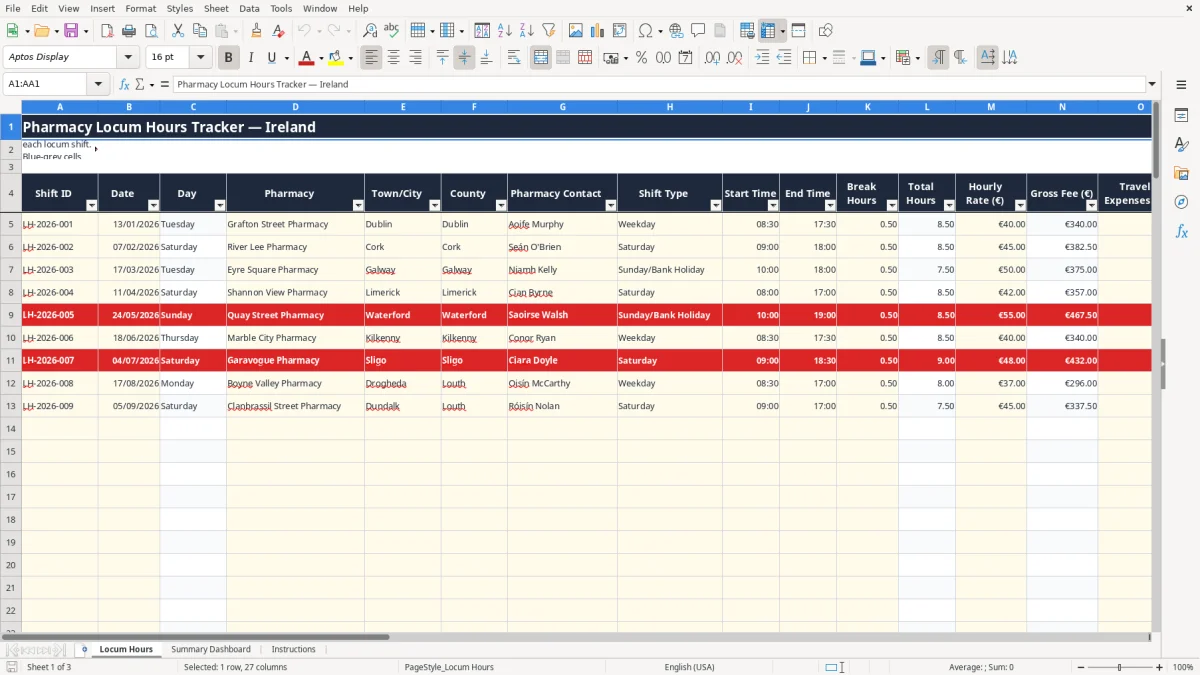
This pharmacy locum hours Excel spreadsheet records each shift's date, pharmacy, location, start and finish times, breaks, hourly rate, expenses, invoice details and payment status. It calculates total hours, gross fees, invoice totals, VAT, VAT amounts and days to payment across 100 prepared shift rows.
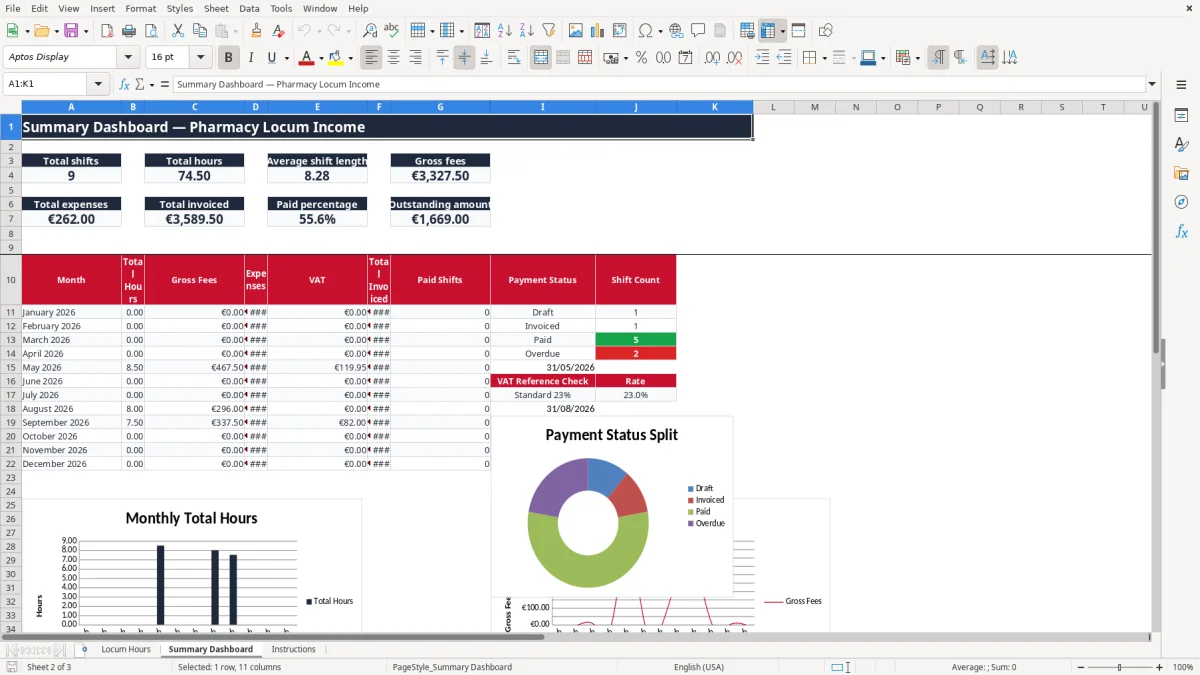
The workbook has three sheets: Locum Hours, Summary Dashboard and Instructions. Image 1 shows the yellow input cells and blue-grey calculated columns; image 2 shows monthly totals, payment measures and three charts; the Instructions sheet explains the entry process and includes VAT and weekday reference tables.
A pharmacy locum usually needs this spreadsheet after a run of shifts rather than at year end. Entering each completed shift while the details are fresh is much safer than reconstructing a month from text messages, diary notes and bank receipts. The Locum Hours sheet is designed for a locum working across several pharmacies, a bookkeeper supporting a self-employed pharmacist, or an administrator checking invoices before they are sent.
Image 1 shows the working sheet from Shift ID through Notes. A Dublin locum might enter Grafton Street Pharmacy, Dublin, Aoife Murphy, Weekday, 08:30 to 17:30 and a 0.5-hour unpaid break. The formula returns 8.5 total hours; at €40 per hour, the gross fee is €340 before the €18 travel expense and any other expense.
A Saturday shift at River Lee Pharmacy can be recorded separately, even if the pharmacy uses the same contact. That matters when the rate changes from €40 to €45 or when a weekend arrangement includes different travel costs. The Shift Type list includes Weekday, Saturday and Sunday/Bank Holiday, so the entry remains consistent across 100 prepared rows.
The dashboard is aimed at the point where several invoices need checking. It summarises total shifts, total hours, average shift length and gross fees, then shows expenses, total invoiced, paid percentage and outstanding amount. For example, 12 shifts averaging 8 hours gives 96 hours; at an average €45 hourly rate, gross fees are €4,320 before expenses and VAT.
Image 2 shows the monthly section for January to December 2026. Its three charts make a useful sense-check: monthly hours, monthly gross fees and the number of shifts by payment status. This is not a payroll system or a pharmacy rota; it is a personal locum work, invoicing and payment record.
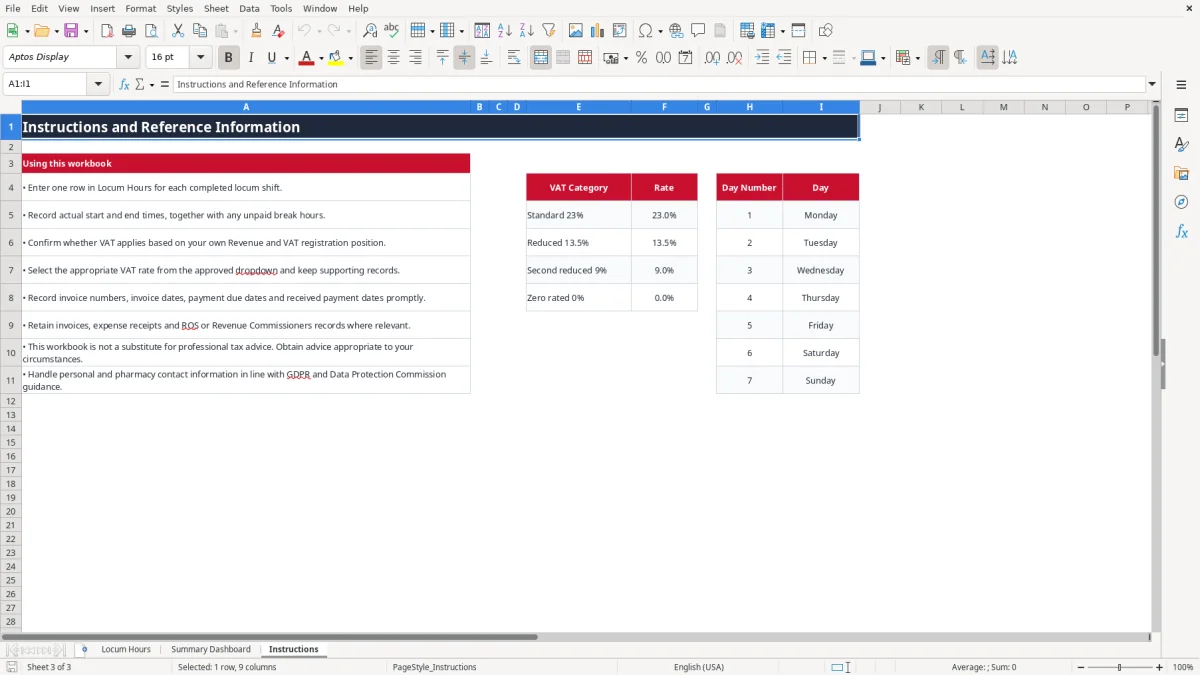
The VAT columns are deliberately user-controlled because the workbook cannot decide whether a particular locum supply is taxable. The Instructions sheet lists 23%, 13.5%, 9% and 0% reference rates, while the Locum Hours sheet provides matching dropdown choices. Confirm the correct treatment before adding VAT to an invoice; do not assume that the sample's 23% selection applies to every user.
For a services business, the Irish VAT registration threshold is €37,500 turnover in a continuous 12-month period. The goods threshold is €75,000. A VAT-registered service provider generally charges the applicable rate and shows VAT separately; the standard rate is 23%, with reduced rates of 13.5% and 9% and zero-rated supplies also recognised in the workbook's reference list.
As an illustration, €340 of fees plus €18 travel gives a total invoice base of €358. At 23%, the calculated VAT is €82.34 and the invoice total including VAT would be €440.34. The workbook's Total Invoice column is the fee-and-expense amount before VAT, while VAT Amount is calculated separately, so do not mistake the two figures.
Revenue expects business records to be retained for six years. Keep the workbook with issued invoices, travel and other expense receipts, bank evidence and relevant communications. A proper invoice should include your name and address, the pharmacy customer's details, sequential invoice number, invoice date, supply details, Tax Reference Number or VAT number where applicable, and VAT shown by rate when charged.
VAT-registered businesses normally file bi-monthly VAT3 returns and an annual Return of Trading Details through ROS. The spreadsheet helps reconcile shift and invoice information; it does not submit a VAT3 or determine the VAT liability. If you are a sole trader, income tax, preliminary tax and the Form 11 deadline in mid-November on ROS are separate matters from this shift tracker.
The most expensive errors I see with locums are usually small omissions repeated across several pharmacies. A forgotten 30-minute break on ten 9-hour shifts overstates hours by 5 hours. At €45 per hour, that is a €225 fee error before any VAT calculation, and it is difficult to defend when the pharmacy's approved timesheet shows the actual break.
Another common problem is entering a total amount in the hourly-rate field, or adding travel to the rate before multiplying by hours. For an 8.5-hour shift at €40, the gross fee should be €340. With €18 travel and €12 parking, Total Invoice should be €370 before VAT; treating €370 as the hourly-rate calculation would produce a completely false invoice.
Use the separate O and P columns for travel and other expenses. Keep the receipt or mileage support behind the figure. A €24.50 travel entry and €6 other expense, as shown in the sample Saturday record, should be traceable to evidence rather than rounded from memory.
Selecting 23% automatically because it is familiar can create an incorrect invoice. On a €1,000 invoice base, the difference between applying 23% and applying 13.5% is €95. Confirm the VAT treatment and retain the supporting records; the dropdown prevents spelling variations but cannot make the tax decision for you.
Payment tracking also fails when an invoice is marked Paid before the bank receipt arrives, or when the due date is left blank. If €2,000 remains in Invoiced or Overdue status, the dashboard's outstanding amount shows why cash flow is tighter than the gross-fee total suggests. Days to Payment uses the payment date where entered, otherwise it counts from the due date to TODAY(), so an incomplete row can produce a misleading ageing figure.
Finally, do not store unnecessary health or patient information in Notes. A pharmacy contact name is business information, but patient details would create a much more serious GDPR risk. Keep the file access-controlled and follow Data Protection Commission guidance.
The spreadsheet works best when it is attached to an existing habit. Set aside ten minutes after the final shift of the week to enter dates, times, breaks, rates and expenses, then another five minutes when invoices are issued to complete the invoice and due-date fields. For a locum completing four 8-hour shifts, this is quicker than rebuilding 32 hours of work at month end.
Freeze panes at A5 keep the headings visible while you enter the prepared rows, and the auto-filter on A4:AA104 helps locate a county, pharmacy or payment status. Use the existing dropdowns rather than typing alternatives such as paid, settled or sent; the dashboard's COUNTIF formulas rely on the exact status values.
This workbook has 100 prepared shift rows and no chart on the Locum Hours sheet. If you are recording 20 shifts a week, managing several locums, or reconciling hundreds of invoices, a bookkeeping system with invoice records, bank feeds and user permissions will reduce manual checking. Until then, save a dated copy after each month-end review and keep the workbook with the six years of Revenue records required for the business.

 Excel template built and verified by Ciara Byrne, Chartered Accountant (ACA) · builds the Excel templates.