
Locum Hours Excel Template (2026)
20
Free download
Plan GP out-of-hours shifts with dates, times, locations, backups, status, hourly rates, travel allowances and cost summaries for Irish practices.
Download template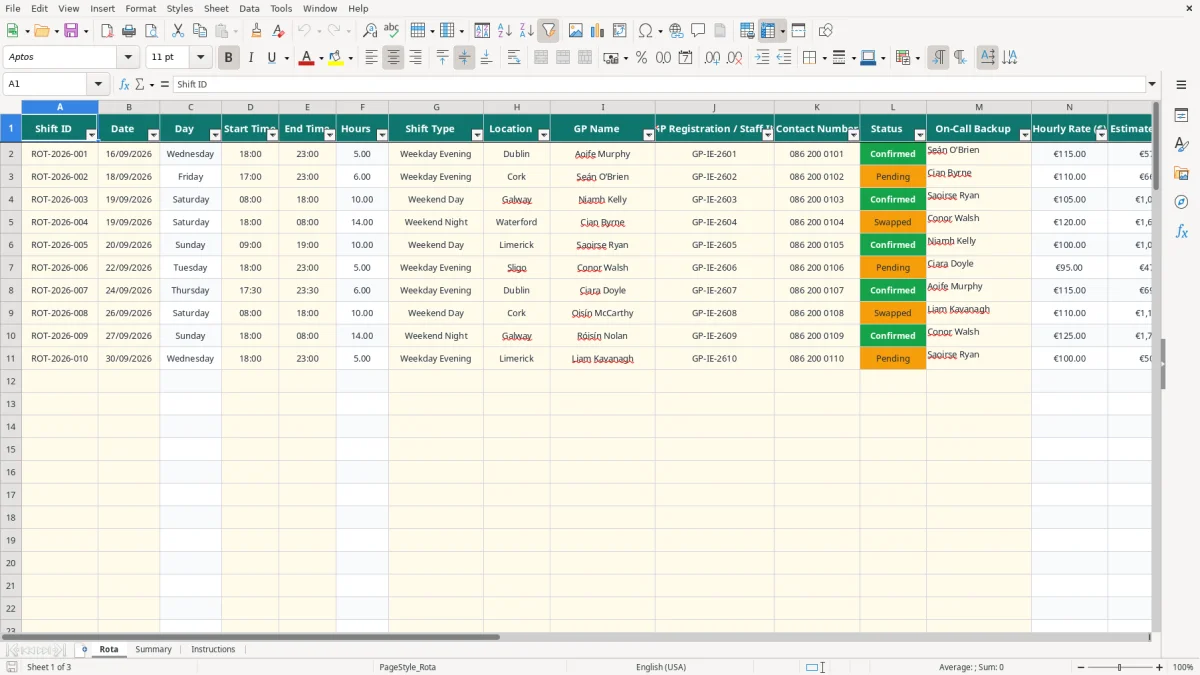
This GP out-of-hours rota Excel template records each shift's date, times, location, GP, backup, status and contact details. It calculates hours, estimated cost, travel allowance and total cost, with a Summary sheet showing coverage, locations and GP costs.
It is suited to a GP co-operative, practice administrator or rota coordinator arranging evening, weekend, night and bank-holiday cover in Ireland. The workbook has 100 prepared rota rows, dropdown lists for consistent entry and an Instructions sheet explaining the workflow.
A practice manager, GP co-operative coordinator or administrator normally updates this rota as cover is agreed. The pressure is greatest before a weekend, public holiday or the monthly payroll cut-off, when several doctors may be working across different locations and some shifts remain pending.
Image 1 shows the Rota sheet as a wide operational register. Its 18 columns run from Shift ID and Date through to Notes, including Start Time, End Time, Location, GP Name, backup and Status. The prepared rows contain examples for Dublin, Cork and Galway, but the location dropdown also includes Limerick, Waterford and Sligo.
A coordinator can enter a Friday 17:00–23:00 Cork shift, select Seán O’Brien and mark it Pending while confirmation is outstanding. A Saturday 08:00–18:00 Galway shift can be marked Confirmed, with Niamh Kelly as the GP and Saoirse Ryan as backup.
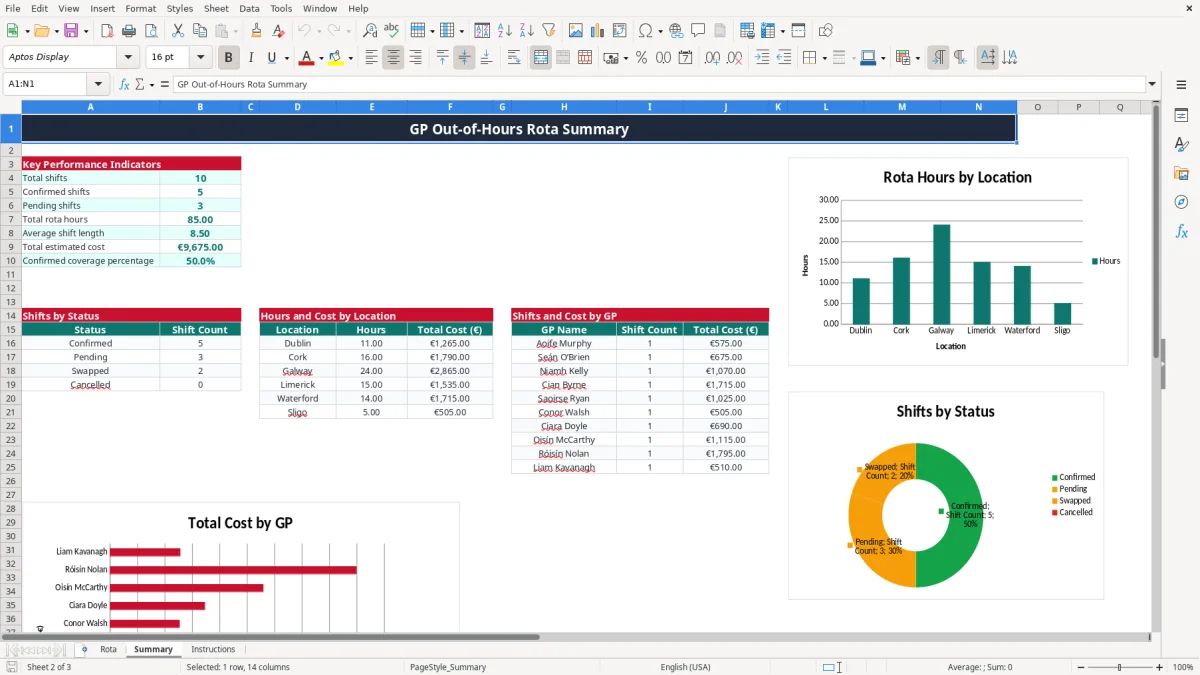
Image 2 shows the Summary sheet with key performance indicators and three reporting areas. For example, a 10-hour weekend shift at €105 per hour produces an estimated cost of €1,050; adding a €20 travel allowance gives a total of €1,070. The workbook calculates this rather than requiring manual arithmetic.
This is useful when a co-operative has 20 shifts in a fortnight and needs to check whether 14 are confirmed, six are pending and total planned hours are 160. The GP section also shows how many shifts and how much total cost are associated with each listed GP.
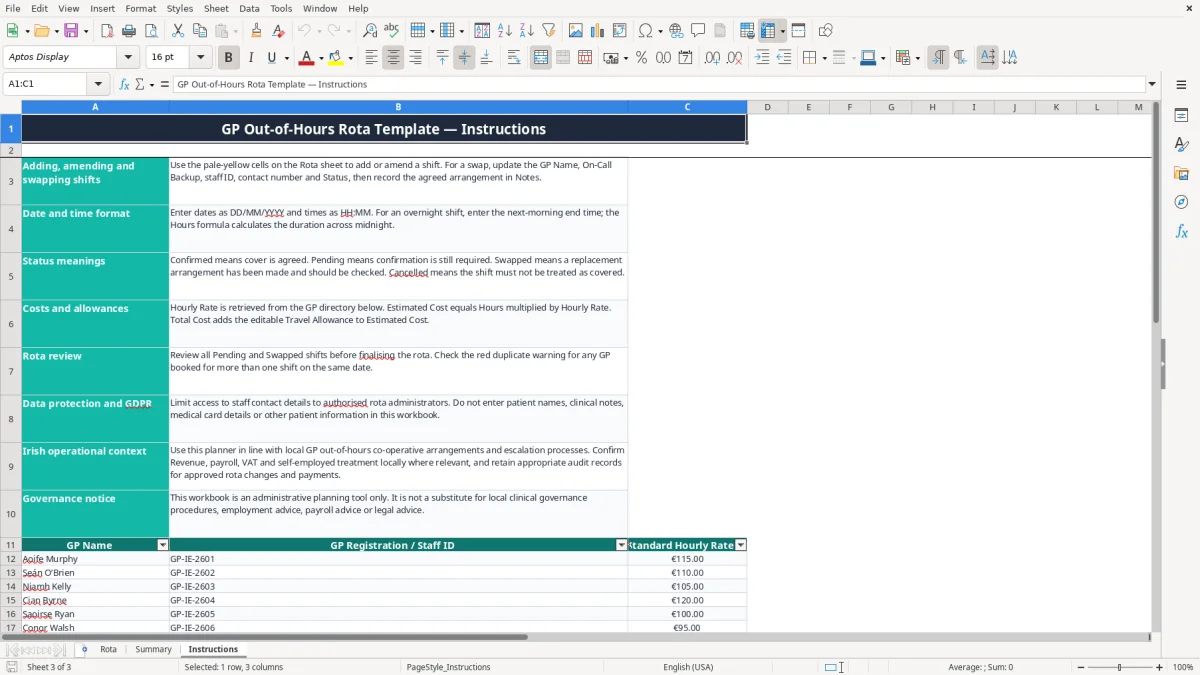
Image 3 shows the Instructions sheet, including the workflow notes and a GP directory with names, staff IDs and standard rates. It is an administrative planner, not a clinical record: do not enter patient names, medical card details, clinical notes or consultation information.
This workbook is for scheduling and cost planning, not for deciding clinical governance, employment status or tax treatment. A GP practice should use its local out-of-hours co-operative arrangements and escalation procedures alongside the rota, because a spreadsheet cannot replace the agreed clinical operating model.
The Rota sheet contains GP names, registration or staff IDs and contact numbers. Those are personal data under the GDPR and the Data Protection Act 2018. The Instructions sheet specifically says access should be limited to authorised rota administrators and that patient information must not be entered.
In practical terms, store the file in an access-controlled location, avoid sending unrestricted copies by ordinary email and remove obsolete contact details according to the organisation's retention policy. The Data Protection Commission can impose fines of up to €20 million or 4% of worldwide annual turnover for serious GDPR infringements, so convenience is not a good reason to circulate the workbook widely.
The template calculates an estimated cost, not a payroll liability. If a GP is an employee, the practice must operate PAYE Modernisation with real-time payroll reporting, and assess employee PRSI and USC where applicable. If the GP is genuinely self-employed, the written arrangement, invoice and tax treatment need to support that position; calling someone a contractor in the spreadsheet does not decide status.
For illustration, six hours at a €110 rate gives €660 before any allowance. A €15 travel allowance makes the workbook total €675, but that €15 still needs the correct payroll or expense treatment outside the workbook.
Medical services may have specific VAT treatment, so do not add 23% automatically to these figures. Keep the rota, approvals and supporting payment records for the Revenue record-keeping period of six years, and have the practice's accounting records agree with the payments actually made.
The most expensive failures are usually administrative: a pending shift is treated as confirmed, a replacement is not recorded, or the same GP appears on overlapping cover. In an out-of-hours service, that can leave a location without the agreed doctor and force a late replacement at a higher rate.
Suppose a Cork evening shift is entered as six hours at €110, giving €660, but the GP has not confirmed. If the coordinator publishes it as settled and discovers the gap on Friday afternoon, a replacement at €140 for six hours costs €840. The avoidable difference is €180, before the time spent making emergency calls.
Use the Status field properly. Pending means confirmation is still required; Swapped means a replacement arrangement has been made and should be checked. The Summary counts these statuses, but it cannot confirm a phone call or validate that a doctor has accepted the shift.
A common workshop mistake is changing only GP Name after a swap. The staff ID, contact number, On-Call Backup and Notes then refer to the former arrangement. The Instructions sheet tells you to update all relevant fields and record the agreed change, so the next person opening the file can understand what happened.
Typing a rate directly into every rota row creates inconsistent calculations. The template instead uses VLOOKUP against the GP directory: Aoife Murphy is listed at €115 and Cian Byrne at €120. A 10-hour shift therefore produces €1,150 or €1,200 respectively, before travel.
Do not overwrite the calculated Hours, Hourly Rate, Estimated Cost or Total Cost cells with hard-coded values. If an agreed rate changes, update the directory and check the resulting totals rather than silently editing one shift.
Putting a patient's name or clinical note into Notes creates a completely different privacy risk from recording rota administration. The workbook has no clinical fields and should remain limited to shift logistics, staffing, cover status, costs and operational notes.
The workbook works best when one named administrator owns the live copy and reviews it at fixed times. For a service with Friday evening and weekend cover, set a Wednesday confirmation review and a final Friday check rather than waiting for an informal message to reveal a gap.
The Rota sheet freezes row 1 and has an auto-filter across A1:R101, making it practical to narrow the 100 prepared rows by location or status. Use the existing dropdowns rather than typing variations such as Confirmed, confirmed and Agreed; consistent values are what make the Summary counts reliable.
Keep the calculated Day, Hours, Hourly Rate, Estimated Cost and Total Cost columns intact. For example, entering 23:00 as the start and 07:00 the next morning as the end gives an eight-hour duration through the workbook's MOD calculation, provided the next date is entered correctly.
Save a dated copy after each approved rota period, but keep one clearly identified live version to avoid two administrators changing the same shifts. A shared system becomes preferable when several coordinators need simultaneous editing, automated messages, permission logs, or integration with payroll and payment approval; this file is strongest as a controlled planning register rather than a clinical or payroll platform.

 Excel template built and verified by Ciara Byrne, Chartered Accountant (ACA) · builds the Excel templates.