
Childcare NCS Hours Excel Template (2026)
9
Free download
Track Irish LPT property details, valuation bands, payment dates, balances and notes in one spreadsheet.
Download template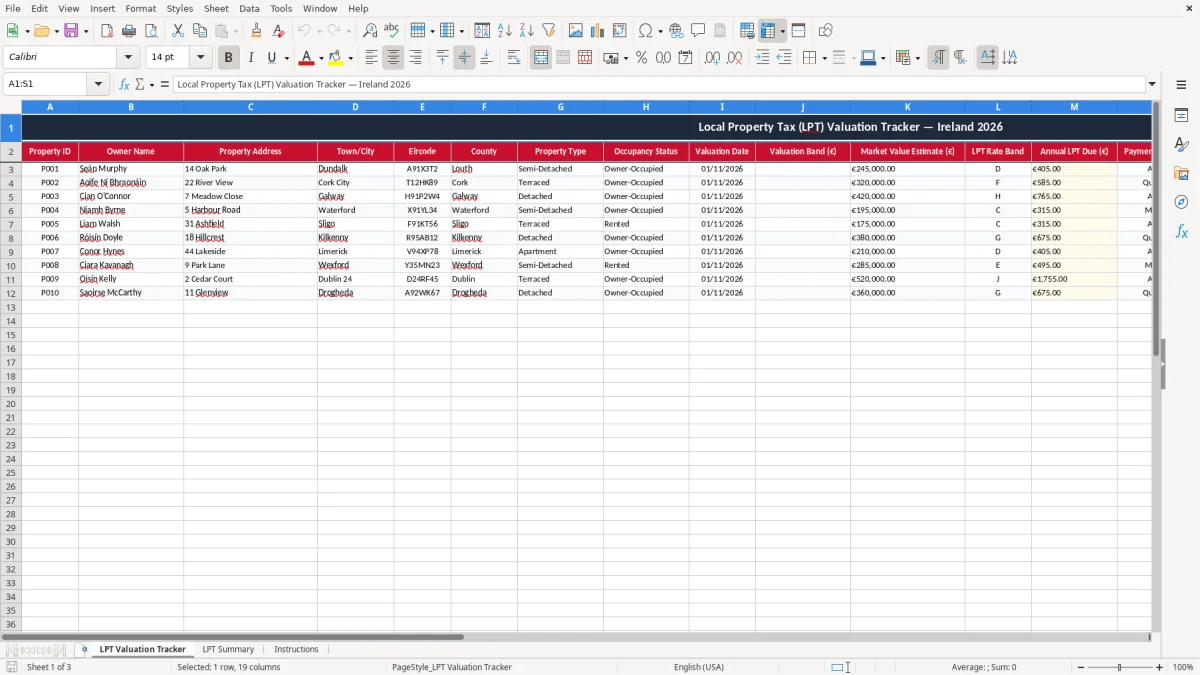
This LPT valuation tracker Excel template helps you record each property’s address, valuation band, payment schedule and balance outstanding in one place. It includes a tracker sheet, a summary sheet and an instructions sheet, so you can keep your Local Property Tax records tidy for Revenue.
Use it if you manage one house, a small portfolio, or multiple family properties and need a simple way to see what is due, what has been paid and what still needs attention. The layout is built for quick updating, with clear status fields and a running view of payment timing.
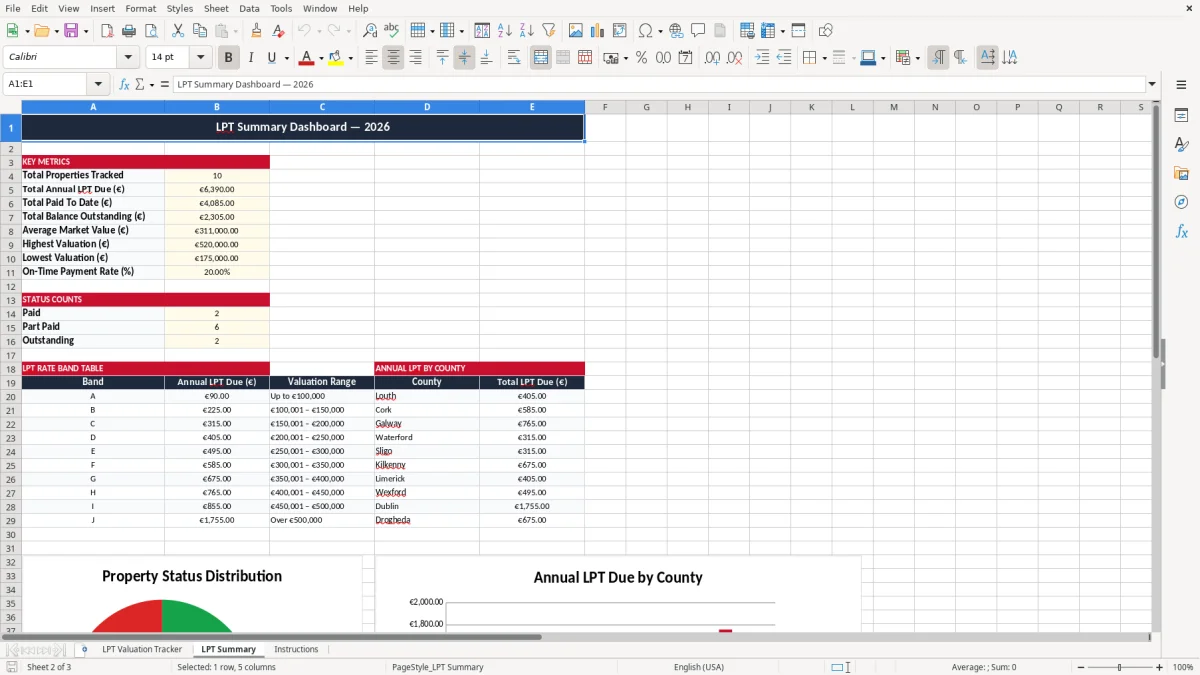
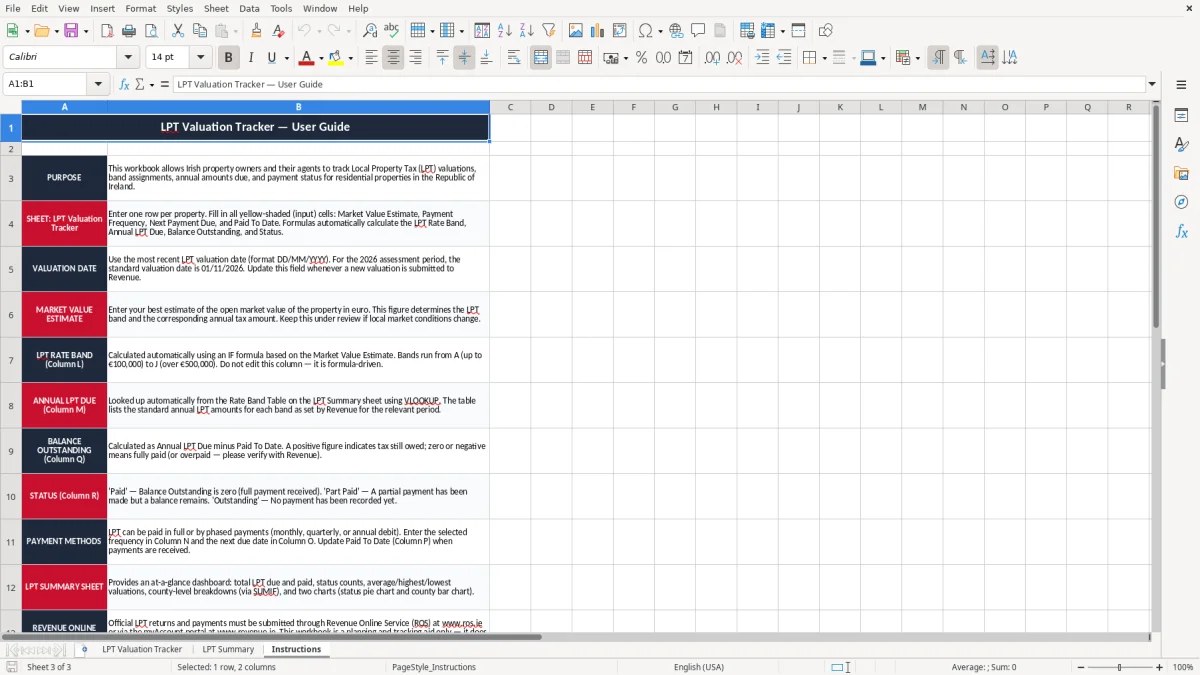
Image 1 shows the tracker table, image 2 shows the summary view and image 3 shows the instructions tab. The workbook is set up so you can enter property details once and then review totals without rebuilding the file every time.
The tracker is aimed at anyone in Ireland who has to keep a clean record of Local Property Tax on one or more homes. That includes a homeowner who wants one place for dates and balances, a landlord with a few units, or a family member helping an older relative keep the paperwork straight.
Image 1 shows the working sheet with the property lines laid out across 19 columns. You can see the core fields straight away: Property ID, owner name, address, town, county, property type, occupancy status, valuation date, valuation band, market value estimate and the payment fields.
The most obvious time is when you are checking the property before a payment run or updating records after a valuation review. If you have four properties and each one has a different payment pattern, a tracker like this stops you relying on memory or on old bank statements.
For example, if three properties each have an annual LPT due of €300 and one is already €120 paid to date, you can see the €180 balance outstanding immediately. That kind of visibility matters when you are planning cash flow around mortgage payments, repairs and other household bills.
Image 2 gives you a summary view rather than a line-by-line list. That is useful if you want to check total amounts due across the portfolio without scrolling through every row, especially when you are dealing with 10 or 15 properties and need a quick answer.
In practice, the summary sheet is the one you open before you make the payment or before you email a family member or co-owner. It turns a messy set of dates and values into a simple picture of what is still open.
For Local Property Tax, the important thing is to keep the property details and valuation basis clear and traceable. Revenue expects proper records to support your position, and in practice that means you should be able to show the address, valuation date, valuation band and any payment history without hunting through old files.
Revenue record-keeping runs for 6 years, so a neat tracker like this is the simplest way to keep a paper trail that survives beyond a single calendar year. If a property changed hands or the occupancy status moved from owner-occupied to rented, you want that change recorded in one place rather than scattered across emails.
The sheet has separate fields for valuation band and market value estimate because those are not the same thing. A property estimated at €315,000 may sit in a different valuation band from one at €305,000, so you need the band field to stay consistent with the valuation date.
That becomes useful when you are updating records ahead of a future valuation date or answering a query about why the annual LPT due looks the way it does. If you manage two houses in Cork and one apartment in Galway, the tracker keeps the valuation basis visible without burying it in a note.
Paper receipts and bank statements prove payments, but they do not organise the whole tax picture. A spreadsheet is better here because it puts next payment due, amount paid and balance outstanding on the same row, which is exactly what you need when you are checking whether a payment has slipped.
For a small portfolio, that is more practical than a separate folder for each house. If you have 3 properties and 12 monthly payments across the year, you are already dealing with 36 individual entries, so a single structured sheet is the safer choice.
That same structured approach becomes useful again when preparing corporation tax workings, where each figure needs to be tracked against the return rather than buried in a note.
The most common failure is not the spreadsheet itself, but the gap between the property record and the actual payment. People enter the address and then leave paid to date blank, which means they lose sight of a €90 or €180 balance until a reminder arrives.
A second problem is using the wrong valuation date or a vague note like “old band”. That is how a record becomes useless when someone later asks why the annual LPT due changed, especially after a valuation review or a transfer between owners.
If one property is short by €120 and nobody notices until later in the year, you may end up making a rushed payment alongside other household bills. The real cost is often the time spent reconstructing what was paid, when it was paid and which bank account it came from.
For a landlord with 6 properties, one missed update per property can easily mean 6 separate checks, 6 bank searches and a messy evening at the kitchen table. That is why the status column matters: “open”, “part-paid” or “cleared” is far better than a vague note in the margin.
It is also easy to duplicate addresses or mix up properties with similar names. A tracker with a Property ID helps avoid that, especially if you manage a home, a rental and a holiday property all in the same county.
If you are keeping records for a family member as well as your own home, the split between owner name, occupancy status and notes is what prevents cross-over. A spreadsheet that looks neat but cannot be trusted is no use; this one is built to make errors obvious before they cost you time.
The best way to keep this file alive is to tie it to something you already do, such as checking bank accounts on the first of the month or reviewing bills after payday. If you link it to a fixed routine, it stops becoming another job you will “get to later”.
For one to about 10 properties, this is usually all you need. Once you are dealing with dozens of units, multiple owners or automatic bank feeds, you are moving into proper accounting or property-management software territory.
If you are only checking LPT a few times a year, though, a clean workbook is still the simplest option. It is quick to update, easy to share, and far less fiddly than a system you will not keep using.

 Excel template built and verified by Ciara Byrne, Chartered Accountant (ACA) · builds the Excel templates.