
Childcare NCS Hours Excel Template (2026)
9
Free download
Track GAA members, annual fees, payments, balances, receipts, consent and overdue subscriptions in one Excel register for 2026.
Download template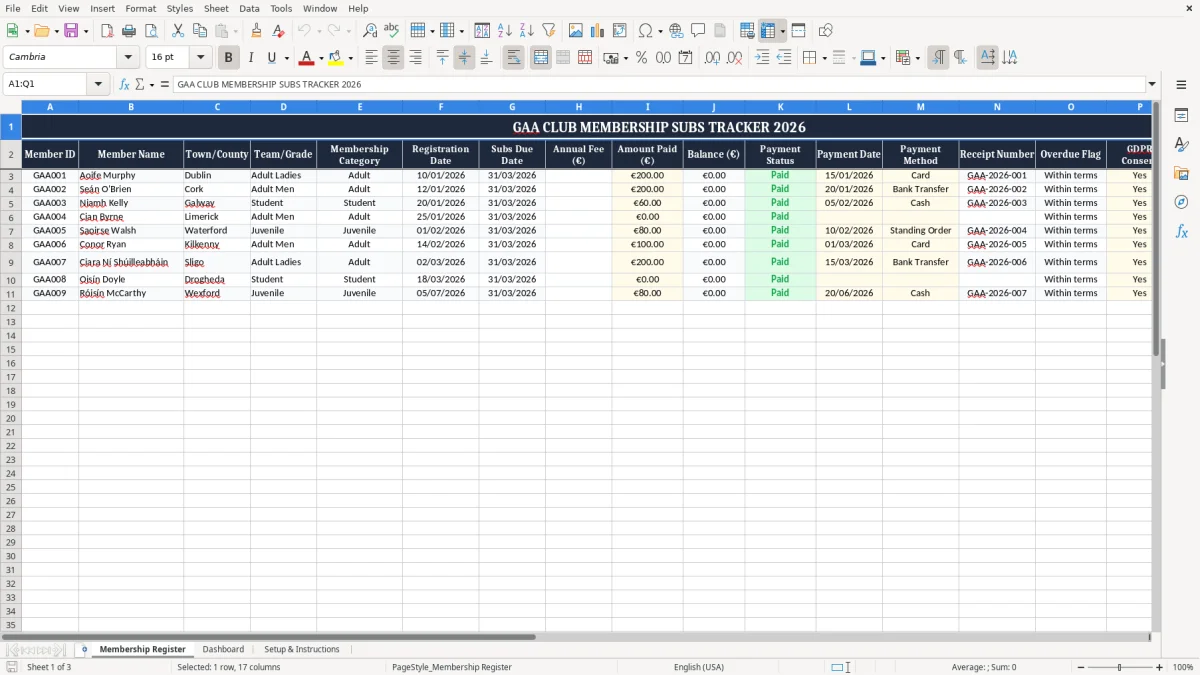
This GAA club membership subscriptions tracker is an Excel spreadsheet for recording members, annual fees, payments and outstanding balances. It contains a Membership Register, a Dashboard and a Setup & Instructions sheet, so a club treasurer can see who has paid and who still needs a reminder.
The register includes member IDs, names, town or county, team or grade, membership category, due dates, payment methods, receipt numbers, GDPR consent and notes. It is suited to a volunteer treasurer managing subscriptions at the start of the season, rather than trying to reconcile payments from text messages, bank references and paper forms.
A volunteer treasurer usually starts using the register when membership opens in January or February, before teams are fully settled. The Membership Register shown in image 1 gives each person a Member ID, Member Name, Town/County, Team/Grade and Membership Category, followed by the dates and money fields needed for collection.
That structure works for an adult club, juvenile section or a club with several grades. A committee can filter Adult Ladies, Adult Men, Student or underage groups instead of scanning one long list. I would keep one row per member, even where three siblings live at the same address, because payment status and consent belong to the individual.
Suppose a club has 4 teams with 25 players each and an annual fee of €200. If 80 members have paid in full, the register should show €16,000 collected and €4,000 still due from the remaining 20 members. That is a much more useful figure for a committee meeting than a bank balance with no link to individual names.
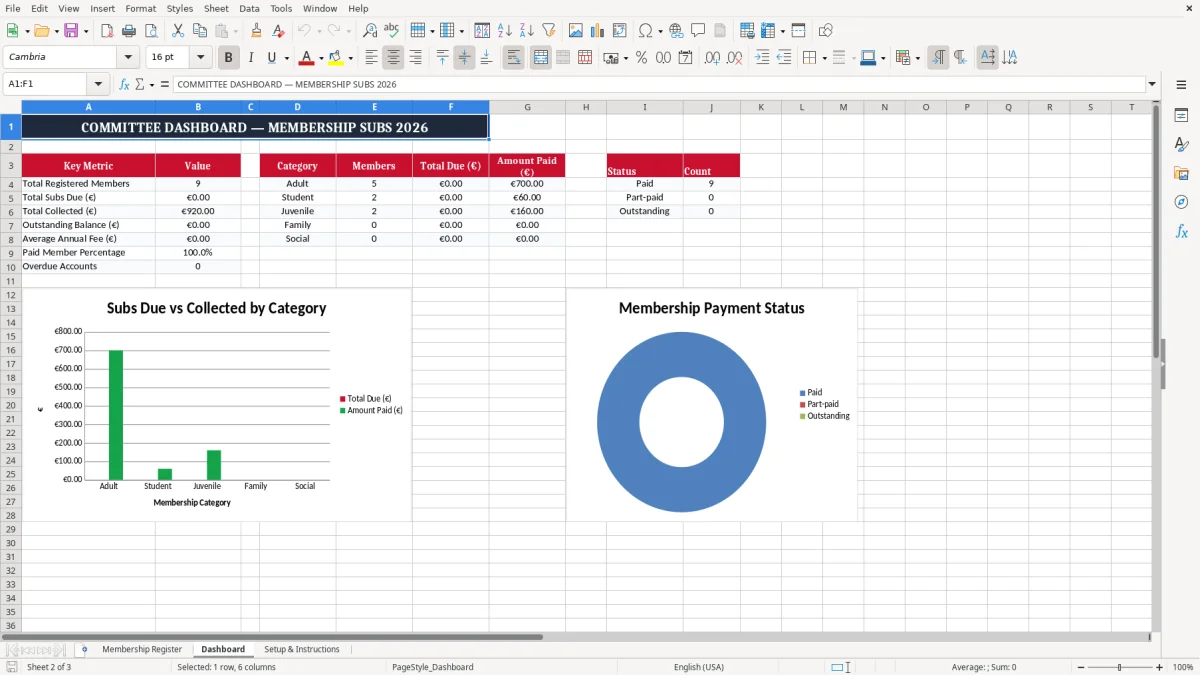
Image 2 shows the Dashboard, which gives the committee a summary view rather than making them work through every row. Use it before a training block, registration cut-off or county competition entry to identify whether the unpaid amount is a few late payments or a wider collection problem.
The same file is useful after a player changes grade, joins mid-season or pays in instalments. A club treasurer can update the amount paid and payment date immediately after checking the bank statement, while the secretary can use the team and category fields to answer registration queries without searching several notebooks.
A membership register contains personal data, so the GDPR and the Data Protection Act 2018 apply. The club is normally acting as the data controller for its membership administration, while the volunteer treasurer or secretary handles the data on the club's behalf. The Data Protection Commission expects the club to know what it collects, why it collects it and who can access it.
The GDPR Consent column in image 1 is useful for recording the club's chosen consent status, but it is not permission to collect everything. Keep Notes limited to information needed for membership administration, such as Committee member or Long-standing member. Do not put medical details, bank account numbers or unnecessary family information into a general subscriptions tracker.
Set a written retention period and review it at least annually. For example, a club might retain payment records for the period needed for its accounts and grant queries, then delete or anonymise old member details rather than keeping every spreadsheet forever. Store the workbook in a restricted club account, not in a public team WhatsApp group or an unprotected USB stick.
A practical rule is to give editing access only to the treasurer and one named committee backup. If a laptop containing the file is lost, the club should follow its breach procedure; a personal-data breach that presents a risk may need notification to the Data Protection Commission within 72 hours under GDPR Article 33.
Do not add 23% VAT to ordinary club membership subscriptions simply because the workbook displays euro amounts. Genuine subscriptions to a not-for-profit sporting club need to be classified correctly; fundraising sales, sponsorship, facility hire or commercial services can have different treatment. Keep the register as a membership and collection record, and maintain proper accounts separately for the club's income and expenditure.
The most common failure I see is a treasurer marking a member paid from a bank narration, then forgetting to enter the receipt number. Three months later, the club has €12,400 in the bank from subscriptions but cannot show which of 62 members paid. That creates awkward conversations when a player is asked for money twice or a parent says the payment was already made.
Use the row as the control point: amount paid, payment date, payment method and receipt number should be completed together. If a family pays €450 for three members, allocate the amount clearly across the relevant rows rather than leaving one member with a credit that makes two others appear overdue.
A due date entered as text, such as 31 March without a year, can undermine an overdue check. A wrong 2026 date can also make a current member appear late. Check that registration and due dates are entered as DD/MM/YYYY and that the annual fee is €200 rather than 200 cents or €2,000.
Team and category drift is another practical problem. If one person enters Adult Men and another enters Senior Men, a filter will split the list and the Dashboard may not give the committee a complete group total. Agree the allowed labels before the season starts; this is more reliable than correcting spelling every month.
Sending the full workbook to every coach exposes names, payments and consent details that coaches may not need. A club with 300 members can create a serious incident from one email attachment, even if no money is lost. Keep the full register with the authorised finance volunteers and provide coaches only with the limited information required for team administration.
Finally, do not delete a row just because a member has left. Deletion can remove the payment trail; instead, keep the financial record according to the club's retention policy and avoid adding new personal detail to the Notes field.
A spreadsheet survives when somebody owns the small maintenance task. The simplest arrangement is for the treasurer to update the register every Friday after checking the bank account, taking 15 minutes to enter new payments while the references are still recognisable. Do not wait until the end of the month when 40 transactions have become a guessing exercise.
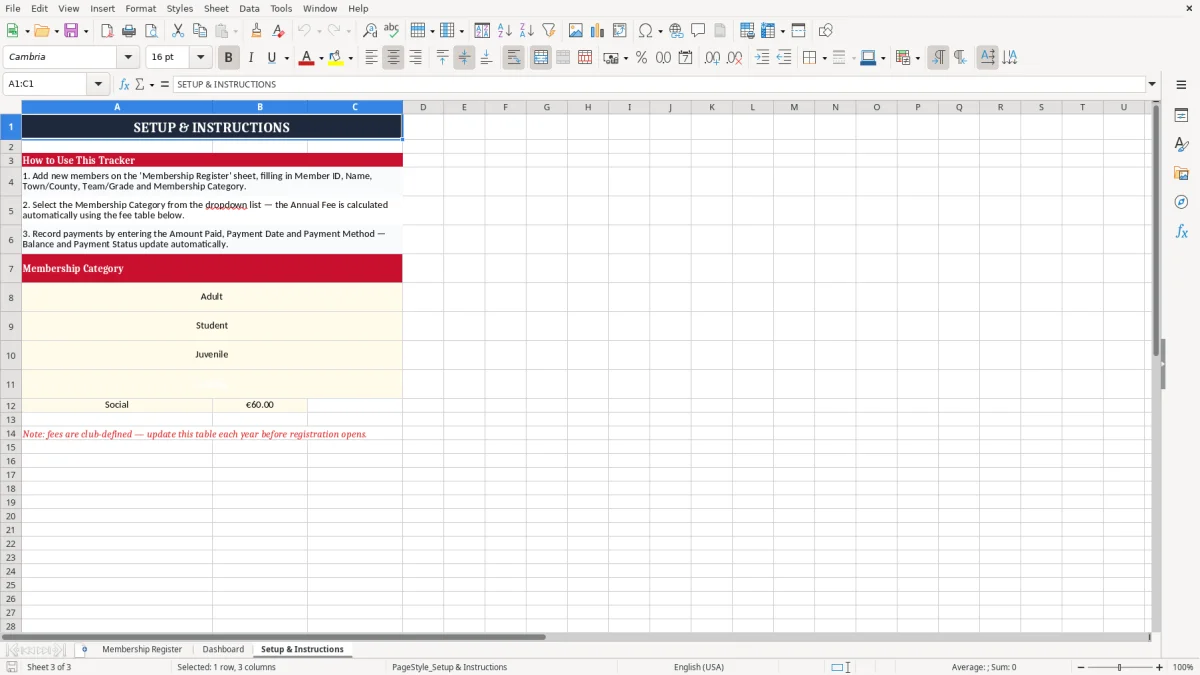
Use the same team names, membership categories and payment method labels throughout the file. The dark header row, red subheader styling and pale input cells make it clear where a volunteer should work, while the Setup & Instructions sheet in image 3 provides the starting point for a new treasurer.
My preference is to correct the register at source rather than maintain a second reminder list. If a member pays €100 today against a €200 fee, enter the €100 once and leave the balance visible; copying that name to a notebook nearly guarantees that one of the two records will be missed later.
For 300 members and one treasurer, this format is manageable if updates are weekly. Once several people edit it at the same time, online registrations need automated receipts, or the club must handle recurring instalments and refunds, move to a club-management system with user permissions and an audit trail. Keep an export of the 2026 register for the accounts and handover, rather than relying on an inaccessible volunteer's laptop.

 Excel template built and verified by Ciara Byrne, Chartered Accountant (ACA) · builds the Excel templates.