
Creche Fee Excel Template – Free Tracker (2026)
6
Free download
Estimate NCS childcare hours, subsidy and parent fees across 100 records, with editable rates, caps, summaries and charts for Irish families and providers.
Download template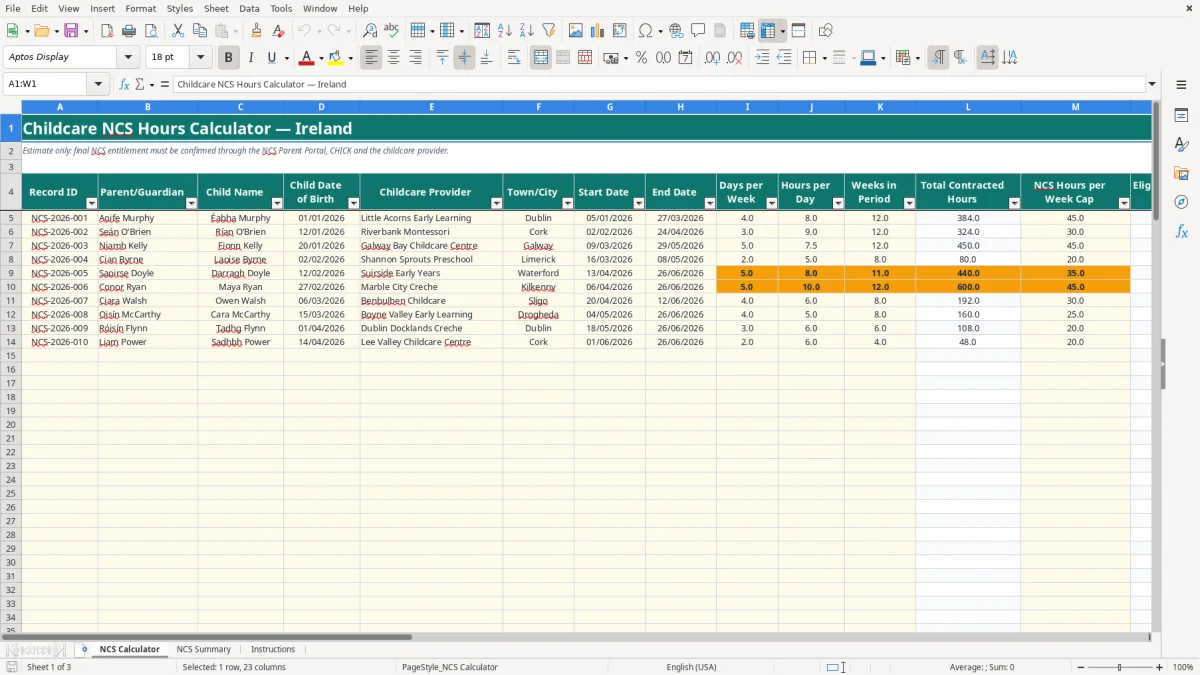
This childcare NCS hours Excel template estimates contracted hours, eligible hours, subsidy and parent fees for up to 100 childcare records. It contains the NCS Calculator, NCS Summary dashboard and Instructions sheets, with editable caps and subsidy rates.
Enter one row for each child and separate childcare arrangement. The workbook calculates the lower of contracted weekly hours and the selected cap, then applies the chosen hourly rate; final entitlement must be confirmed through the NCS Parent Portal, CHICK and your childcare provider.
A parent or guardian usually needs this calculation when comparing a childcare arrangement, checking a provider's weekly schedule or planning a change in attendance. A childcare provider can also use it to prepare estimates for several families, while an office administrator may use it to model childcare costs before a staff member changes working hours.
The workbook's NCS Calculator sheet is designed around a record rather than a monthly transaction. Image 1 shows the columns from Record ID and Parent/Guardian through to Childcare Provider, Town/City, dates, attendance, fees and the subsidy category. The practical approach is one row per child and separate arrangement, even where two children are in the same service.
For example, the populated Aoife Murphy record has 4 days per week, 8 hours per day and 12 weeks. The formula calculates 4 × 8 × 12 = 384 total contracted hours. With a 45-hour weekly cap, eligible hours are the lower of 32 and 45, giving 32 per week and 384 across 12 weeks.
The prepared table runs from row 5 to row 104, so you can enter up to 100 operational rows in this workbook. A family with two children and two providers should use four rows if the arrangements or schedules are separate. That keeps the contracted hours, cap and weekly fee attached to the correct child.
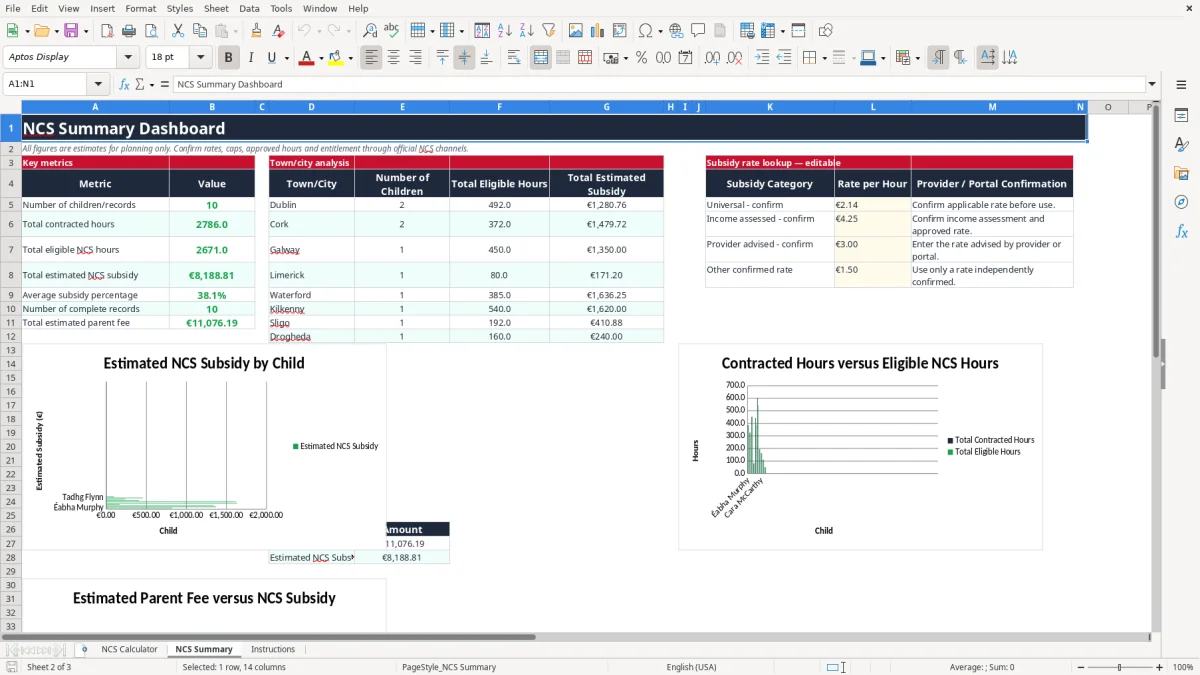
The NCS Summary sheet groups the view by town or city, including Dublin, Cork, Galway, Limerick, Waterford, Kilkenny, Sligo and Drogheda. Image 2 shows the dashboard layout, while its charts help you compare records without manually adding the calculator rows.
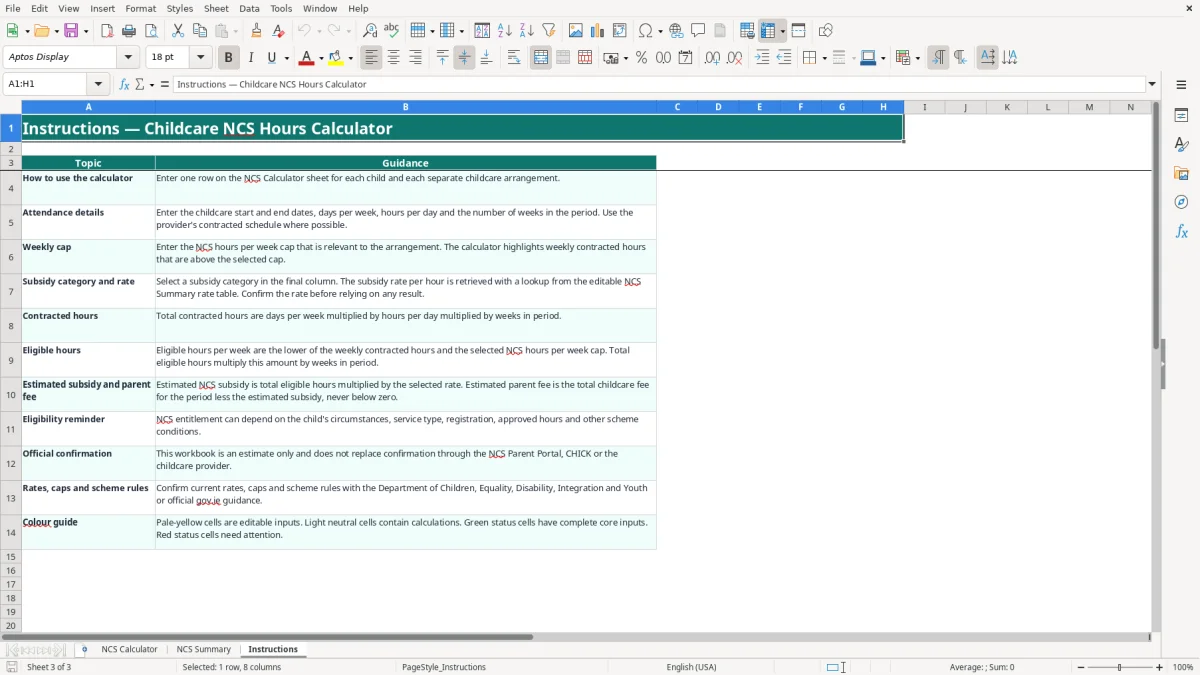
The National Childcare Scheme is administered through official channels, and this workbook is an estimate rather than an entitlement decision. The Instructions sheet specifically directs you to confirm current rates, caps and scheme rules with the Department of Children, Equality, Disability, Integration and Youth or official gov.ie guidance, and to check through the NCS Parent Portal, CHICK or the provider.
Do not treat the sample rates as a permanent 2026 entitlement. On NCS Summary, the editable lookup table contains four categories: Universal - confirm, Income assessed - confirm, Provider advised - confirm and Other confirmed rate. The sample hourly values are €2.14, €4.25, €3.00 and €1.50 respectively, but the workbook labels them for confirmation.
When you select a category in column W of NCS Calculator, the formula in column P uses VLOOKUP against NCS Summary K5:L8. The estimated subsidy is then total eligible hours multiplied by that rate. For instance, 384 eligible hours at €2.14 would produce €821.76 as a calculation only; it does not confirm that the child qualifies for that rate.
Use the provider's contracted schedule for days, hours, weeks and fees. The calculator accepts 0 to 7 whole days per week, 0 to 24 hours per day, 0 to 52 weeks, and a cap from 0 to 60 hours. Those are workbook validation limits, not statements of legal entitlement.
The NCS Summary reminder is important: entitlement can depend on the child's circumstances, service type, registration, approved hours and other scheme conditions. Treat the sheet as a planning aid, then reconcile it to the provider and official NCS information before relying on the parent fee.
The most expensive errors usually come from treating a planning input as an approved NCS fact. I have seen families copy a provider's full-day schedule into a calculator, accept a remembered hourly rate and assume the resulting parent fee is final. The workbook is useful precisely because it separates contracted hours, eligible hours, rate and fee, but each of those inputs still needs checking.
If a record has 5 days at 7.5 hours, the contracted week is 37.5 hours. Selecting a 30-hour cap produces 30 eligible hours, not 37.5, and over 12 weeks that difference is 90 hours. At a hypothetical €3.00 rate, the gap would be €270, so a wrong cap can materially change a family budget.
Column U provides a warning rather than an approval. Its formula returns Check required where the core attendance inputs are positive, and Incomplete where required values are missing or unsuitable. Read that status alongside the cap and rate instead of assuming a green-looking calculation is a confirmed award.
Changing the label in column W without checking NCS Summary can produce a neat but unsuitable estimate. The rate table is deliberately editable, and the dashboard says Confirm applicable rate before use. If a category is misspelled, VLOOKUP returns a blank rate and the subsidy calculation remains blank rather than inventing a number.
Another common mistake is entering a weekly fee where the model expects the total childcare fee for the whole period. The formula for estimated parent fee subtracts the subsidy from R multiplied by K. If €220 is entered as a weekly fee for 12 weeks, the model treats the period fee as €2,640; that may be correct for the sample structure, but it must match what you are actually budgeting.
Use the workbook at a fixed point rather than only when a fee dispute arises. For a family, Friday evening or the day a provider issues a revised schedule works well. For a provider, update it after the weekly attendance pattern is agreed and before sending an estimate to a parent.
Image 3 shows the Instructions sheet, including the colour guide: pale-yellow cells are editable inputs, neutral cells contain calculations, and status colours indicate whether attention is needed. Keep the original workbook unchanged and save a dated copy when a rate, cap or arrangement changes.
Image 2 shows the NCS Summary layout. Its key metrics total contracted hours, eligible hours, estimated subsidy, average subsidy percentage, complete records and estimated parent fees. The town analysis uses COUNTIF and SUMIF, so entering Cork or Galway consistently matters if you want meaningful location totals.
This spreadsheet is a good fit for a small number of arrangements and planning comparisons. Move to a controlled childcare or finance system when several staff edit the file, you need an audit trail of rate changes, or the 100 prepared rows are no longer enough. Do not expand the model by overwriting formulas in calculated columns; add inputs only in the intended cells.

 Excel template built and verified by Ciara Byrne, Chartered Accountant (ACA) · builds the Excel templates.