
Dental Recall Excel Template (2026)
0
Free download
Manage Irish B&B bookings, room rates, deposits, balances, VAT and occupancy with four linked Excel sheets for daily operations.
Download template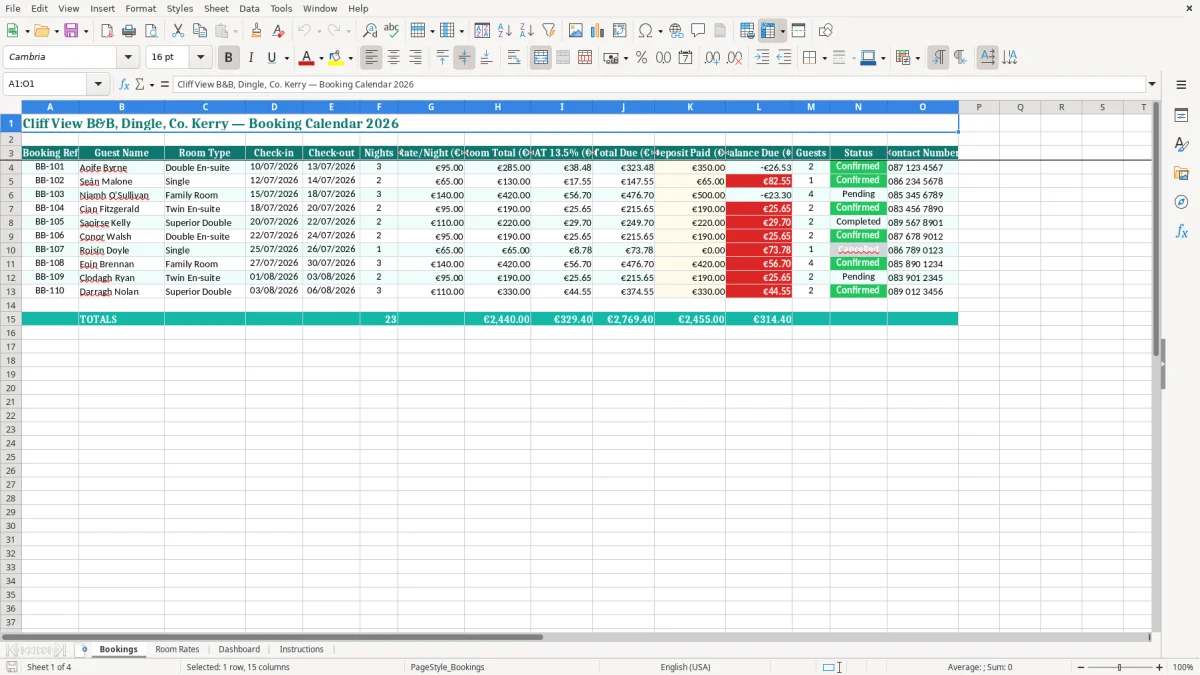
This B&B booking calendar Excel spreadsheet records guests, rooms, check-in and check-out dates, nights, rates, deposits and balances. It includes a Bookings sheet for daily reservations, Room Rates for pricing, a Dashboard for summaries and Instructions to guide setup.
It is suited to a small Irish bed and breakfast that wants one clear view of who is arriving, what each stay is worth and which balances remain unpaid. Image 1 shows the main booking table, with pale yellow input cells and teal column headings.
The sample file is set up for Cliff View B&B in Dingle, Co. Kerry, with July 2026 bookings and a 13.5% VAT column. You can replace the sample names, rooms, rates and contact numbers with your own information.
A B&B owner often updates the calendar between breakfast service and room turnover. The Bookings sheet gives a quick list of the guest, room, dates, party size and contact number, which is more useful at 10am than a long email thread from an online travel agency.
For example, the sample has Aoife Byrne in a Double En-suite from 10/07/2026 to 13/07/2026, Seán Malone in a Single from 12/07/2026 to 14/07/2026, and Niamh O'Sullivan in a Family Room from 15/07/2026 to 18/07/2026. The owner can see overlapping arrivals and departures before allocating cleaning time.
In a small Kerry, Galway or Donegal B&B, the person taking a phone booking may also answer guest questions, post deposits and prepare the room list. A reference such as BB-104 is easier to quote than a guest's surname, particularly when two guests have similar names.
The 15 columns cover the practical handover: contact number, status, guests and deposit are beside the financial fields rather than hidden on another page. I would keep one row per booking and use the Status field consistently as Pending, Confirmed or Completed; that is safer than adding notes such as probably coming or paid maybe.
The busiest use is usually the weekly review before a bank-holiday weekend or local festival, not just year end. A B&B with six rooms and 80 occupied room nights in a month can quickly lose track of €1,200 in deposits if payments sit in text messages and a separate notebook.
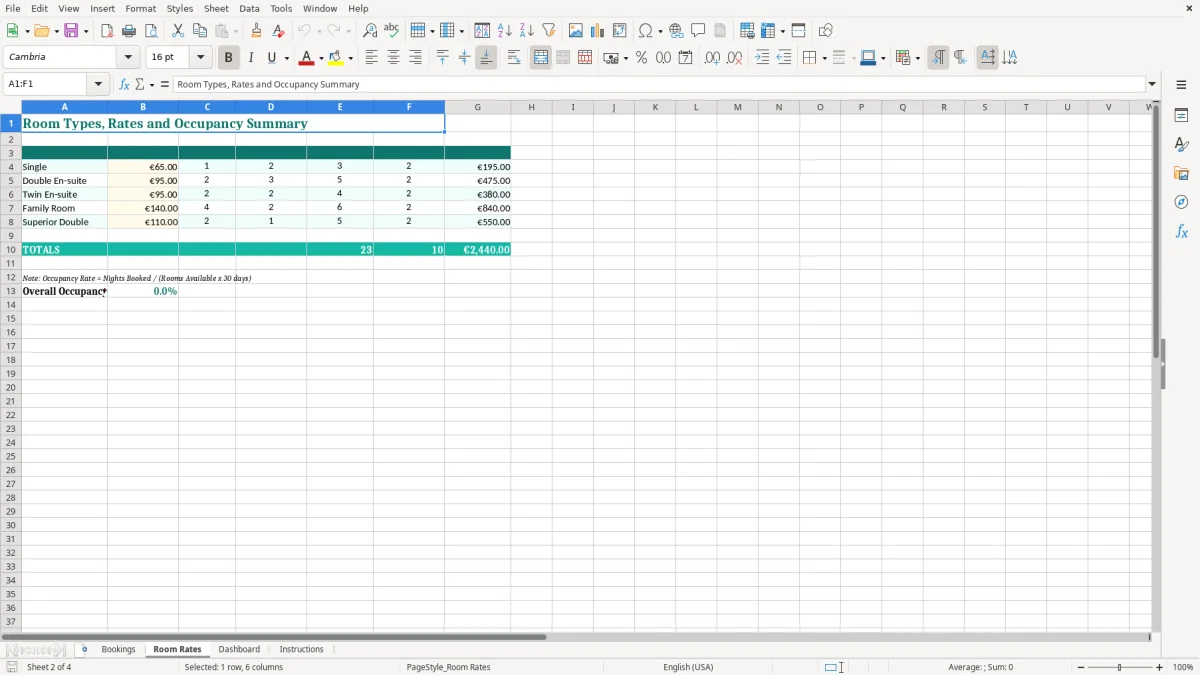
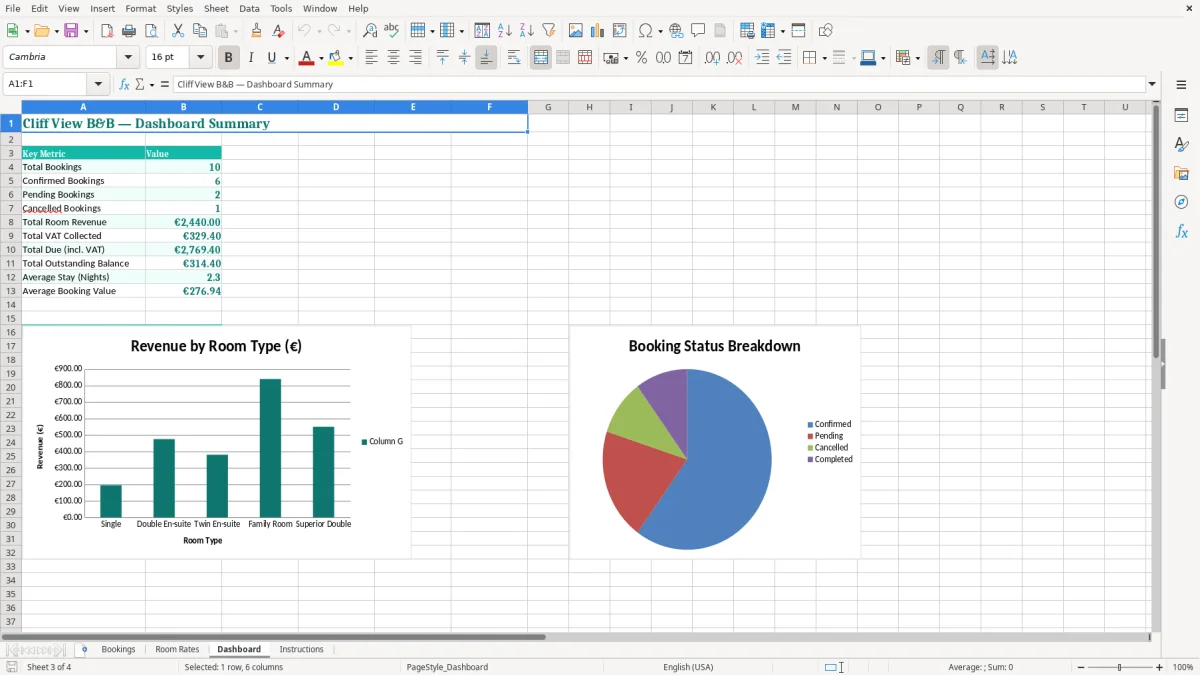
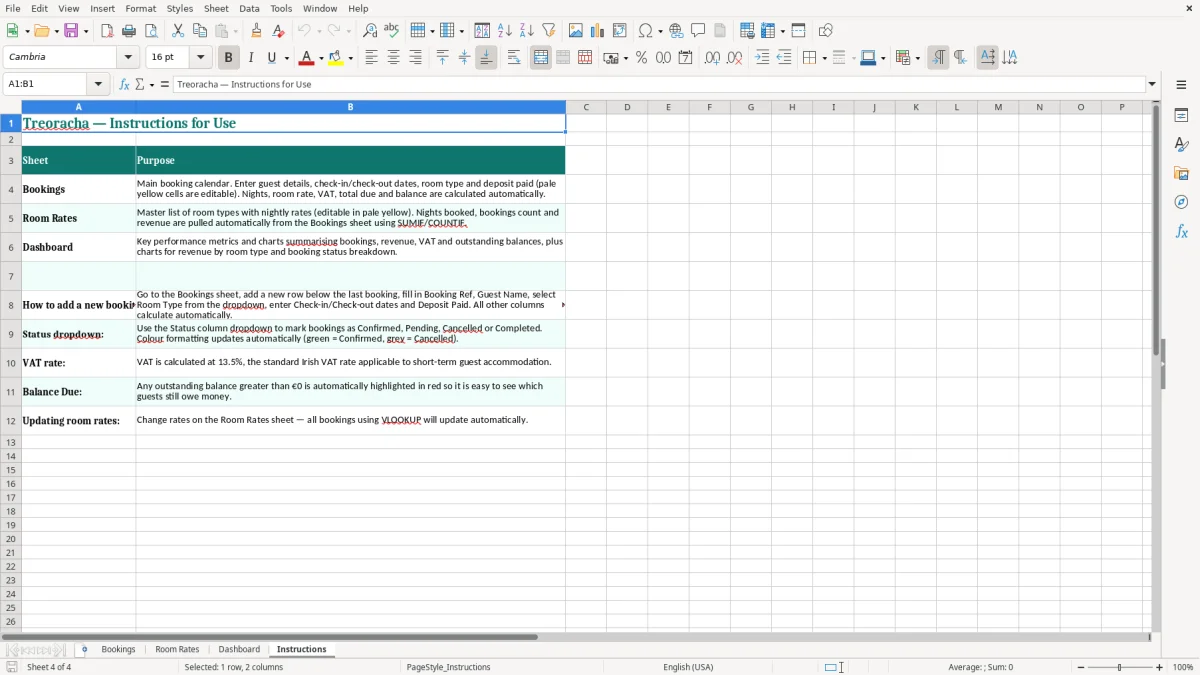
The Dashboard is useful when the owner wants a quick summary, while the Bookings sheet remains the detailed record. Image 2 shows the Room Rates layout, image 3 shows the Dashboard summaries and image 4 shows the Instructions sheet, so the workbook can be handed to a relief administrator without a long explanation.
The workbook includes a VAT 13.5% column because qualifying hotel and guest accommodation in Ireland is generally charged at the reduced 13.5% rate in 2026. On a €500 room total, the VAT shown at that rate is €67.50 and the total including VAT is €567.50, assuming the displayed room total is VAT-exclusive.
Do not treat the spreadsheet's VAT figure as a substitute for your VAT3 working papers. Check whether a displayed rate is VAT-inclusive or exclusive before quoting a price: €113.50 including 13.5% VAT contains €13.50 VAT, while €113.50 excluding VAT produces a customer charge of €128.82.
For a business supplying services, the usual VAT registration threshold is €37,500 turnover in a continuous 12-month period; the goods threshold is €75,000. A B&B should monitor its accommodation turnover against the relevant threshold rather than waiting until a booking calendar becomes crowded.
A VAT-registered business normally files a bi-monthly VAT3 return through ROS and also completes the annual Return of Trading Details. Keep the booking totals, invoices, receipts and payment evidence together so the amount on the VAT3 can be traced back to source records.
Revenue expects business records to be retained for 6 years. This workbook can support the sales side of that file, but bank statements, invoices or receipts, cancellation records and payment processor reports still need to be retained separately where relevant.
Use the B&B's legal name, Tax Reference Number or VAT number on invoices, give invoices sequential numbers, and show VAT separately by rate where VAT is charged. The spreadsheet is a control tool: your annual accounts, preliminary tax and Form 11 or Form CT1 must still be prepared from complete accounting records.
The most expensive booking error is confirming the same room twice. It often happens when one reservation is in a diary, another is in an online channel and a third arrives by phone. One double booking can mean a refund, a taxi to alternative accommodation and a poor review, easily costing €150 or more before the lost future booking is considered.
Check the number of nights against the dates before taking a deposit. In the sample, a booking running from 10/07/2026 to 13/07/2026 represents three nights on a normal check-in/check-out basis, so a displayed Nights value of 2 would need investigation. Never correct a date mismatch by quietly changing the total; confirm the guest's actual departure date first.
A common failure is recording a €100 deposit in a bank book but leaving the booking's Deposit Paid cell blank. A €500 room total then appears to have a €500 balance when only €400 is outstanding, leading to an awkward request for money the guest has already paid.
Use the booking reference on the bank transfer description and match it to the row. If three July reservations each have a €100 deposit, the workbook should show €300 collected and each individual balance should reduce by €100; a single monthly total is not enough to resolve a disputed payment.
Marking every stay as Completed at the time of booking hides unpaid balances and makes the Dashboard less useful. Likewise, applying 13.5% VAT to a non-accommodation item without checking its treatment can distort the VAT3 by €13.50 on every €100 charged.
I have seen small guesthouses lose an afternoon reconstructing a summer from card settlement reports because guest names, dates and deposits were not recorded together. The practical answer is to update one row when the booking is made, again when the deposit arrives and finally after checkout, rather than rebuilding the history in October.
Attach the workbook to a task that already happens, such as checking the breakfast order on Monday morning. Spend 10 minutes reviewing arrivals for the next 14 days, filtering for Pending bookings and checking that every Confirmed stay has a room, rate, contact number and deposit position.
For a six-room B&B, a two-week look-ahead means checking up to 84 possible room nights. That is manageable in Excel, but only if the calendar is updated before the next enquiry is accepted.
Use the same room names as the Room Rates sheet: do not alternate between Double, Double Room and Double En-suite. If you extend the workbook, add data validation for Room Type and Status, and use conditional formatting to highlight Pending rows or balances above €0.00.
This workbook is a sensible choice for one owner or a small team managing a modest number of rooms. I would move to dedicated property-management software when you are handling hundreds of bookings each month, several sales channels, automated payment links, real-time availability or multiple users editing simultaneously.
Until then, the simplest routine is one master file, one person responsible for changes and a weekly backup. Keep the spreadsheet for operational control and reconcile its totals to the bank and accounting records at month end.

 Excel template built and verified by Ciara Byrne, Chartered Accountant (ACA) · builds the Excel templates.