
School Book Rental Excel Template – Free Tracker (2026)
4
Free download
Track pub kegs by brand, supplier, cellar location, pints sold, reorder levels and remaining value across three practical Excel sheets.
Download template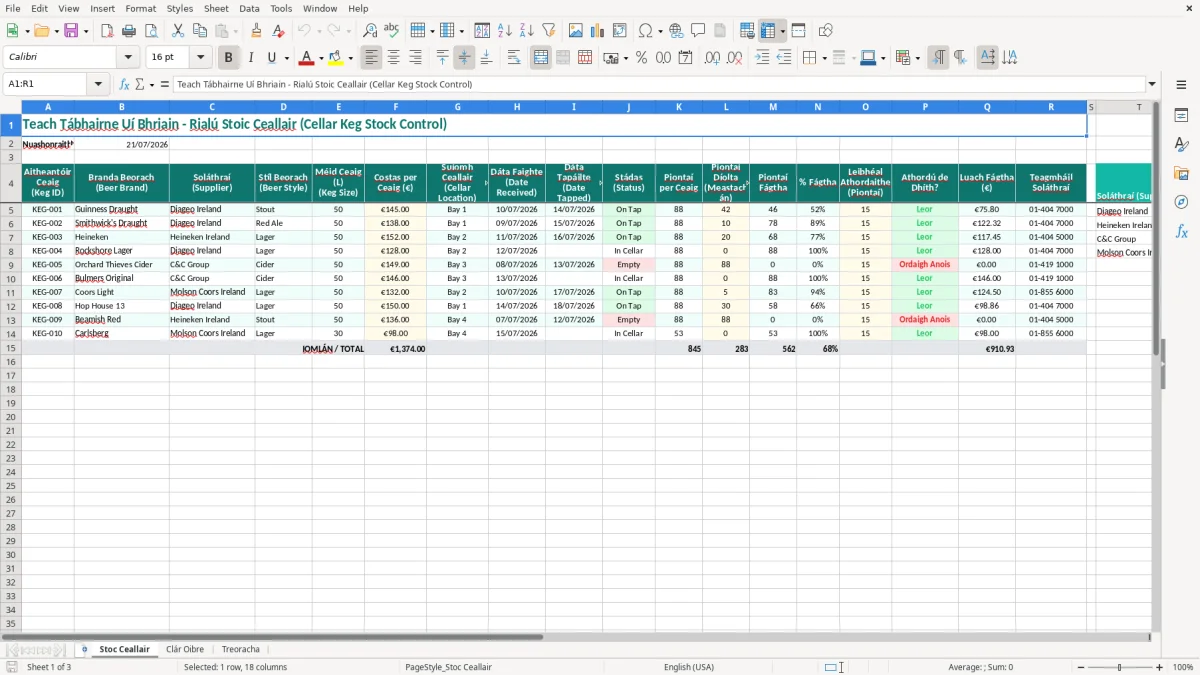
This pub cellar keg stock control Excel spreadsheet records each keg by ID, beer brand, supplier, size, cost, location, status and dates received or tapped. It also calculates estimated pints sold, pints remaining, percentage left, reorder requirements and remaining stock value, with instructions for Irish pub teams.
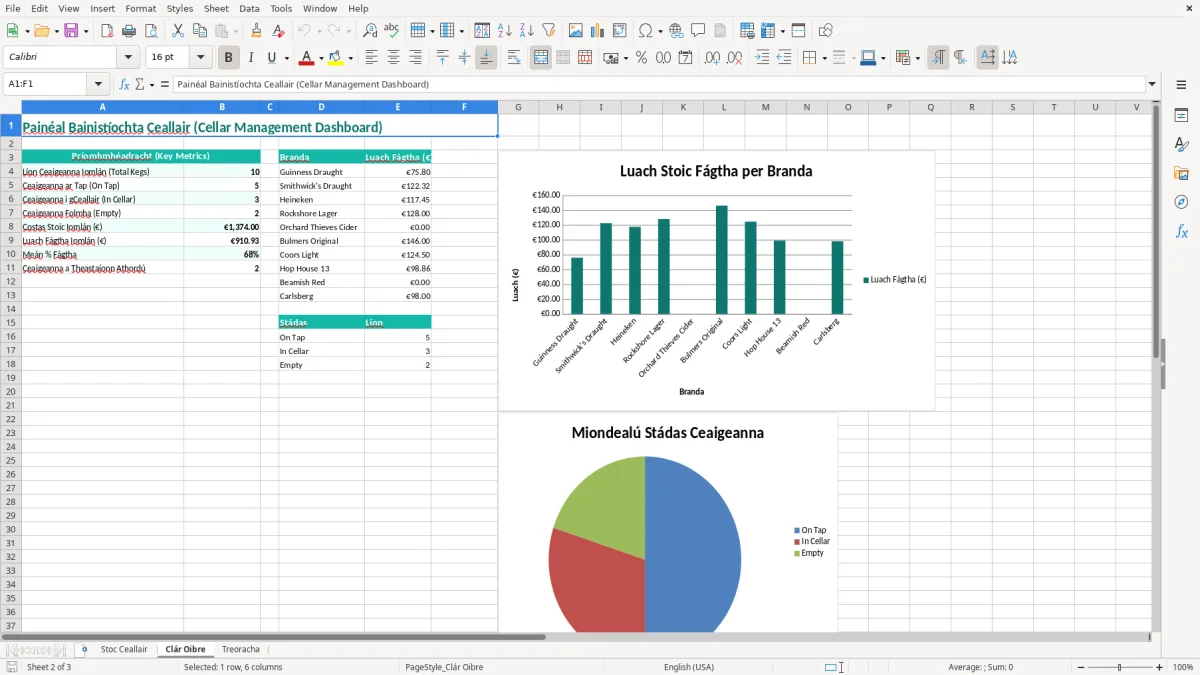
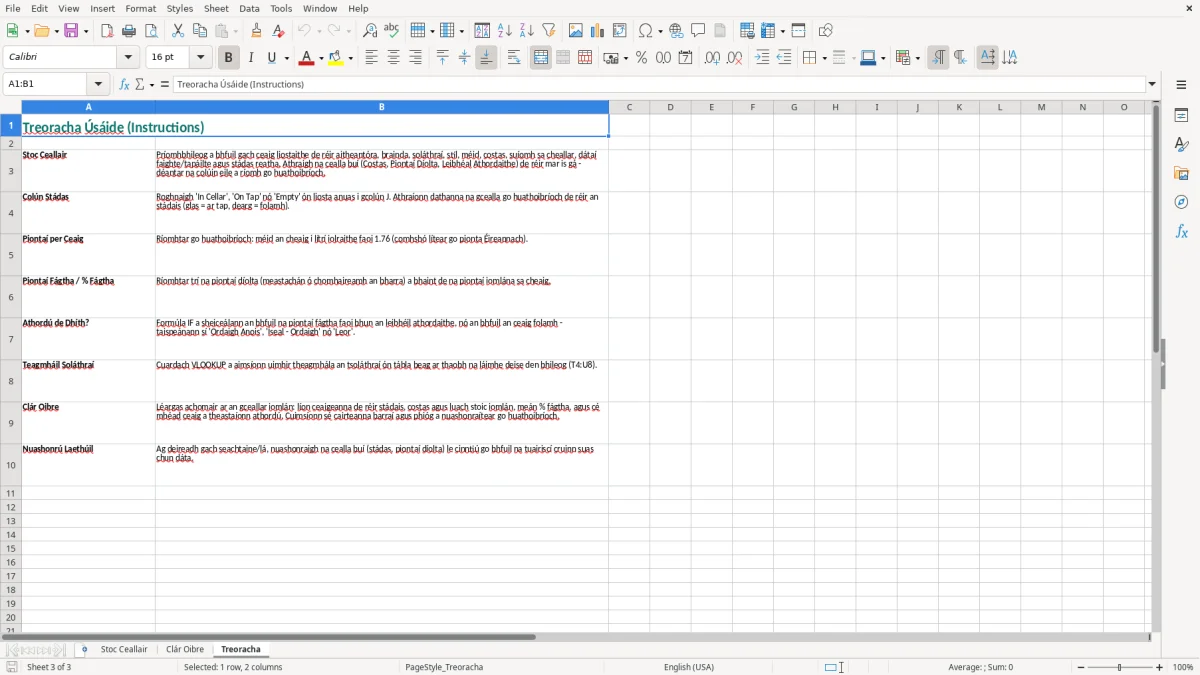
The main sheet, Stoc Ceallair, is laid out for a bar manager or cellar person to update during deliveries and stock checks. Clár Oibre provides a simple work-planning area, while Treoracha explains how to complete the workbook; images 1, 2 and 3 show the three sheets in that order.
In a small Irish pub, the person opening the cellar may also be the duty manager, so the delivery check has to be quick. When four Guinness Draught kegs, two lagers and a seasonal ale arrive, the manager can assign KEG-001 style IDs, record the supplier, litre size, cost and cellar location before the driver leaves.
Image 1 shows Stoc Ceallair as the working register. Its columns run from Keg ID, Beer Brand and Supplier through Beer Style, Keg Size, Cost per Keg, Cellar Location, Date Received, Date Tapped and Status. The second half covers Pints per Keg, estimated pints sold, pints remaining, percentage left, the reorder threshold, the reorder flag, remaining value and supplier contact.
A bar manager will usually update the status when a keg is tapped or emptied. The cellar person may instead count the lines and estimate what remains, while the owner reviews supplier costs and stock value before paying invoices. Keeping all three views in one row is more useful than a notebook that only records deliveries.
Consider a 50-litre keg with an estimated 88 pints. If the team enters 60 pints sold, the sheet can show roughly 28 pints left. With a reorder level of 30 pints, that line needs attention even though the keg is not empty. That is the point at which a Saturday-night shortage can be prevented.
Clár Oibre, shown in image 2, supports the work around the register, such as checking cellar lines or following up an order. Treoracha, shown in image 3, gives the handover information for a new manager. The strongest use is a short count every week, followed by a fuller count at month end and at the end of the trading year.
Revenue expects a business to retain accounting records for 6 years. For a pub, that means keeping the supplier invoice, delivery docket, credit note and any return documentation with the stock records rather than relying on the spreadsheet alone. The Keg ID and Date Received columns make it easier to link a physical keg to that paperwork.
VAT is normally shown separately on a supplier invoice. Ireland's standard VAT rate is 23%, while 13.5%, 9% and 0% rates apply to specified supplies; beer purchased for resale must be coded according to the actual invoice and not guessed from the brand. A €1,230 invoice at 23% contains €230 VAT and €1,000 net cost, so entering €1,230 in Cost per Keg while later treating it as a net cost would overstate stock.
A VAT-registered pub generally files a bi-monthly VAT3 return and an annual Return of Trading Details through ROS, the Revenue Online Service. This spreadsheet is a physical stock-control tool, not a VAT3 calculator, so take the VAT treatment from the purchase invoices and post the accounting totals separately.
At year end, do a physical stocktake and value unopened and partly used kegs consistently. For beer bought at €145 net per keg, 10 full kegs represent €1,450 before any agreed treatment for opened kegs. My practical preference is to use a documented cost basis and apply the same method each month; switching between invoice price, selling price and an unsupported estimate makes the profit and loss and balance sheet difficult to defend.
Use FIFO, first in, first out, where it reflects how the cellar is actually operated: older stock should normally be used before newer deliveries. The template's Date Received, Date Tapped and Cellar Location fields support that discipline, but they do not replace a check of best-before dates, line cleaning records or excise and licensing obligations.
I have seen stock sheets show 12 kegs while the cellar contains 10 because two empty kegs were never marked as emptied. At an average cost of €140 each, that is €280 of apparent stock and a poor purchasing signal. The problem is not an Excel formula; it is leaving Status unchanged after the last pint is poured.
The opposite error is also costly. A manager may count a tapped keg as half full when it has actually yielded fewer pints because of foam, line waste, spillage or incorrect glass measures. If a 50-litre keg is treated as 88 saleable pints but only 76 are realistically sold, a €160 keg has a theoretical cost of €1.82 per pint before wastage. The difference needs investigation, not quiet adjustment.
Beer brand names are often shortened in a hurry: Guinness, Guinns and Draught can become three different descriptions. A 30-litre keg entered as 50 litres can inflate the expected pints by more than 40%, making the reorder flag meaningless. Use the full brand and style in the row, and check Keg Size against the supplier docket at intake.
Duplicate Keg IDs create a different failure. If KEG-014 is entered twice, a later status update may be applied to the wrong physical keg. That can lead to a second order being placed or a returned keg remaining in the valuation. The best stance is simple: one physical keg, one row, one unique ID.
Suppose the till reports 420 pints of lager sold but the cellar estimate implies only 350 pints left from the deliveries. The 70-pint gap could represent a missed delivery, a line change, staff drinks, wastage or a counting error. Do not force the spreadsheet to match the till; record the variance, check dockets and investigate the operational cause.
Repeated gaps above 5% of expected yield deserve a manager's review. They can cost hundreds of euro over a month in a busy venue, particularly where high-volume lager and stout lines are involved.
Those same monthly variances also matter when you need to estimate a refund, because the final figure depends on reconciling what was delivered, what was sold and what was actually left.
The easiest routine is not a separate administration session. Give the duty manager ten minutes after the Sunday close, or attach the count to the Monday supplier-order review. Update only what changed: new deliveries, moved kegs, tapped dates, estimated pints sold and empty returns.
For a pub selling 900 draught pints a week, a 10-minute count is a small control compared with discovering on Friday that a core line has 18 pints left. The threshold in Reorder Level (Pints) should reflect actual delivery lead time, not an arbitrary round number.
This workbook suits a single pub or a small group with a manageable number of lines. If you are tracking 300 orders a month, several venues, barcode scans, multiple users or live supplier purchasing, move to a stock system with permissions and an audit trail rather than creating five conflicting copies of the file.
Until that point, keep one master workbook, one weekly owner and one agreed cut-off time. A modest spreadsheet used every week is better than an expensive system whose cellar data is two months out of date.
That same discipline carries into a pub stocktake sheet, where one master copy and a fixed cut-off keep cellar figures current enough to trust.

 Excel template built and verified by Ciara Byrne, Chartered Accountant (ACA) · builds the Excel templates.