
School Book Rental Excel Template – Free Tracker (2026)
4
Free download
Ireland Sheep Welfare Scheme tally Excel template for flock records, welfare measures, estimated payments, costs and supporting documents.
Download template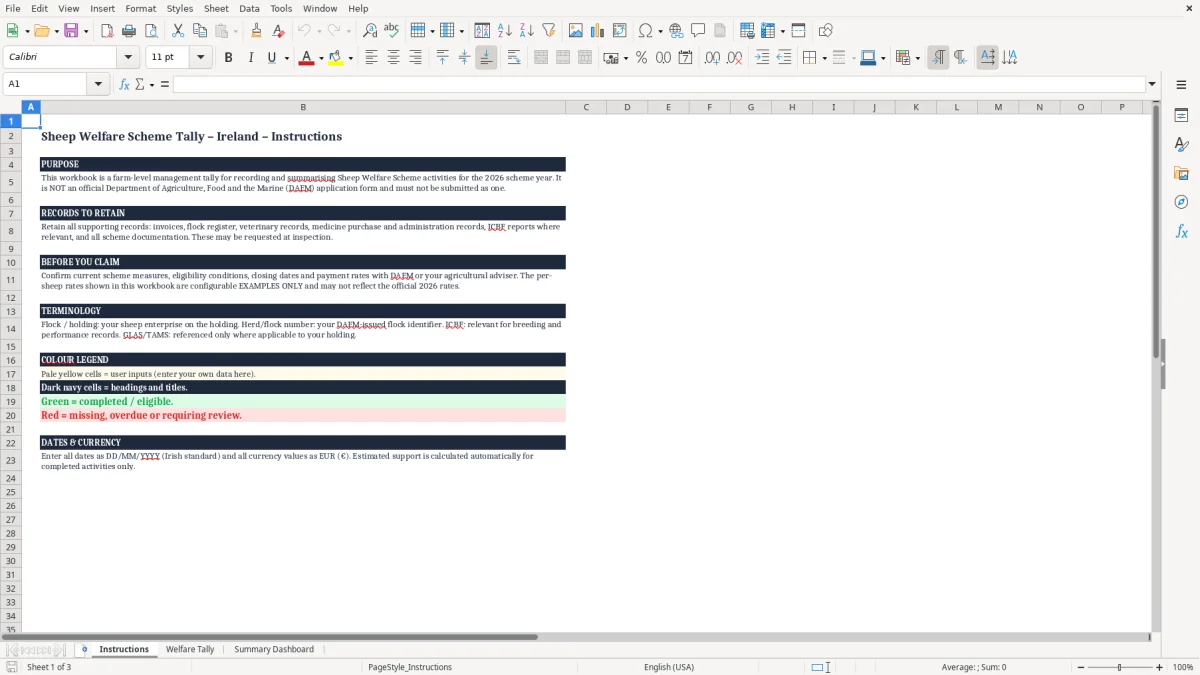
This Sheep Welfare Scheme Tally Excel Template is a practical farm-level management tool for Irish sheep farmers. It helps organise flock information, eligible sheep numbers, welfare activities, dates, costs, estimated payments and supporting records in one workbook. Use it during the scheme year to maintain a consistent tally and to identify missing information before reviewing your records with an agricultural adviser.
The workbook is designed for internal planning and record keeping only. It is not an official Department of Agriculture, Food and the Marine (DAFM) application form and must not be submitted as one. Scheme measures, eligibility rules, closing dates and payment rates can change, so confirm current requirements with DAFM or your adviser before relying on any calculation or making a claim.
Open the workbook in Microsoft Excel or a compatible spreadsheet application and begin on the Instructions sheet. Read the guidance carefully before entering data. Add your farm, holding, flock and scheme-year details in the highlighted input cells.
Check the current DAFM conditions, eligible measures, deadlines and payment rates, then update any example figures with confirmed information where appropriate. Record the number of eligible sheep, each selected or completed welfare measure, the date of completion and any relevant notes. Use the supporting-record fields to reference invoices, veterinary records, medicine records, flock registers, ICBF information where relevant and scheme correspondence.
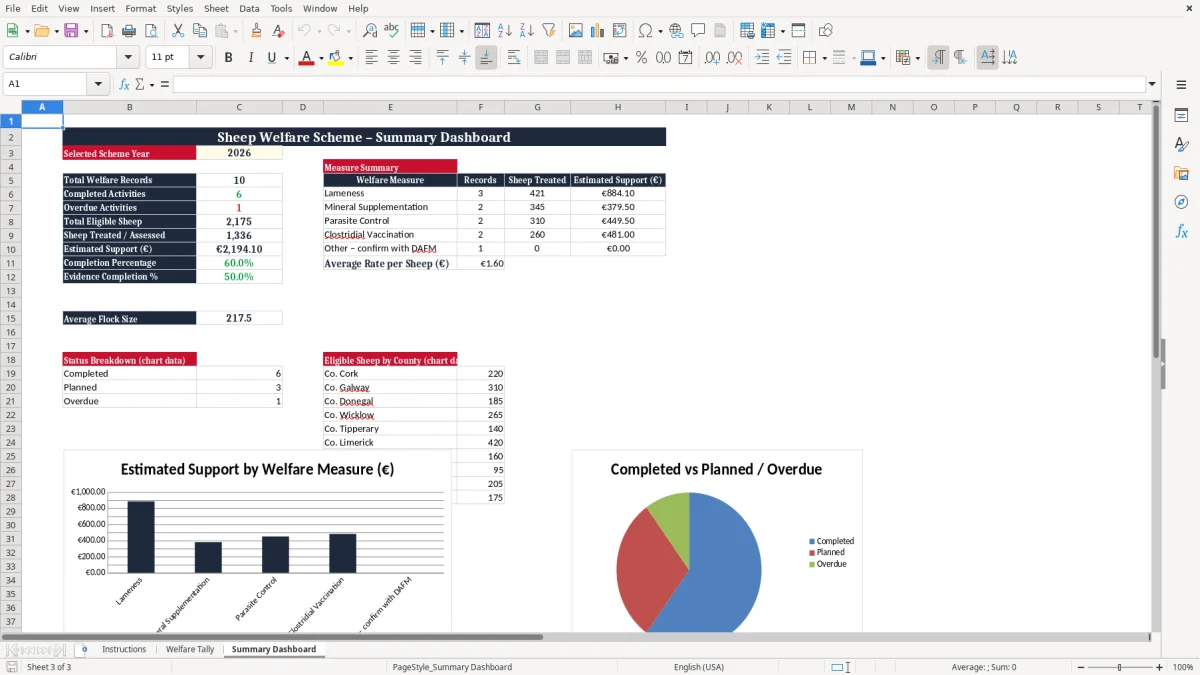
Review the calculated totals and summary information regularly rather than waiting until the end of the scheme year. Use the outstanding or incomplete indicators to identify records that need attention. Before making a claim, compare the workbook with official guidance and your original farm records.
Keep the completed workbook with all supporting documents for the relevant retention period. The template provides an internal tally and estimated result only; it does not confirm eligibility, replace official records or determine the final payment made by DAFM.
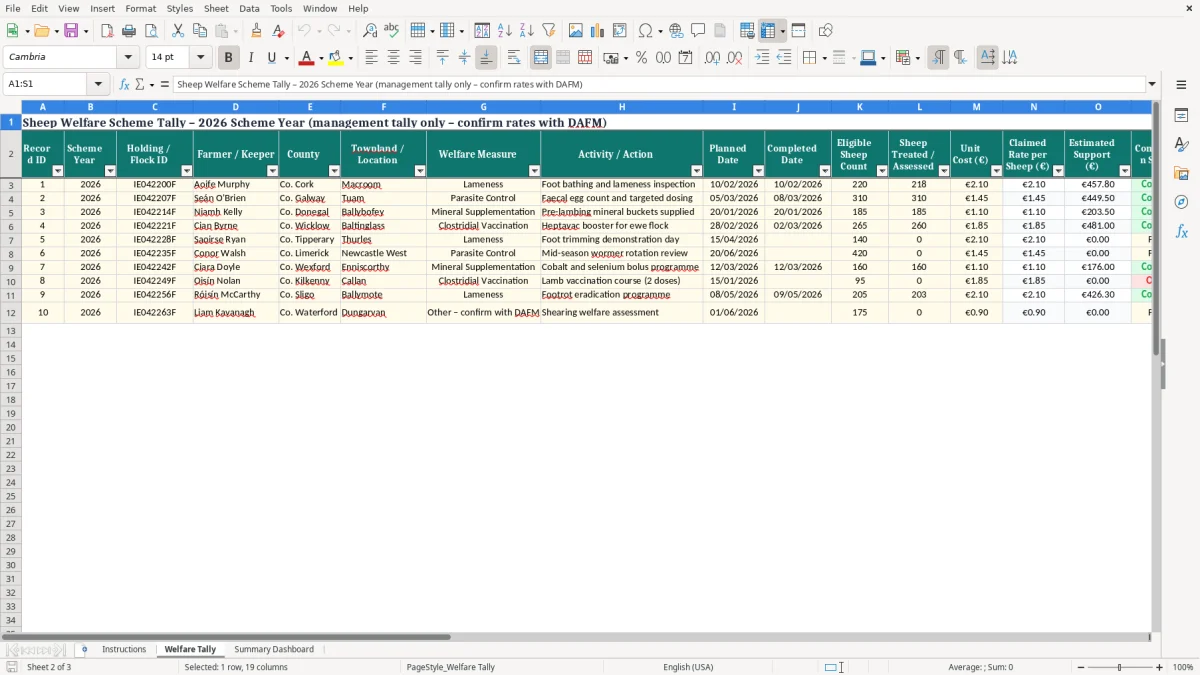
An Ireland Sheep Welfare Scheme tally template is a farm management spreadsheet used to organise information connected with sheep welfare activities during a scheme year. Instead of relying on loose notes, separate notebooks or several disconnected files, the workbook provides a consistent place to record flock details, eligible sheep numbers, selected measures, completion dates, costs and supporting-document references. This can make routine administration easier for a busy sheep enterprise and can help reveal gaps while there is still time to correct them.
The template is intended for an Irish farming context and uses familiar fields such as holding information, flock identification, euro amounts and dates in day, month and year format. It may also include references to veterinary records, medicine records, flock registers and ICBF information where relevant. The workbook should be treated as a management aid rather than a legal or official scheme document.
It does not replace the DAFM application process, an official flock register, statutory medicine records, veterinary documentation or any declaration required under the scheme. Farmers should confirm the current scheme year, eligible measures, conditions, deadlines and payment rates before entering final figures. A well-maintained tally can nevertheless provide a useful working overview.
It can show which measures have been completed, which entries still need evidence, how many sheep are included in an estimate and where further discussion with an adviser may be needed. Keeping the information current throughout the year is generally more reliable than reconstructing events from memory at the point of application or inspection.
The workbook is therefore most useful as an organised companion to official records, not as a substitute for them. It can support planning, provide a clearer internal audit trail and make routine conversations about scheme readiness more focused.
That same planning trail also leads naturally into a contribution estimate when the workbook needs to show the sheep numbers and figures behind a scheme application.
The workbook supports Irish sheep farmers by bringing several practical record-keeping tasks into one structured Excel file. At the beginning of the scheme year, the user can enter holding and flock information, identify the relevant sheep numbers and note the measures being considered. As work progresses, each activity can be recorded with a date, status, quantity, cost or document reference.
This creates a running tally that can be reviewed throughout the year rather than assembled hurriedly before a deadline. Highlighted input cells make it easier to distinguish information that must be entered from headings and calculated outputs. Drop-down lists can encourage consistent terms for measures and completion status, while formulas can total sheep numbers, costs and estimated payments.
Conditional formatting can draw attention to missing dates, incomplete actions or items marked for review. Summary areas and charts are useful for a quick visual check, especially where several measures or groups of sheep are being tracked. The file can also help a farm family, employee or adviser understand the current position without searching through multiple paper records.
It is important, however, to separate an internal estimate from an official entitlement. A figure calculated in Excel may not match a final DAFM payment because approval, eligibility, inspection outcomes, declarations, limits or other scheme rules may apply. Example rates included in a template are not guaranteed official rates and should be checked before use.
The strongest approach is to update the workbook from original records, keep evidence references specific and review the information against current DAFM guidance. Used in that way, the spreadsheet can improve organisation without creating the impression that it is an official claim form. It is particularly useful when reviewed at regular farm-management intervals.
That same review point is also where a bog plot record becomes useful for keeping plot details and evidence references aligned with the file.
A spreadsheet entry is most useful when it can be supported by an original farm record. For that reason, users should retain the documents connected with the welfare activities recorded in the Sheep Welfare Scheme tally. Depending on the measure and the circumstances of the holding, this may include invoices, receipts, veterinary records, medicine purchase records, medicine administration records, flock registers, movement information, relevant ICBF reports and scheme correspondence.
The workbook can provide a reference number, date, supplier name or short description so that a supporting document can be located quickly. It is good practice to use a consistent naming system for digital files and to store paper documents in a secure, accessible folder. Entries should be made promptly and should describe what actually happened rather than what was planned.
If an activity is postponed, cancelled or completed differently, update the status and add a note instead of leaving an ambiguous entry. Where several people work with the flock, agree who will enter information and who will check it. A periodic review can compare the tally with the flock register, invoices and veterinary records, helping identify duplicate entries or missing evidence.
Supporting documentation may be requested during an inspection, so retaining a complete audit trail is important. The Excel workbook itself should also be saved regularly, with sensible backups and a clear file name that identifies the holding and scheme year. These practices do not guarantee eligibility or payment, and they do not alter any official record-keeping obligations.
They simply make the farm’s internal information easier to follow and discuss. Always check the retention requirements and current documentation expectations set by DAFM or your agricultural adviser for the applicable scheme year. Keep sensitive farm information secure when sharing files.
The payment section of a Sheep Welfare Scheme tally Excel template is designed to support planning, not to promise a final result. Users can enter eligible sheep numbers and applicable figures to produce an estimated total, but the result remains dependent on the current official rules. Before using any rate, confirm the relevant DAFM guidance for the scheme year, including approved measures, eligibility conditions, limits, deadlines, declarations and any requirements relating to inspections or supporting records.
If the workbook contains example rates, label them clearly and replace them only with figures that have been verified from an appropriate official source or adviser. A readiness review should cover more than the calculated amount. Check that the holding and flock details are correct, sheep numbers are supported by the appropriate records, each claimed activity was actually completed, dates are recorded, and evidence can be found without delay.
Look at any cells flagged as incomplete, outstanding or requiring review. Compare totals with original documents and investigate unusual changes in numbers or costs. It can also be useful to print or save a summary for a farm meeting, while retaining the detailed records separately.
The template does not submit information to DAFM, validate a claim, replace an application or determine the payment ultimately issued. Its value is in helping the user see what has been recorded and what still needs attention. If there is uncertainty about an interpretation, measure or deadline, contact DAFM or an agricultural adviser before acting.
Keep a copy of the completed workbook and supporting evidence for the applicable retention period. A careful final check can reduce avoidable administration errors, but only official guidance and the relevant scheme process can establish the requirements for an actual claim. Review the file before signing or submitting any official declaration.

 Excel template built and verified by Ciara Byrne, Chartered Accountant (ACA) · builds the Excel templates.