
Childcare NCS Hours Excel Template (2026)
9
Free download
Track Irish subsistence day rates, journeys, claims, receipts and status across four sheets for staff travel and expenses.
Download template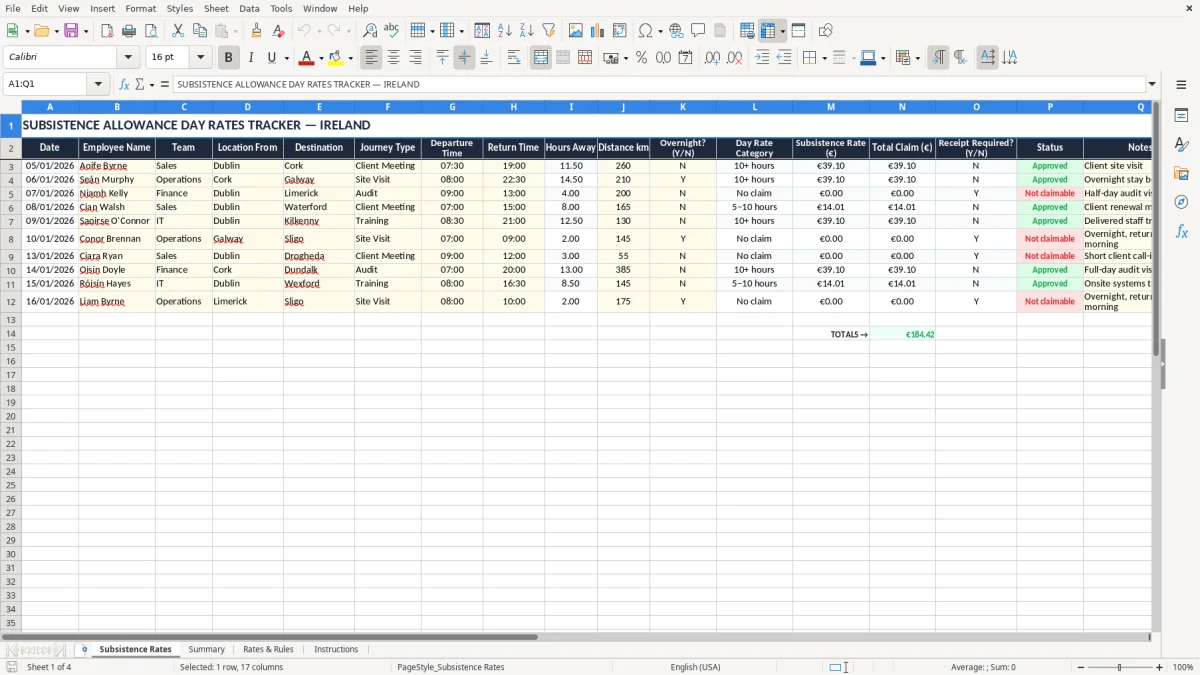
This Excel template tracks Irish subsistence allowance day rates, journey details, claim amounts and receipt status in one place. It includes four sheets: Subsistence Rates, Summary, Rates & Rules, and Instructions.
Use it to record who travelled, where they went, how long they were away, and what rate applies. The layout is built for a small firm, a bookkeeper, or an office manager who needs a clean record for reimbursement and review.
The summary sheet gives you totals at a glance, while the rates sheet captures the working detail line by line. It is a practical way to keep a tidy cash flow record for staff expenses without losing the proof behind each claim.
This file is for the person who actually has to process claims, not for a policy folder that no one opens. A sole trader with one van, an office manager in a trades firm, or a bookkeeper in a small Ltd company can all use it when staff are on the road and expenses need checking quickly.
The Subsistence Rates sheet is the working sheet shown in image 1. It records the date, employee name, team, location from, destination, journey type, departure and return times, hours away, distance km, overnight flag, day rate category, subsistence rate, total claim, receipt required, status and notes.
A practical example: if a carpenter has 4 employees and each one makes 6 claimable trips in a month, that is 24 lines to check. At an average claim of €32.50, you are reviewing €780 of expenses, so a clean line-by-line tracker saves time at approval and again at month end.
Most users open this file after a site visit, at the end of a delivery day, or when a weekly expense envelope lands on the desk. It also becomes handy in busy periods like the payroll run, when travel claims need to be approved before reimbursement.
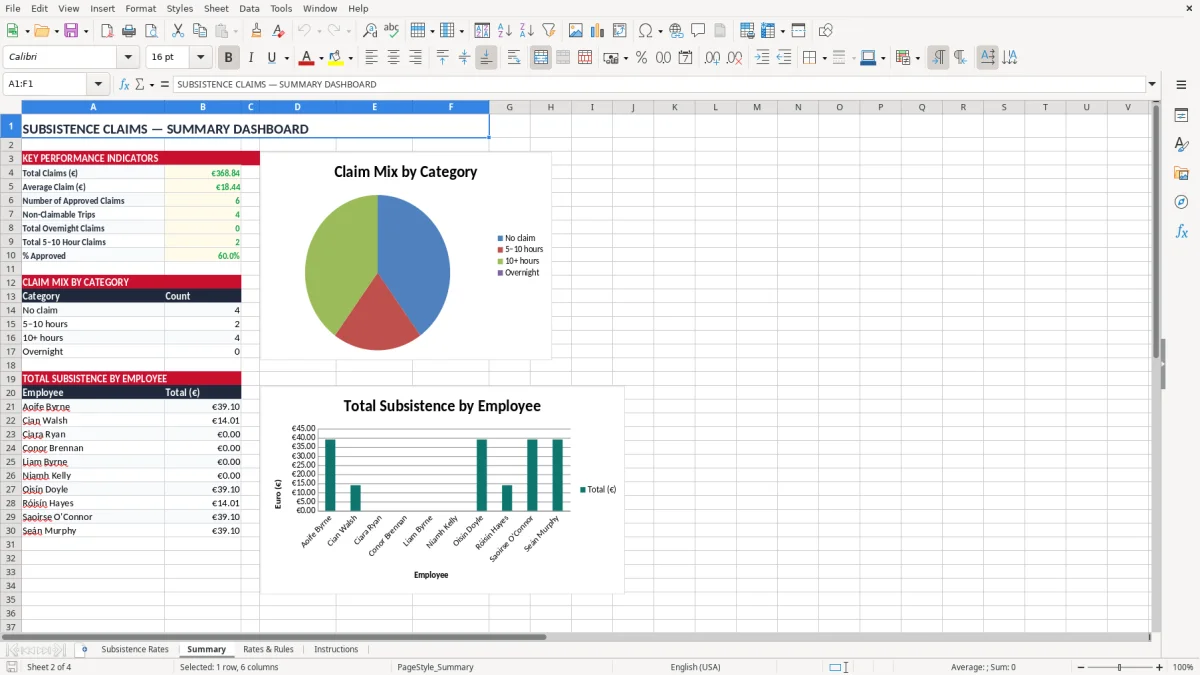
Image 2 shows the Summary sheet, which is the fastest way to see totals without scanning every row. That is the right view when you need one figure for management, or when you want to see whether claims have jumped from €600 to €1,200 in a month.
Revenue expects records to be clear, dated and kept for 6 years. If you are claiming subsistence for staff travel, the file should show who travelled, when they travelled, where they went, and why the rate was used.
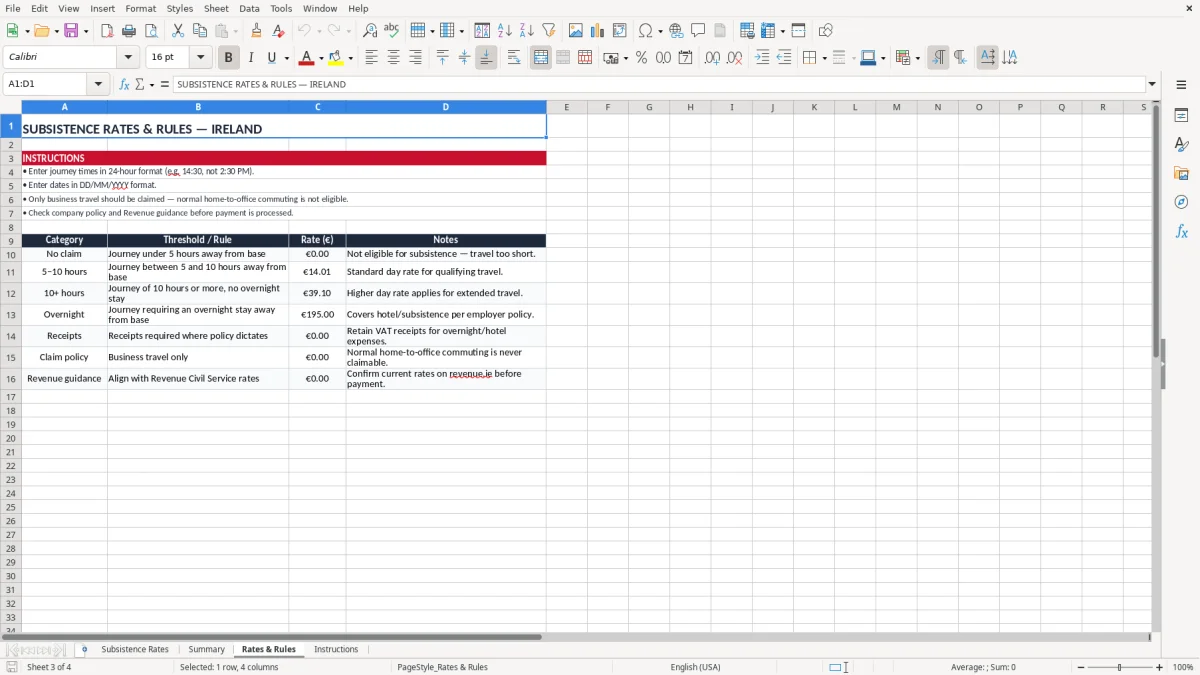
This template supports that discipline by separating the raw journey data from the rate list in image 3. The Rates & Rules sheet is the place to confirm the day rate structure before you enter claims, which is better than spreading rates across random tabs or email notes.
For payroll teams, this matters because a subsistence payment can sit beside PAYE, PRSI and USC items in the wider month-end process. If 12 staff each submit €45 of travel claims, that is €540 to review; if 40 claims are processed badly, you lose an hour or more untangling missing dates and unclear receipt flags.
The safest approach is to keep one consistent method: one row per trip, one rate source, one approval status. That is simpler than keeping claims in chat messages or paper slips that go missing before the quarter end.
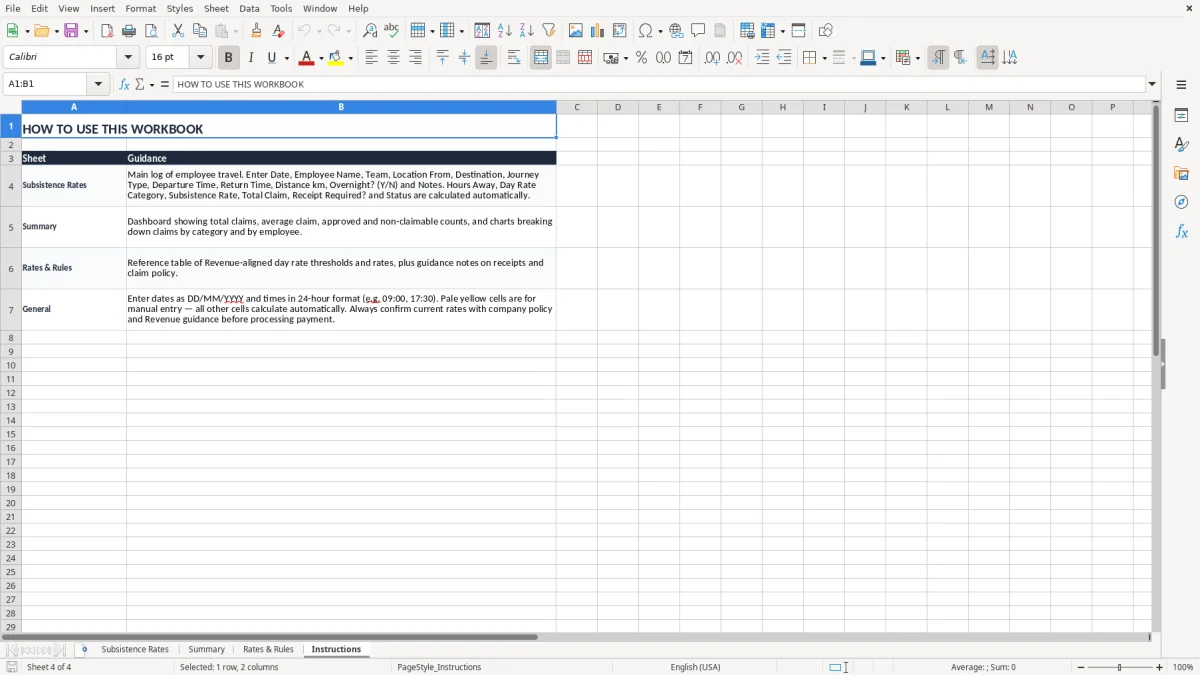
Image 4, the Instructions sheet, is there to stop the file drifting into chaos after the first user. It tells the next person exactly how to fill in the fields and what to check before payment, which is important when more than one person touches the file.
The usual mistake is not the maths; it is the record. If a trip is logged without times, a destination, or a clear overnight flag, you can end up paying the wrong rate or leaving yourself with weak backup if the claim is questioned later.
A second problem is duplicate or inflated claims. If 8 staff each claim an extra €10 because a rate was copied into the wrong row, that is €80 lost in one month; across a year, that is €960 before you count the time spent fixing it.
Another issue is using one sheet for everything and letting the format drift. Once the team starts typing rate notes into free text instead of the rate column, the summary view becomes unreliable and the approval process slows down by 10 to 15 minutes per batch.
The receipt flag is not decorative. If one trip should carry a receipt but the column is left blank, the claim can be paid and then chased later, which is messy when you are trying to close a month or explain an expense line to the owner.
Status also matters. A file with no clear pending, approved or paid marking leaves two people thinking the other one has dealt with the claim, and that is how reimbursements stall for a week.
For small Irish businesses, a tidy spreadsheet is usually better than WhatsApp screenshots or a pile of fuel receipts on a desk. If 25 claims are processed each fortnight, a structured file saves time, avoids double entry, and gives you a proper audit trail when someone asks why a trip was paid at a particular rate.
That same structure also carries over to a medical card income tracker when household income needs to be checked against a set limit before any reimbursement is approved.
The file only works if it becomes part of an existing habit. The best hook is the weekly expenses check or the month-end payroll routine, because that is when claims are already being reviewed anyway.
Use the same cut-off every time, such as Friday at 4 p.m. or the last working day of the month. If you process 30 claims in one batch instead of five small bursts, you spend less time switching context and you are less likely to miss a line.
If you are handling hundreds of claims a month, or multiple branches are editing the same file at once, a spreadsheet will start to creak. At that point, you are better off moving to an expenses system with approval workflows and user permissions rather than stretching the template past its limits.
For most small Irish firms, though, this is enough. A disciplined spreadsheet, used once a week, will beat a messy app setup that nobody follows.
For those claims, the next step is a contribution estimate before any payment goes out.

 Excel template built and verified by Ciara Byrne, Chartered Accountant (ACA) · builds the Excel templates.