
Childcare NCS Hours Excel Template (2026)
9
Free download
MED1 claim tracker for qualifying health expenses, receipts, insurer refunds and claimable amounts. Built for Irish taxpayers in 2026.
Download template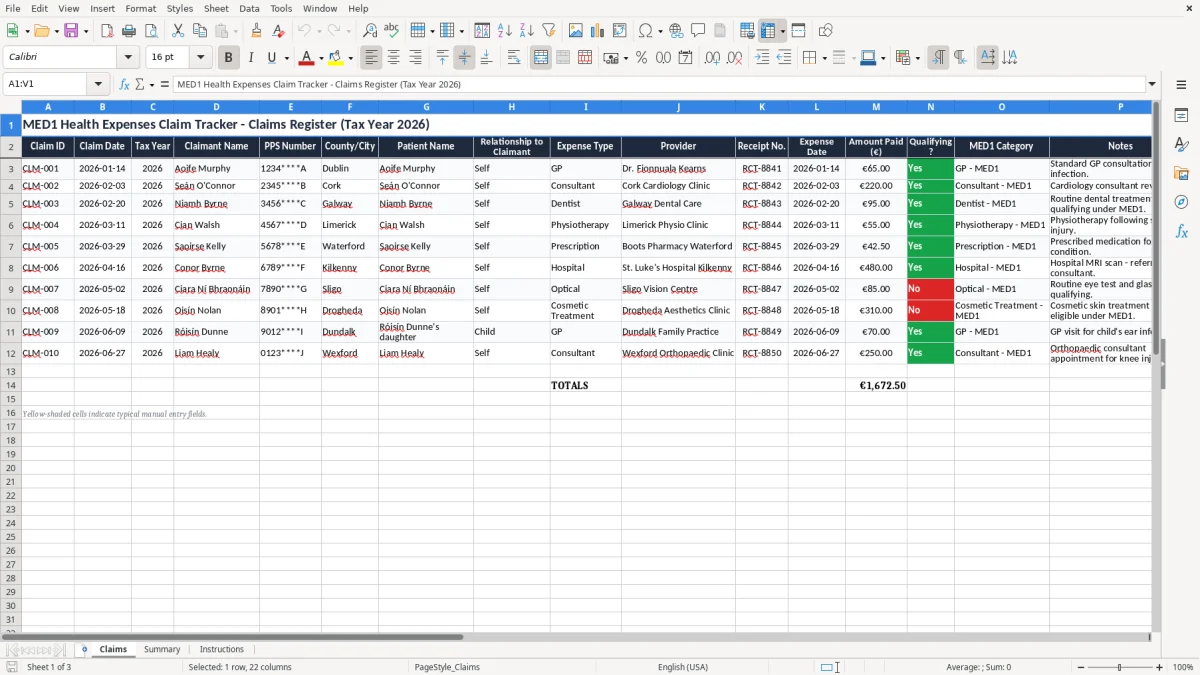
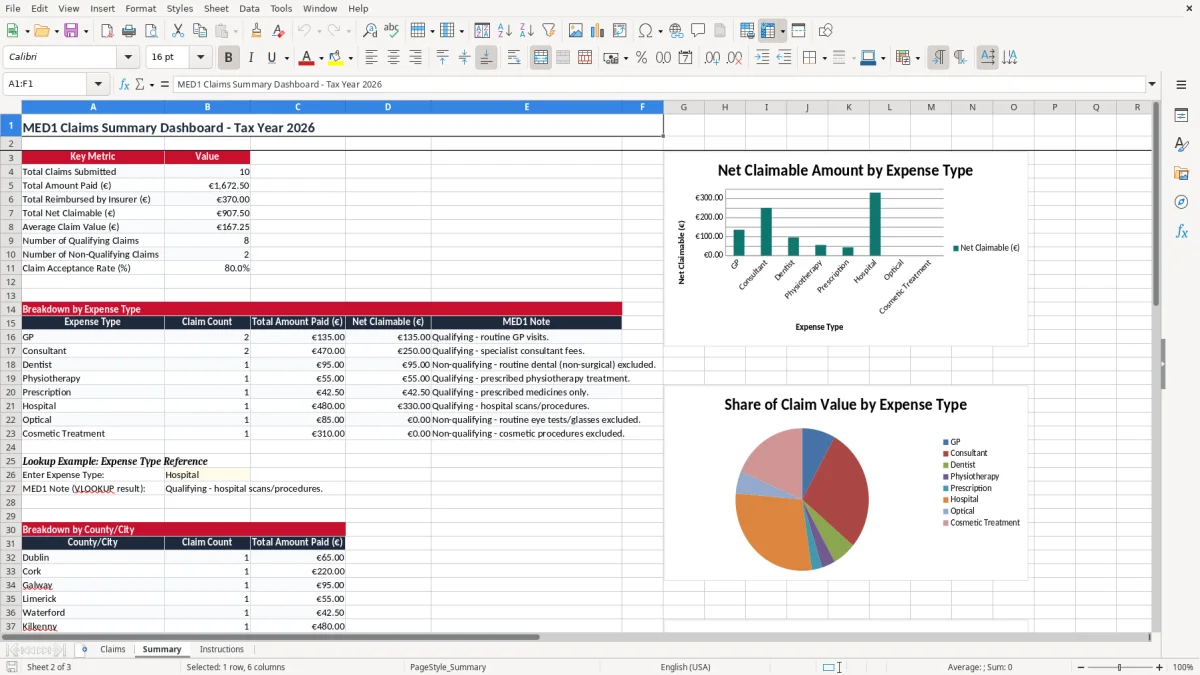
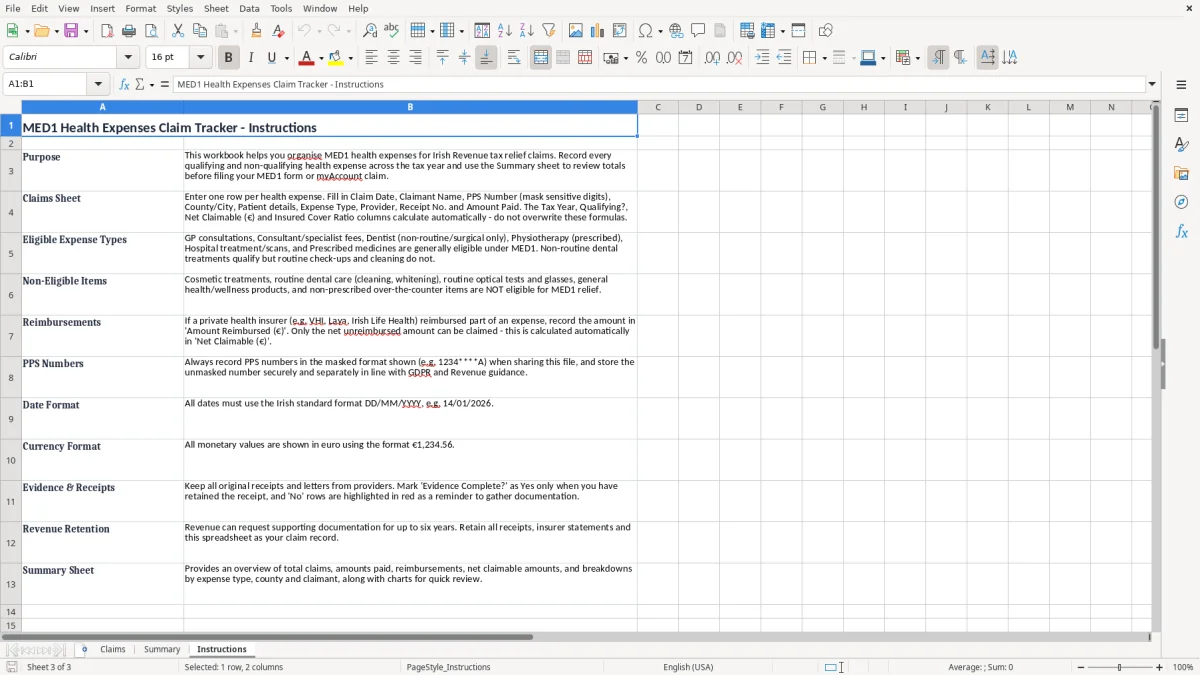
This MED1 health expenses claim Excel spreadsheet helps you organise qualifying medical receipts, insurer refunds and the net amount you can claim from Revenue. It includes three sheets: Claims, Summary and Instructions, so you can keep the record, see totals at a glance and follow the filing steps.
Use it if you are preparing a MED1 claim for a tax year and want one place for GP visits, consultant fees, prescribed treatments and other qualifying expenses. It is set up for Irish use, with PPS number, expense dates, receipt numbers, insurer cover and claimable amounts.
If you are claiming for yourself, your spouse or dependent relatives, the spreadsheet keeps the figures tidy before you submit through Revenue or ROS. It is much easier to check your totals in Excel first than to chase missing receipts after the fact.
This template is for the person who ends up chasing receipts in the real world: a PAYE worker with a few GP bills, a self-assessed sole trader whose child needed orthodontic treatment, or a household that wants to keep one clean record before claiming relief. The usual trigger is the end of the tax year, but plenty of people start only when a consultant invoice lands at €220 or a dentist bill arrives with no insurer cover.
If you have 8 to 20 qualifying receipts in a year, a spreadsheet is usually enough. For example, 12 claims at an average €95 is €1,140 of expenses to review, and you can see quickly that €300 refunded by health insurance leaves €840 to work with.
The Claims sheet is the working log, the Summary sheet gives you the totals without manual adding, and the Instructions sheet stops the usual “what do I enter here?” delay. That is better than scattering medical bills across email, paper folders and bank statements, then trying to reconstruct everything in one evening.
The screenshot of the Claims sheet shows a wide table with columns for Claim ID, Claim Date, Tax Year, claimant details, expense type, provider, receipt number, amount paid, reimbursement and evidence status. The Summary sheet is a compact dashboard with totals, so you can check the numbers in minutes instead of tabbing through every line.
For a MED1 claim, Revenue expects you to keep the supporting records for your expenses, including receipts, dates, the name of the provider and the amount paid. In practice, keep the records for 6 years, because that is the standard retention period for tax records in Ireland and it covers the years Revenue can review.
The point is not just to have a total. You need a clear link between the charge and the patient, especially where the expense is for a spouse, child or dependent relative and where insurer cover reduced the amount you can claim.
The template asks for receipt number, expense date, amount paid, reimbursed by insurer, net claimable amount and evidence complete. That is the minimum you need to make the file credible if Revenue asks for backup.
If you paid €420 for consultant visits and got €180 back from insurance, only the €240 net figure should survive in your claim total. Leaving out the insurer amount inflates the claim and creates a problem if Revenue cross-checks the policy payout against your return.
Most people batch their records once a year, but if you are claiming after a large private treatment bill, update the spreadsheet straight away. A clean register built from the start of the year is much easier to file than a late scramble where half the receipts are still in the glove box.
The biggest error is claiming on the gross receipt when health insurance already paid part of the bill. On a €900 treatment with a €300 insurer refund, that mistake overstates the claim by €300 and can force a correction later.
A second problem is missing receipt numbers or provider names. If you have six medical receipts at €65 each and two of them cannot be matched to evidence, you have €130 of spend sitting in the file with weak support, which is exactly the sort of gap that leads to delays.
People also treat every medical bill as qualifying. A routine dental cleaning, for example, is often entered by mistake because it looks like a health cost, but it may not belong in the claim you are building.
The Evidence Complete and Qualifying? fields are there to stop you building a claim full of weak lines. If you are the kind of person who files eight receipts today and forgets the ninth until October, the spreadsheet is worth more than the 5 minutes it takes to use it.
It also helps you avoid double counting. If a family paid €1,250 in private treatment fees and the insurance statement already shows €500 reimbursed, the only sensible claimable amount in your working file is €750.
That same cross-checking matters for remote working relief records, where reimbursements and eligible amounts also have to be kept from slipping into the wrong total.
The best way to keep this alive is to attach it to one fixed habit: save claims on the same day you file away your paper receipts, or do the update when you log into your banking app each Sunday. A 10-minute weekly update beats a two-hour cleanup at year end.
If you have a busy household, one person should own the spreadsheet and the receipts folder. That avoids duplicate entries and means the file is still usable when you need to claim after 15 or 20 separate medical spends.
If you are dealing with multiple policies, several dependants and dozens of claims a year, the workbook can get crowded. At that point you still use the spreadsheet for control, but you may want a document folder with stricter naming rules so the evidence stays easy to match to each claim line.
At that point the same discipline applies to a refund estimate, where each entry has to line up cleanly with the supporting evidence.

 Excel template built and verified by Ciara Byrne, Chartered Accountant (ACA) · builds the Excel templates.