
Childcare NCS Hours Excel Template (2026)
9
Free download
Track Drug Payment Scheme claims, thresholds, household spend and reimbursements in one Excel sheet for Ireland.
Download template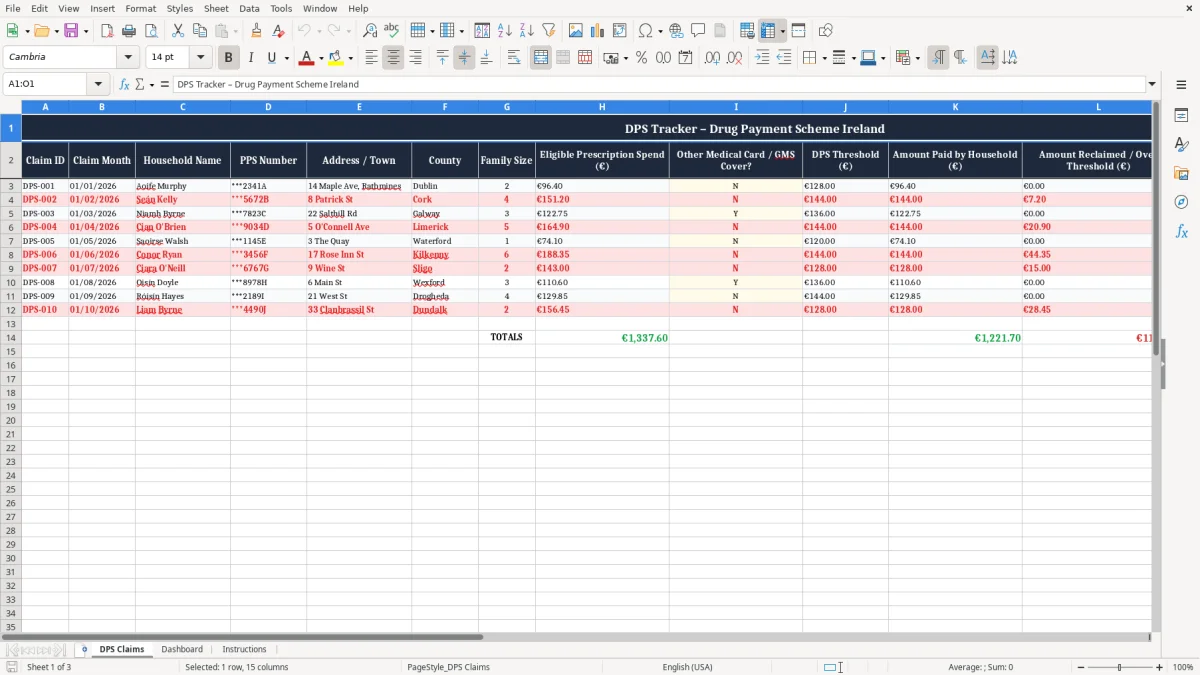
This Drug Payment Scheme tracker is an Excel workbook for recording household claims, prescription spend and any amount paid over the monthly cap in Ireland. It includes a DPS Claims sheet, a Dashboard and an Instructions sheet, so you can log each claim and see the totals at a glance.
It is built for a family, carer or office helper who wants one place for PPS details, claim month, pharmacy, threshold and reimbursement tracking. The first sheet lists the claim lines, the second summarises the numbers, and the third explains how to use the file.
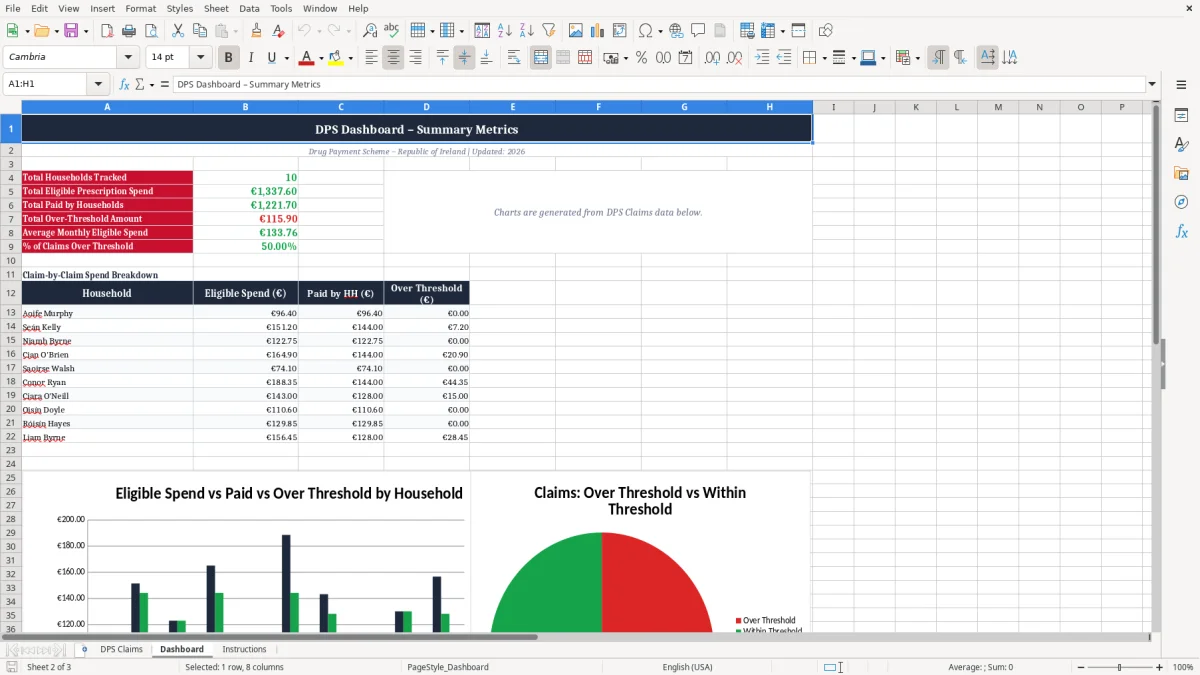
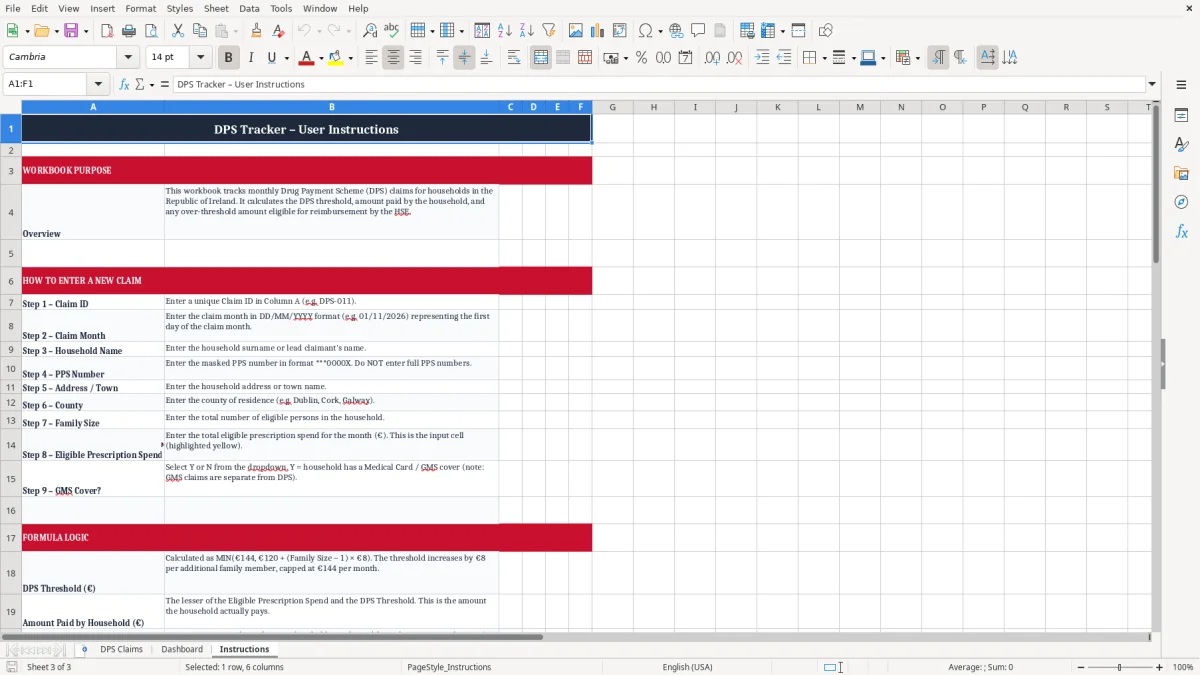
Image 1 shows the DPS Claims sheet with the main input columns. Image 2 shows the dashboard view, and image 3 is the instructions tab.
This is the kind of spreadsheet a parent, carer or household admin person opens when the pharmacy receipts start building up and they want a clean record of what has been spent each month. In practice, it is often used at the kitchen table after a run to the chemist, or at month end when the folder of receipts needs sorting.
The DPS cap matters because the monthly limit is €114 in 2026. If a household spends €151.20 on eligible prescriptions in a month, the over-threshold amount is €37.20, and that is exactly the kind of figure you want the sheet to show without manual re-checking.
A family with two adults and three children might have one person paying for different prescriptions across the month. A tracker like this keeps the PPS number, address, county and family size together, so you do not have to dig through envelopes later.
For a single household, a spreadsheet is usually simpler than a notebook once the claims start running into several months. If you have 12 claims a year and each one carries three or four receipts, you quickly end up with enough detail to benefit from a structured list rather than a loose pile of paper.
The DPS Claims sheet in image 1 is laid out for that job, with one row per claim and the key fields visible immediately. That is much easier to work with than trying to reconstruct a month from bank statements alone.
The key rule for the Drug Payment Scheme is simple: eligible prescription costs are capped at €114 per calendar month in 2026. Once you pass that level, the spreadsheet should show the amount over the cap so you can see what has been paid and what is claimable.
This is not the same as VAT, PAYE or business bookkeeping, but the record discipline is similar. Keep the dates, names and amounts clear, because a messy list with missing months can waste time when you are checking a claim or dealing with a pharmacy query.
Use the claim month in DD/MM/YYYY format, the household name, the partially masked PPS number, and the pharmacy or provider. The sample rows in the sheet show how a household spend of €96.40 sits below the cap, while €151.20 is above it and creates a €37.20 over-threshold amount.
A single, sequential Claim ID is better than typing free-form notes first and trying to sort them later. If you are dealing with six or eight months of claims, that one habit saves you from duplicate entries and from missing a reimbursement line that should have been captured.
The Dashboard sheet in image 2 is there for a quick overview, not for detailed entry. That split is useful because it keeps the working sheet tidy and stops the summary from being cluttered with raw receipt detail.
The same clean split carries over to a medical card income tracker, where the working sheet holds the entries and the dashboard stays clear for the summary only.
The most common problem is not entering the over-threshold amount at all, which leaves you with a list of receipts but no clear figure for what was actually above the monthly cap. If you miss €37.20 one month and €24.80 the next, that is €62.00 you may have to reconstruct later from paper receipts.
Another frequent error is mixing up one household member’s details with another, especially where two people share the same address and use the same pharmacy. A wrong PPS number or a missing family size field can turn a quick check into a back-and-forth that takes 20 minutes instead of 2.
People also leave the status column blank, so they cannot tell whether a claim is open, submitted or settled. After three months, that turns into duplicate work, and duplicate work usually means a second pass through every receipt folder.
If you are tracking 12 claims a year and each correction takes 10 minutes, you lose 2 hours before you even count the stress of checking old paperwork. In a busy household, that is usually the difference between a tidy system and a folder nobody trusts.
The safest approach is to keep one row per claim and to update it as soon as the pharmacy receipt is in hand. That is much better than waiting until the end of the quarter, when the detail is half forgotten and the numbers have to be rebuilt.
The file only works if you use it at the same time each month. The easiest habit is to update it the day you sort receipts, or straight after the weekly shop if prescriptions are usually collected then.
If you are handling claims for several households, or if the file is being shared between people who keep overwriting each other’s entries, a simple spreadsheet will start to creak. At that point, you may need a shared folder, stricter permission control or a proper case-management system rather than one workbook.
For a normal household, though, this template is enough. It gives you a routine, a summary and a place to keep the record straight without turning it into a second job.

 Excel template built and verified by Ciara Byrne, Chartered Accountant (ACA) · builds the Excel templates.