
Childcare NCS Hours Excel Template (2026)
9
Free download
Track GMS and medical card income, deductible costs, VAT and payment status by month, practice and location in Excel.
Download template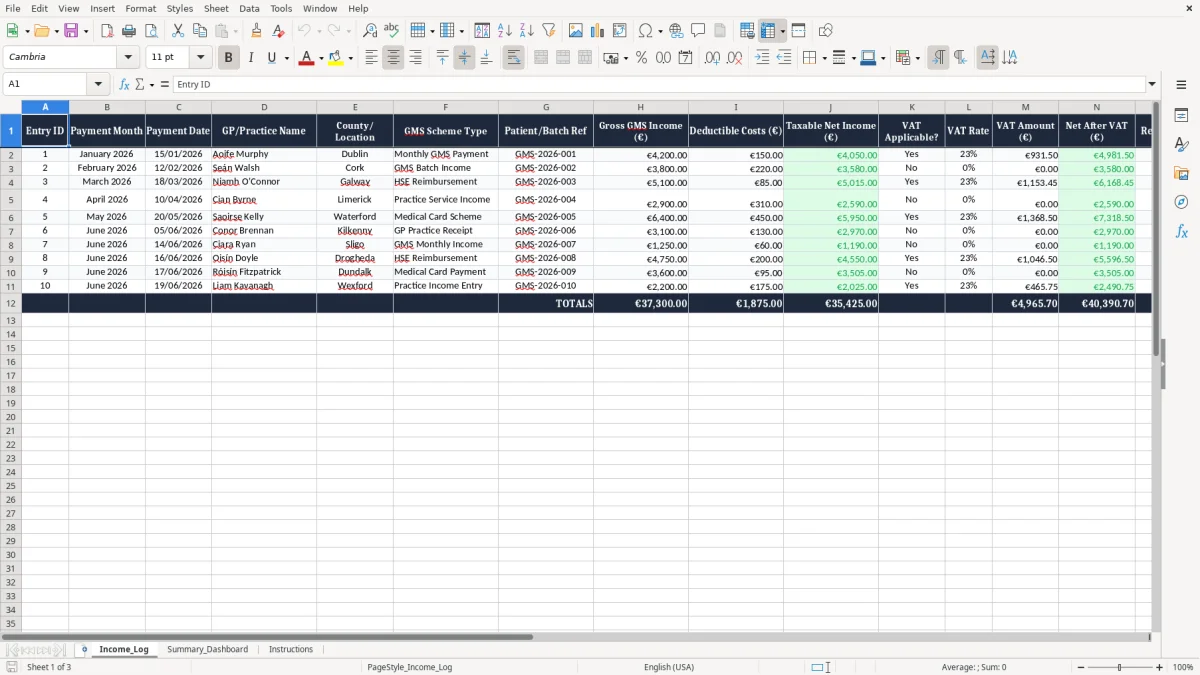
This GMS medical card income tracker Excel template records each payment line by month, practice, county, scheme type, gross income, deductible costs, VAT, and whether the money has been received. It is for GPs, practice managers, bookkeepers and sole traders who need a clear log of HSE-related income and the net amount left after costs.
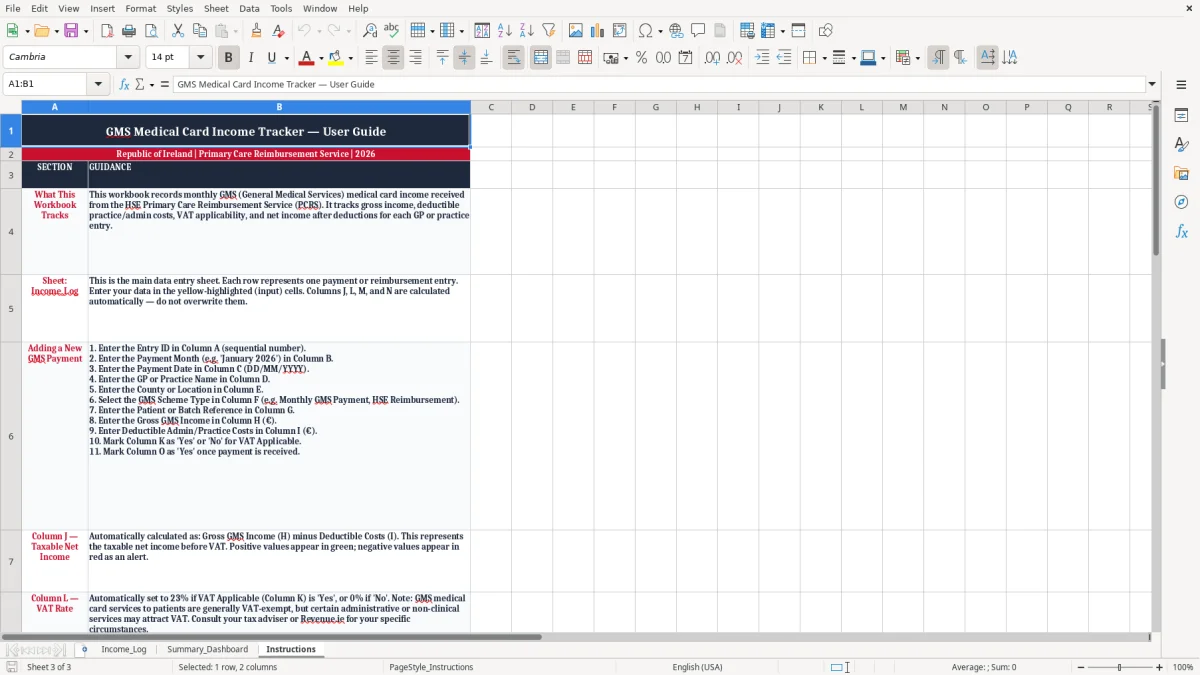
The template has three sheets: Income_Log for entries, Summary_Dashboard for totals and charts, and Instructions for setup. It gives you one place to keep cash flow, profit and loss and payment tracking in order without having to piece everything together from bank statements and emails.
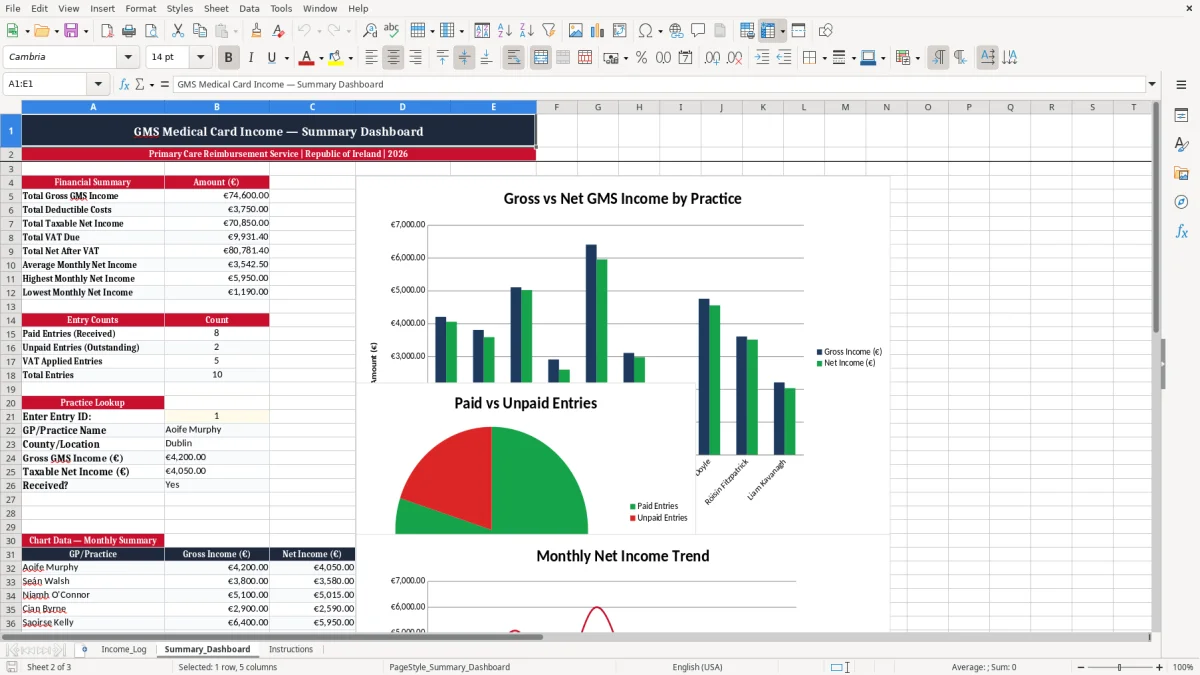
Image 1 shows the entry sheet with structured columns and sample rows. Image 2 shows the dashboard, which turns those entries into a monthly view you can read at a glance.
This sheet is for anyone who has to keep a proper record of medical card and GMS income in Ireland. In practice, that usually means a GP practice manager, a sole trader doctor, a bookkeeper in a small clinic, or the office person who is trying to match HSE payments to the bank before month end.
The big job is simple: you need to know what was paid, when it was paid, what costs were deducted, and what is still owed. If you have three practices and 20 batches a month, a single log is far easier than hunting through emails, bank lines and pdf remittances.
A doctor with 4 payment batches a month can keep this in under 10 minutes a week. A clinic with 60 entries a quarter can use the county and scheme columns to see which locations produce the strongest net income after deductible costs.
Take a practice with €18,000 of GMS income in a month, €1,200 of deductible costs and €2,200 still unpaid. The log makes the gap obvious, which is exactly what you need when you are deciding whether to chase the payer, query the batch, or wait for the next remittance.
Image 1 shows the Income_Log sheet with 16 columns, including payment month, payment date, practice name, scheme type, gross income, VAT fields and notes. The layout is built for one line per payment batch, so you can scan a whole month without bouncing between tabs.
The Summary_Dashboard sheet gives you the picture at a glance. That is useful if you are sitting down at the end of the month and want to know whether receipts are up, down or simply late.
For tax and bookkeeping purposes, this is not just a list of receipts; it is supporting evidence for your profit and loss and for the records you keep for Revenue. In Ireland, Revenue expects you to keep records for 6 years, and that means the payment date, description, amount and any related costs should be traceable back to the source document.
If you are a sole trader, the totals from this sheet feed into your Form 11 return, and the return is due by the mid-November ROS deadline. If you are operating through a limited company, the same style of tracking helps the accounts team prepare the company file for the CRO annual return and corporation tax work.
The template includes VAT columns because some medical-related income may be outside VAT while other related charges are not. Ireland’s standard VAT rate is 23%, with reduced rates of 13.5% and 9%, and the VAT registration thresholds are €37,500 for services and €75,000 for goods.
A practical example: if a clinic logs €4,000 of gross income and €300 of deductible costs on one batch, the taxable net is €3,700 before any VAT treatment. That is a cleaner starting point for your accountant than a bank statement line that simply says “HSE payment”.
Sequential entry IDs, dated rows and a clear batch reference help when you are reconciling with remittance advice in ROS or answering a query months later. The direct stance here is simple: if you are handling more than a handful of payments a month, the structured log is better than keeping the information in a notebook or one loose spreadsheet column.
Once the records start feeding tax, year-end accounts and payment follow-up, the discipline of one row per payment is what keeps the numbers usable. That is the difference between a tidy file and a pile of screenshots.
The most common failure is not the maths, it is the missing detail. A practice may know €9,600 came in during the month, but if the batch reference, payment date and scheme type are absent, the office still spends hours matching it to the bank and remittance files.
That wasted time is not small. Two staff members spending 45 minutes each every month on a messy reconciliation is 18 hours a year, and at even €25 an hour that is €450 gone before you count the stress.
Another error is treating every receipt as if it has the same VAT position. If €5,000 is logged without separating VAT-applicable income from non-VAT income, the net figure is unreliable and the accounts file becomes harder to defend.
For a practice that runs three clinics and does 40 batch lines a month, one wrong VAT assumption can distort the monthly dashboard enough to mislead cash planning by a few thousand euro. That matters when payroll, suppliers and rent all hit the same week.
The Received? column looks minor until you ignore it. If a €2,200 payment stays marked as unpaid for two months, you may chase nothing, draw down cash too cautiously, or miss an error that should have been fixed within the same payment cycle.
My view is that the log should be updated the day the bank lodgement lands, not at some vague end-of-quarter tidy-up. Once the file slips, the whole point of having a tracker is lost and you are back to guessing from the bank feed.
The easiest way to keep this alive is to bolt it onto something you already do, such as the payroll run, the bank reconciliation or the first working day after the HSE payment lands. If you leave it as a separate “admin task”, it will die after two weeks.
For a small clinic with 12 payments a month, this takes about 15 minutes if you stay current. If you let it drift to quarter end, it can easily swallow 2 hours and still leave gaps.
Once you are dealing with multiple staff, multiple practices and hundreds of payment lines, Excel starts to show its limits. At that point, a proper practice management or accounting system is the better choice because it reduces manual entry and reference drift.
Until then, this template is a sensible middle ground: enough structure to keep the records clean, but simple enough that an office manager or sole trader will actually use it.

 Excel template built and verified by Ciara Byrne, Chartered Accountant (ACA) · builds the Excel templates.